web
You’re offline. This is a read only version of the page.
close
Skip to main content

Announcements

No record found.

News and Announcements icon
Community site session details

Community site session details

Session Id :
Microsoft Dynamics CRM (Archived)

Connecting Cloud Partner Portal with Dynamics and Receiving 'lead' entity error with missing attribute of Name='mslead_offersource'

(0) ShareShare
ReportReport
Posted on by

Hi, where can I find and add the "Name='mslead_offersource'" into my 'lead' entity configuration to correct the error below:

Error Details

Step

Lead management validation and registration

Error Message

Could not save the lead to Dynamics CRM. LastCRMError: 'lead' entity doesn't contain attribute with Name = 'mslead_offersource'., LastCRMException: System.ServiceModel.FaultException`1[Microsoft.Xrm.Sdk.OrganizationServiceFault]: 'lead' entity doesn't contain attribute with Name = 'mslead_offersource'. (Fault Detail is equal to Microsoft.Xrm.Sdk.OrganizationServiceFault).

Tracking Id

6611713b-a233-4b8b-b195-8cfdd5cdb312

Here's a screenshot, I don't see 'mslead_offersource' anywhere.
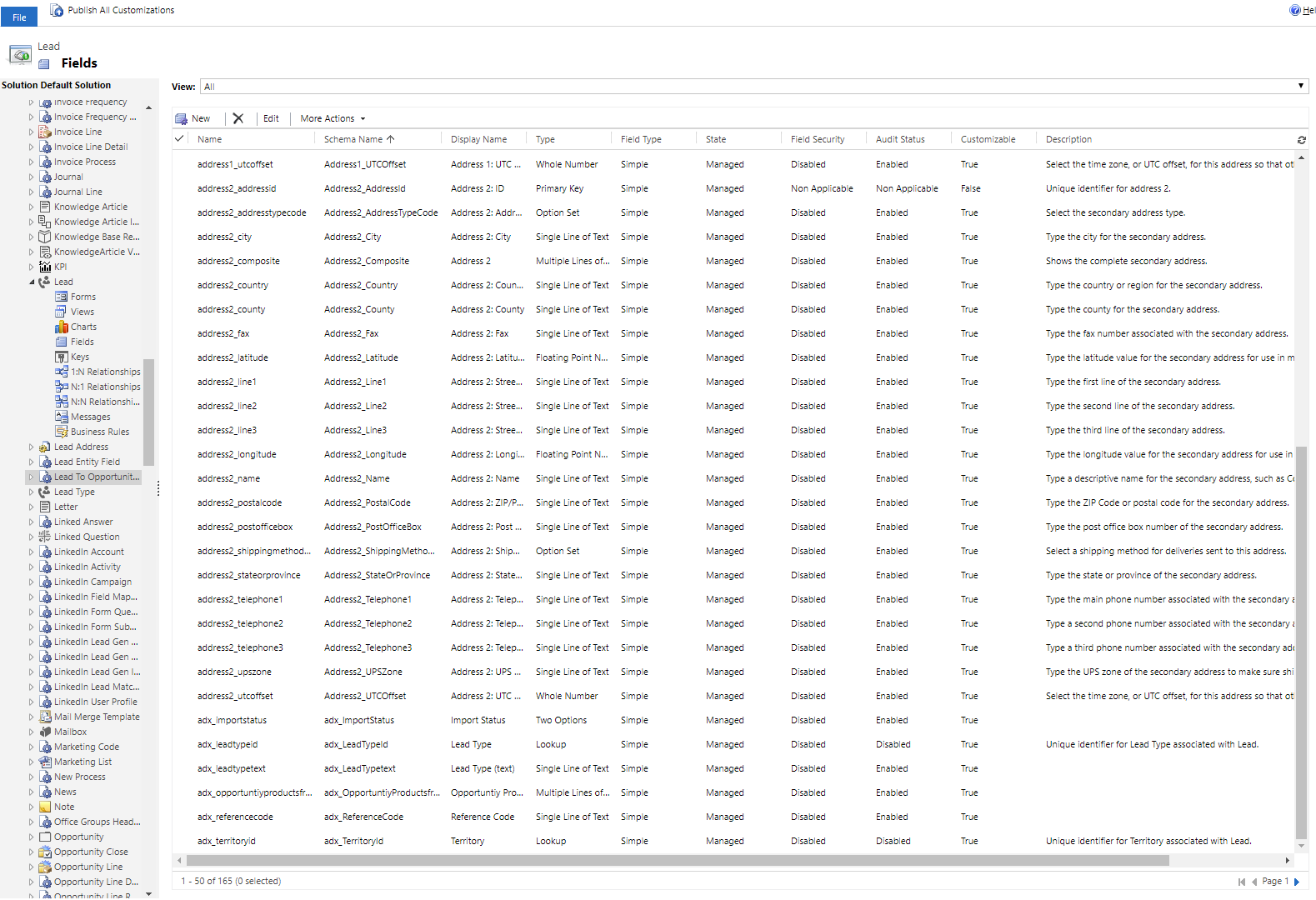
MS-Dynamics-Error.PNG

Thanks!

*This post is locked for comments

I have the same question (0)
  • Suggested answer
    Adrian Begovich Profile Picture
    1,032 Moderator on at

    Hi brianael,

    What action took place before the error message appeared?

  • Community Member Profile Picture
    on at

    Hi Adrian,

    I'm on Microsoft's Cloud Partner Portal trying to set up a new offering to publish. One of the requirements is to set up a "Lead Management" where I input my CRM online credentials (see picture)... after trying to publish the offering... the website goes through a list of publishing steps (see picture) where it fails at this thread's error.

    0844.Lead2.PNG0844.Lead2.PNG

  • Community Member Profile Picture
    on at

    We are having the same issue.  Did you get a fix for this?

  • Suggested answer
    Rodney - Data-Driven Profile Picture
    21 on at

    "Step 1: Installing the solution" from Lead Management Instructions for Dynamics 365 has likely not been completed or has been overwritten by a different customization (which is likely the case). Please follow all the steps below from the documentation to proceed.  Documentation: cloudpartner.azure.com/

Under review

Thank you for your reply! To ensure a great experience for everyone, your content is awaiting approval by our Community Managers. Please check back later.

Helpful resources

Quick Links

Introducing the 2026 Season 1 community Super Users

Congratulations to our 2026 Super Stars!

Meet the Microsoft Dynamics 365 Contact Center Champions

We are thrilled to have these Champions in our Community!

Congratulations to the April Top 10 Community Leaders

These are the community rock stars!

Leaderboard > 🔒一 Microsoft Dynamics CRM (Archived)

Last 30 days Overall leaderboard

Featured topics

Product updates

Dynamics 365 release plans
