web
You’re offline. This is a read only version of the page.
close
Skip to main content

Notifications

Announcements

No record found.

Community site session details

Community site session details

Session Id :
Supply chain | Supply Chain Management, Commerce
Answered

CSV file import error - Selected file is not Unicode

(2) ShareShare
ReportReport
Posted on by

Hi Everyone,

I'm trying to import a list of new items using CSV file.

Item number consists of number but item name is in Korean not English.

In this case, I checked the unicode flag set to Yes and tried to import the CSV file.

As shown below, the system didn't run because the file is not Unicode.
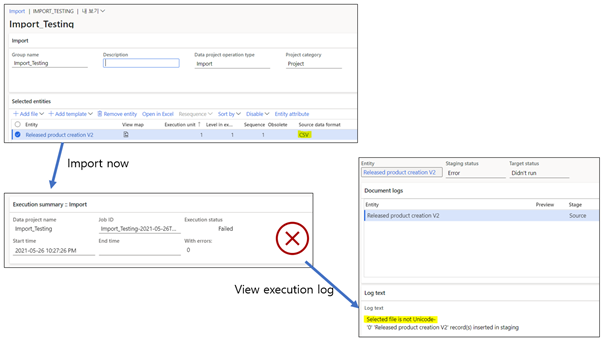
pastedimage1622036281359v1.png

Does anyone know how to fix this unicode error?

Thanks.

I have the same question (0)
  • Verified answer
    Martin Dráb Profile Picture
    237,967 Most Valuable Professional on at

    Either use a file in Unicode (which is a good idea especially if you need characters from multiple languuages) or set your file formation with Unicode = No (and set the code page to the right language).

  • JS-07061926-0 Profile Picture
    6 on at
    I am seeing this issue as well.  I'm attempting to import Products V2 and some of the rows have PRODUCTNAMES that include characters that are not making their way through the import.  I verified that the characters are valid in product name by seeing if I could edit the name afterwards and get the original characters back in there.  So it seems to be a problem with the import itself.  I've worked with VerticalBarSeparated and VerticalBarSeparated-Unicode in my Manifest.xml.  VerticalBarSeparated allows the import to go through, but the characters are messed up.  VerticalBarSeparated-Unicode causes my import to fail right away, claiming that my "file is not Unicode."  I've made sure that the file is saved as UTF-8 and I've also tried an import with UTF-8 with BOM.  I've also tried with and without quotes around every single value.  I've also changed the Code page in the Regional settings to 65001 for the VerticalBarSeparated-Unicode source data format.
     
    Examples of characters not going in correctly are a different kind of dash, double and single quotes that, seemingly, are not the normal ones, fractions like 3/4 as one character, etc.
     
    Is there a way to get imports to allow these characters through if they are valid to save on the products by hand successfully?  I can't feasibly go back in and change the names by hand as I don't have a full list of characters that aren't going to make it through and there are potentially thousands of products that this is happening for.
  • Martin Dráb Profile Picture
    237,967 Most Valuable Professional on at
    How have you configured VerticalBarSeparated-Unicode format?

Under review

Thank you for your reply! To ensure a great experience for everyone, your content is awaiting approval by our Community Managers. Please check back later.

Helpful resources

Quick Links

Responsible AI policies

As AI tools become more common, we’re introducing a Responsible AI Use…

Neeraj Kumar – Community Spotlight

We are honored to recognize Neeraj Kumar as our Community Spotlight honoree for…

Leaderboard > Supply chain | Supply Chain Management, Commerce

#1
Laurens vd Tang Profile Picture

Laurens vd Tang 301 Super User 2025 Season 2

#2
André Arnaud de Calavon Profile Picture

André Arnaud de Cal... 118 Super User 2025 Season 2

#3
Siv Sagar Profile Picture

Siv Sagar 105 Super User 2025 Season 2

Last 30 days Overall leaderboard

Product updates

Dynamics 365 release plans
