web
You’re offline. This is a read only version of the page.
close
Skip to main content

Notifications

Announcements

No record found.

Community site session details

Community site session details

Session Id :
Small and medium business | Business Central, N...
Answered

Error in posting Purchase Journal - "Amount must be negative..."

(0) ShareShare
ReportReport
Posted on by 36

Hi there,

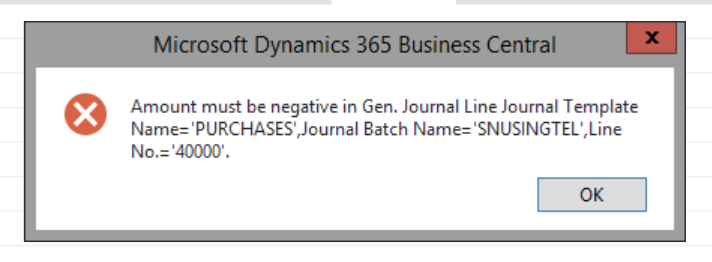
Im trying to upload an invoice with multiple distributions through the Purchase Journal, but i keep getting this error below even though my amount is already negative in the GL account.

I managed to solved some issues from an earlier thread (subj "Purchase Journal - GL Distributions") but i cannot seemed to get past this error and i cannot figure out what i did wrong.

This is what im currently trying to upload,

pastedimage1590911792853v1.png

pastedimage1590911823209v2.png

pastedimage1590907960716v1.png

Im not sure if im doing anything right in the first place, but basically, i have a bunch of handphone bills that i am trying to upload via the purchase journal instead of creating the invoices one by one in the system as i find it highly inefficient doing the latter.

Im a relatively new user to this system so id appreciate any thoughts and suggestions, thank you!

I have the same question (0)
  • Suggested answer
    Gulshan Shubham Profile Picture
    2,210 on at

    In the last line select general posting type as Purchase. Currently it's showing blank.

  • Basitah Profile Picture
    36 on at

    Thanks, Gulshan. I tried, but now it gave me this error,

    pastedimage1590982153054v1.png

    This is currently how my batch is currently set up,

    pastedimage1590982261667v2.png

  • Verified answer
    Gulshan Shubham Profile Picture
    2,210 on at

    Here, you are creating a Purchase Invoice. Hence, the Vendor Account must be credited i.e. the amount in last line must be negative. So, in the last line put the same amount as it is now buy with a negative sign and in all the other lines make the amount positive. 

    Then, try to preview post or post. Let me know if it resolves the issue.

  • Basitah Profile Picture
    36 on at

    Thanks Gulshan. I would guessed it worked because now it's showing me a different error about the VAT Posting Setup, but i would assumed this is at my vendor Setup?

    pastedimage1591099095849v1.png

  • Suggested answer
    Gulshan Shubham Profile Picture
    2,210 on at

    Hi.

    Yes. Now you just have to create the missing VAT posting setup for the combination being highlighted in the error message.

  • Basitah Profile Picture
    36 on at

    Thanks, Gulshan.

    I couldnt managed to fix the VAT at the vendor card, so i ended up splitting the tax line entirely on its own and it seemed to post well. Hopefully i didnt mess up the anything at the back end though.

    pastedimage1591956312154v1.png

  • Gulshan Shubham Profile Picture
    2,210 on at

    Hi Basitah,

    You managed it quite wisely. As long as the Dr. and Cr. side is matched, nothing is messed.

Under review

Thank you for your reply! To ensure a great experience for everyone, your content is awaiting approval by our Community Managers. Please check back later.

Helpful resources

Quick Links

Responsible AI policies

As AI tools become more common, we’re introducing a Responsible AI Use…

Neeraj Kumar – Community Spotlight

We are honored to recognize Neeraj Kumar as our Community Spotlight honoree for…

Leaderboard > Small and medium business | Business Central, NAV, RMS

#1
OussamaSabbouh Profile Picture

OussamaSabbouh 3,064

#2
Jainam M. Kothari Profile Picture

Jainam M. Kothari 1,568 Super User 2025 Season 2

#3
YUN ZHU Profile Picture

YUN ZHU 1,063 Super User 2025 Season 2

Last 30 days Overall leaderboard

Featured topics

Product updates

Dynamics 365 release plans