web
You’re offline. This is a read only version of the page.
close
Skip to main content

Announcements

No record found.

News and Announcements icon
Community site session details

Community site session details

Session Id :
Small and medium business | Business Central, N...
Suggested Answer

Posting Dates

(5) ShareShare
ReportReport
Posted on by 16
if i create a sales order today but post the invoice next week, is it normal that it shows the posted date as the date the sales order was created?
 
This makes reporting very difficult and adjusting manually is allowing for too much human error. Is this a normal thing?
I have the same question (0)
  • Suggested answer
    Mohana Yadav Profile Picture
    61,204 Super User 2026 Season 1 on at
    Posting Date does not automatically change to the actual posting date (today’s date) unless you explicitly enter it.
    So user has to change it to actual date before posting.
  • Suggested answer
    Akash Raj Profile Picture
    121 on at
    Hi @JW-15090547-0

    Yes, that’s normal in BC the Posting Date defaults from when the order was created. If you want it to reflect the actual posting day, update the Posting Date before posting or adjust the Default Posting Date in Sales & Receivables Setup to No Date. This way, when you create a sales order the Posting Date will be blank, and BC won’t allow posting until the user enters the correct date, helping reduce manual errors.


    Thanks.
    Regards,
    Akash Raj.
  • Suggested answer
    DAnny3211 Profile Picture
    11,417 Super User 2026 Season 1 on at
    Hi,
    In Business Central, the **Posting Date** on a sales order does indeed default to the date the order was created, not the date the invoice is actually posted. This is standard behavior and can complicate reporting if not managed carefully.
    To address this:
    - **Manually update the Posting Date** before posting the invoice to ensure it reflects the correct date.
    - Alternatively, you can change the **Default Posting Date** setting in **Sales & Receivables Setup** to "No Date." This will require users to enter the posting date manually each time, which helps reduce errors and ensures more accurate reporting.
    You can find more details in the official documentation on Posting Dates in Business Central.
     
    Please verify if this explanation helps clarify the behavior and possible solutions.
    Thanks and best regards,  
    Daniele  
    *Note: This response was prepared with support from Copilot to ensure clarity and completeness.*
  • Gerardo Rentería García Profile Picture
    25,555 Most Valuable Professional on at

    Hi, good day
    I hope this can help you, and give you some hints.

    The dates on Sales Order header - Dynamics 365 Business Central

    How to Use Sales Order Dates in Business Central | Forvis Mazars

    Best Regards
    Gerardo

  • Suggested answer
    Pallavi Phade Profile Picture
    5,420 Super User 2026 Season 1 on at
    Namaste
     
    Sales Order is created when we recieve our Client PO . Order Date is when Sales Order get created . 
     
    You are correct , Invoicing can be done next week or month based on shipment to your customer . 
     
     
    Please check below fields 
    Document Date , Posting Date 
    Document Date - Symbolizes the date of Sales Invoice submitted to Customer , based on which due date is calculated according to the payment terms 
    Posting Date is at the time of Sales order for shipment , invoice .
    In ideal scenarios Posting DAte & Document Date are same , which you always look into the posted Tables . 
    Same Sales Order can be shipped , invoiced multiple times with multiple posting Dates under same order date 


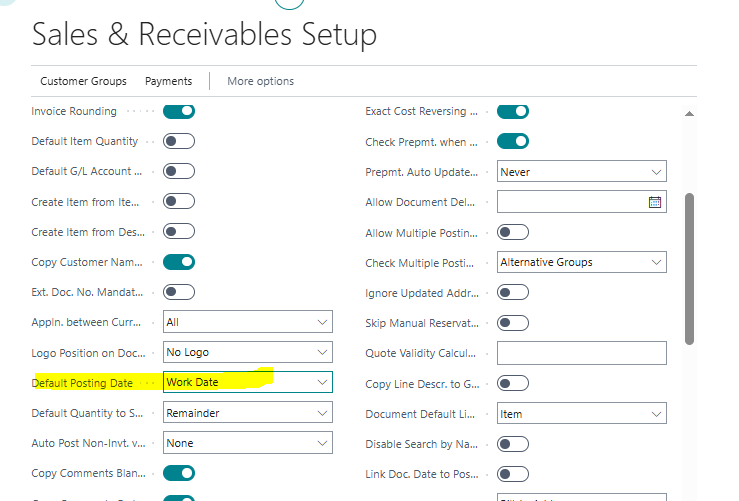
    To control posting date you can do the below setting in sales & Receivables Setup
    Set "Default Posting Date" as "No Date" . user can select the date when he will post .


    Or Set posting date as Workdate 
     
    If you feel I have answered your query , Please verify the answer 
     
    Regards 
    Pallavi Phade 
  • Suggested answer
    Sahan Hasitha Profile Picture
    2,683 on at
    hi
     
    ·  Train users to check/update Posting Date before posting
    • On the Sales Order → update the Posting Date field to the actual invoice date before posting.
    • You can even set the Posting Date = Work Date automatically in settings.
    ·  Change setup in Sales & Receivables Setup
    • Field: Default Posting Date → you can set it to Work Date instead of Document Date.
    • This way, the posting date defaults to today whenever posting, not the order date.
    • Path: Search → Sales & Receivables Setup → Default Posting Date.
  • Suggested answer
    Sumit Singh Profile Picture
    11,757 Super User 2026 Season 1 on at
    Agreed with @pallavi on this. The ideal way is to maintain the settings of "No date" under default posting date in your case over Sales & receivables set up. That will help.
  • Suggested answer
    Ben Baxter Profile Picture
    6,918 Super User 2026 Season 1 on at
    As others have said, in Sales and Rec. Setup change the Default Posting Date to No Date.  This prevents the Order from being Posted until a User sets the date.  The User should simply type "t" in the Posting Date field to enter today's date automatically.
     
    Some AI have wrongly suggested to use "Work Date", which defaults the date of entry into the Order, and it does not get updated as time passes.  This is why your Orders are getting Posted on the creation date, not the actual date of posting.
     
    Best Regards,
    Ben Baxter
    Accent Software Inc
  • Suggested answer
    Nimsara Jayathilaka. Profile Picture
    4,950 Super User 2026 Season 1 on at
    Hi
     
    It is normal in Microsoft Dynamics 365 Business Central that the "Posting Date" of a posted sales invoice defaults to the date when the sales order was created if it is not manually changed before posting. This Posting Date controls the ledger entries and financial reporting dates. If the invoice is posted in a later period, but the Posting Date is left unchanged, the system will still show the original order creation date as the posting date, causing difficulties and errors in reporting.
     
    To avoid this, the Posting Date and Document Date should be updated manually before posting the invoice. Business Central has setup options like "Posting Date Check on Posting" and "Default Posting Date" that help enforce correct date entry at posting time to prevent accidental date mismatche
     
    Thanks
    Nimsara
  • Suggested answer
    Valentin Castravet Profile Picture
    32,157 Super User 2026 Season 1 on at
    This is normal behavior. Users need to select the posting date of a transaction, so the system doesn’t automatically change it to the date the transaction is posted. This is required because sometimes transactions need to be posted with different posting dates.
     
    For this reason, the posting date must be updated manually each time you post. In your current setup, the posting date field is automatically populated when an order is created. If it helps, you can change this in the Sales & Receivables Setup page so that the posting date defaults to blank.
     

Under review

Thank you for your reply! To ensure a great experience for everyone, your content is awaiting approval by our Community Managers. Please check back later.

Helpful resources

Quick Links

Introducing the 2026 Season 1 community Super Users

Congratulations to our 2026 Super Stars!

Congratulations to our 2025 Community Spotlights

Thanks to all of our 2025 Community Spotlight stars!

Leaderboard > Small and medium business | Business Central, NAV, RMS

#1
OussamaSabbouh Profile Picture

OussamaSabbouh 1,946 Super User 2026 Season 1

#2
YUN ZHU Profile Picture

YUN ZHU 1,177 Super User 2026 Season 1

#3
Khushbu Rajvi. Profile Picture

Khushbu Rajvi. 555 Super User 2026 Season 1

Last 30 days Overall leaderboard

Featured topics

Product updates

Dynamics 365 release plans
