web
You’re offline. This is a read only version of the page.
close
Skip to main content

Notifications

Announcements

No record found.

Community site session details

Community site session details

Session Id :
Microsoft Dynamics CRM (Archived)

Server Error in '/' Application - Request is not available in this context after switching AppPool from Classis to Integrated.

(0) ShareShare
ReportReport
Posted on by

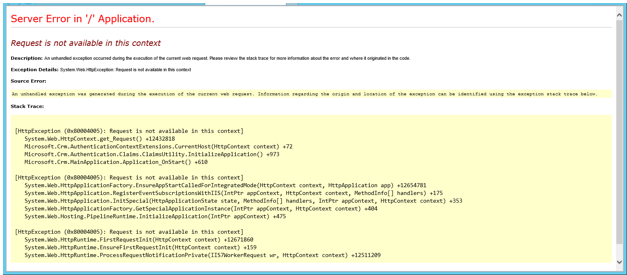
Hello, I switched my AppPool from Classic to Integrated and now receive this error when accessing any of the ORGs in the Web Browser. I've seen some information about the Application_OnStart setting. But, cannot figure out where or how to change this. I'm not a programmer. Just looking for specific instruction on what settings in IIS Manager to change to fix this. Thank you.
8741.AppError.PNG

*This post is locked for comments

I have the same question (0)
  • jestuder Profile Picture
    158 on at

    can you copy the text into you post or into a new one.  Its hard to read in the image.

  • Community Member Profile Picture
    on at

    Here is the Text of the above message.

    Request is not available in this context

    Description: An unhandled exception occurred during the execution of the current web request. Please review the stack trace for more information about the error and where it originated in the code.

    Exception Details: System.Web.HttpException: Request is not available in this context

    Source Error:

    An unhandled exception was generated during the execution of the current web request. Information regarding the origin and location of the exception can be identified using the exception stack trace below.


    Stack Trace:

    [HttpException (0x80004005): Request is not available in this context]
       System.Web.HttpContext.get_Request() +12432818
       Microsoft.Crm.AuthenticationContextExtensions.CurrentHost(HttpContext context) +72
       Microsoft.Crm.Authentication.Claims.ClaimsUtility.InitializeApplication() +990
       Microsoft.Crm.MainApplication.Application_OnStart() +610
    
    [HttpException (0x80004005): Request is not available in this context]
       System.Web.HttpApplicationFactory.EnsureAppStartCalledForIntegratedMode(HttpContext context, HttpApplication app) +12654781
       System.Web.HttpApplication.RegisterEventSubscriptionsWithIIS(IntPtr appContext, HttpContext context, MethodInfo[] handlers) +175
       System.Web.HttpApplication.InitSpecial(HttpApplicationState state, MethodInfo[] handlers, IntPtr appContext, HttpContext context) +353
       System.Web.HttpApplicationFactory.GetSpecialApplicationInstance(IntPtr appContext, HttpContext context) +404
       System.Web.Hosting.PipelineRuntime.InitializeApplication(IntPtr appContext) +475
    
    [HttpException (0x80004005): Request is not available in this context]
       System.Web.HttpRuntime.FirstRequestInit(HttpContext context) +12671860
       System.Web.HttpRuntime.EnsureFirstRequestInit(HttpContext context) +159
       System.Web.HttpRuntime.ProcessRequestNotificationPrivate(IIS7WorkerRequest wr, HttpContext context) +12511209
    

Under review

Thank you for your reply! To ensure a great experience for everyone, your content is awaiting approval by our Community Managers. Please check back later.

Helpful resources

Quick Links

Responsible AI policies

As AI tools become more common, we’re introducing a Responsible AI Use…

Neeraj Kumar – Community Spotlight

We are honored to recognize Neeraj Kumar as our Community Spotlight honoree for…

Leaderboard > 🔒一 Microsoft Dynamics CRM (Archived)

#1
SA-08121319-0 Profile Picture

SA-08121319-0 4

#1
Calum MacFarlane Profile Picture

Calum MacFarlane 4

#3
Alex Fun Wei Jie Profile Picture

Alex Fun Wei Jie 2

Last 30 days Overall leaderboard

Featured topics

Product updates

Dynamics 365 release plans
