web
You’re offline. This is a read only version of the page.
close
Skip to main content

Notifications

Announcements

Community site session details

Community site session details

Session Id :
Small and medium business | Business Central, N...
Answered

Automatically Calculating Depreciation

(0) ShareShare
ReportReport
Posted on by 65

Good morning,

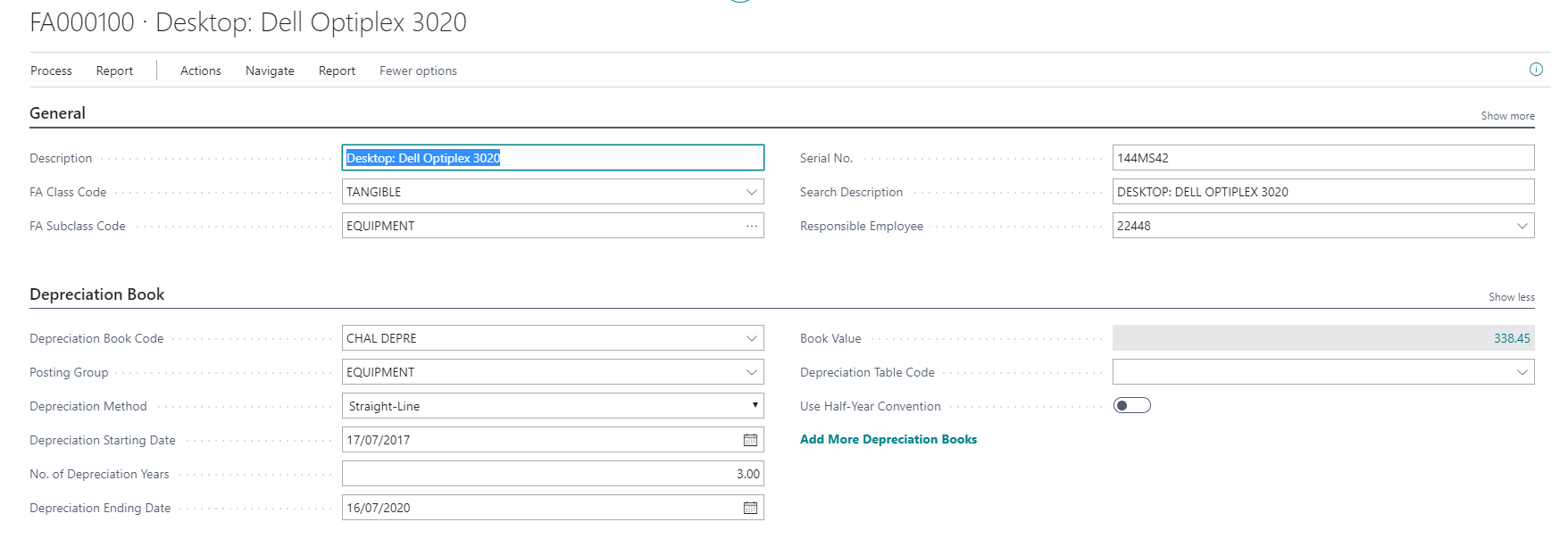
I am trying to get deprecation automatically calculated on fixed assets. I believe the fixed asset has been set-up correctly as per below:
pastedimage1587636984523v1.png

The acquisition start date is the 17/07/2017 and depreciation should be calculated up until 16/07/2020 - 3 years. 

The depreciation method and start and end dates are entered. I haven't specified a depreciation table code (not sure if this is required).

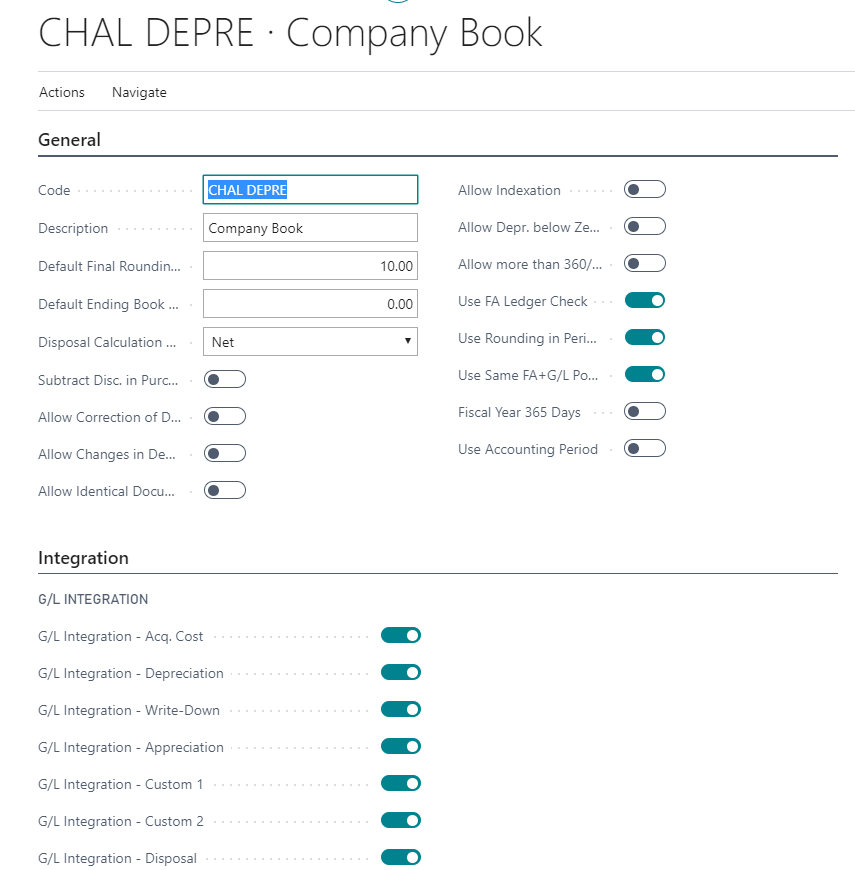
A depreciation booking card has been set-up (all integrations ticked):
pastedimage1587637184727v2.png

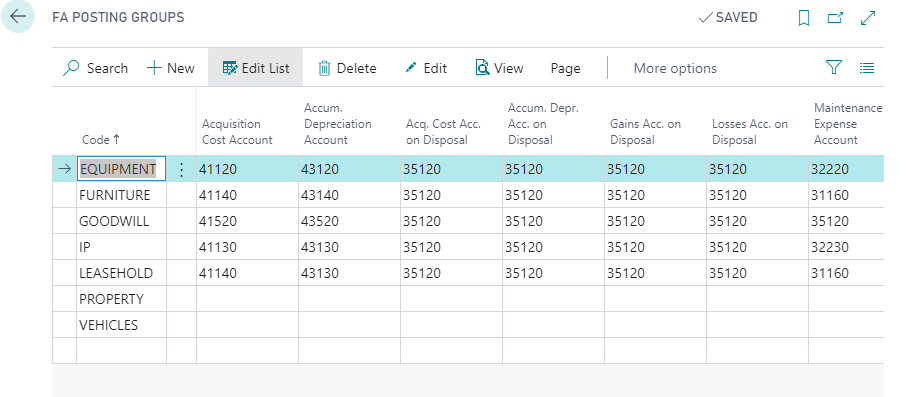
FA posting groups have been defined, pointing to the correct G/L's (chart of accounts):
pastedimage1587637274673v3.png

When I try and use the calculate depreciation batch job, pointing to the depreciation book CHAL DEPRE with the below config:
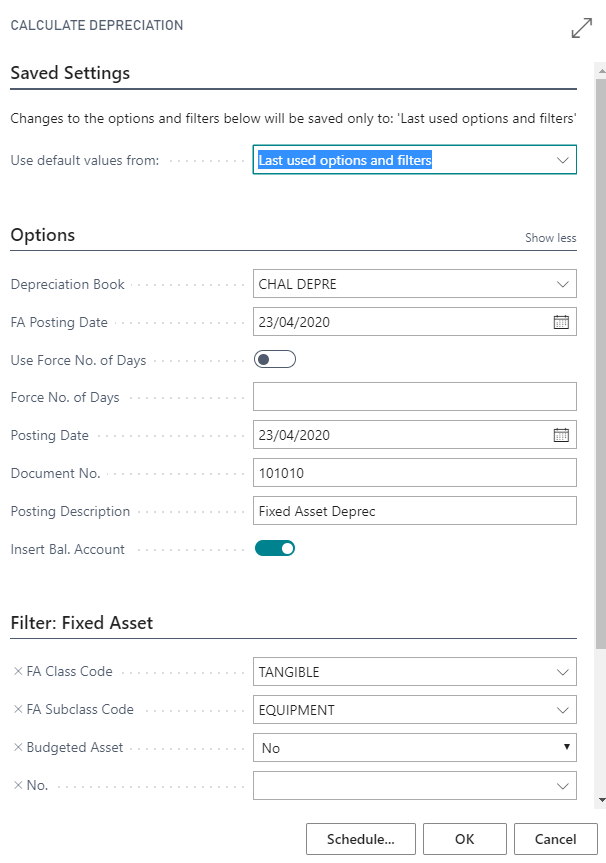
pastedimage1587637398999v4.png

I seem to get the below output:

pastedimage1587637682993v5.png

I click 'Yes' but nothing happens at this point. If I manually search for the fixed asset G/L journal I can see the below:
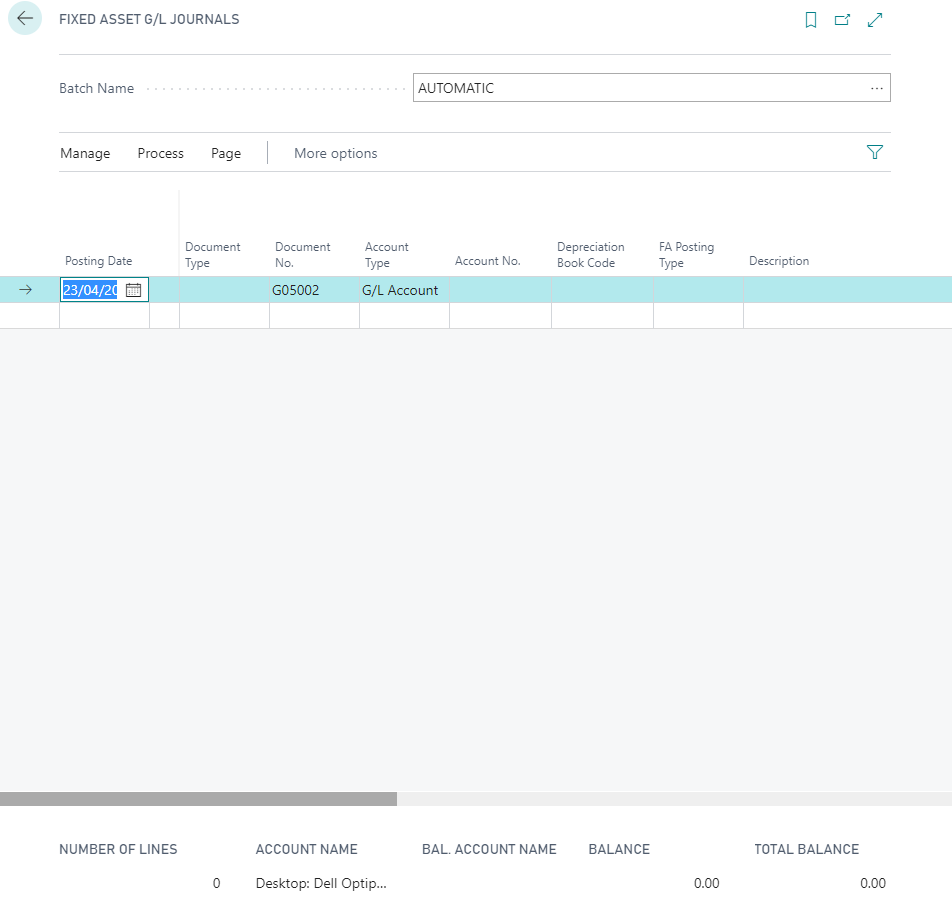
pastedimage1587637798493v6.png

Seems to not be calculating the depreciation days or calculating any amounts, can anyone spot where I might be going wrong here?

If there are calculations, then the next step i guess is to 'Post' the journal entry? Where should I see depreciation amounts listed, against the fixed asset or within chart of accounts?

Apologies, fairly new to BC.

Any help would greatly be appreciated.

Regards,

Matt Smith 

I have the same question (0)
  • Matt Smith - Cha Ltd Profile Picture
    65 on at

    Hi Martin,

    Applying the 'Default' to the Fixed Asset G/L Journal as per below fixed the issue:

    pastedimage1587714843488v1.png

    Thank you for your help. Fantastic!

    Regards,

    Matt Smith

  • Verified answer
    MartinNL Profile Picture
    480 on at

    Hi Matt,

    Yes that looks like the 'out of box' setup that BC has. I see that your FA Posting Setup is using the batch 'Default' but in your original post you looking in the FA Journal batch called 'Automatic'. Have you checked if the depreciation values are in the batch 'Default'? 

    FA_5F00_Setup_2800_2_2900_.png

    FA_5F00_Setup_2800_3_2900_.png

    If you want your depreciation to go to your 'Automatic' batch then I suggest you make that amendment in your FA Posting Setup.

    Hope that helps!

    Kind regards,

    Martin

  • Matt Smith - Cha Ltd Profile Picture
    65 on at

    Hi Aotto & Martin,

    Thanks for the replies, some great direction.

    I have checked the FA Journal Templates & FA Journey Setup - as per below:

    FA JOURNAL TEMPLATES

    pastedimage1587645391494v1.png

    Are these 'out of the box' set-up entries or perhaps these have been created?

    FA JOURNAL SETUP

    The FA journal set-up is pointing to the above template (ASSETS)

    pastedimage1587645587381v2.png

    I have also checked the FA Posting Type Setup - In case you may spot anything incorrect here:

    pastedimage1587645861539v3.png

    Would be great to solve this, thanks for your help so far!

    Regards,

    Matt Smith

  • Suggested answer
    MartinNL Profile Picture
    480 on at

    Hi Matt,


    As mentioned by aotto, you should check to which Journal Batch the depreciation is being created, you can see this by navigating to "FA Journal Setup", here you will see the setup for the depreciation book.

    FA_5F00_Setup.png

    If you have multiple depreciation books you can also navigate via the depreciation book:

    FA_5F00_Setup_2800_1_2900_.png

    Let us know how you get on

    Regards,

    Martin

  • Suggested answer
    Community Member Profile Picture
    on at

    Can you go to Depreciation Books -> FA Journal Setup and check the journal batch setup in there.

Under review

Thank you for your reply! To ensure a great experience for everyone, your content is awaiting approval by our Community Managers. Please check back later.

Helpful resources

News and Announcements

Season of Giving Solutions is Here!

Quick Links

Responsible AI policies

As AI tools become more common, we’re introducing a Responsible AI Use…

Neeraj Kumar – Community Spotlight

We are honored to recognize Neeraj Kumar as our Community Spotlight honoree for…

Leaderboard > Small and medium business | Business Central, NAV, RMS

#1
OussamaSabbouh Profile Picture

OussamaSabbouh 1,476

#2
Khushbu Rajvi. Profile Picture

Khushbu Rajvi. 789 Super User 2025 Season 2

#3
YUN ZHU Profile Picture

YUN ZHU 719 Super User 2025 Season 2

Last 30 days Overall leaderboard

Featured topics

Product updates

Dynamics 365 release plans