web
You’re offline. This is a read only version of the page.
close
Skip to main content

Announcements

No record found.

News and Announcements icon
Community site session details

Community site session details

Session Id :
Microsoft Dynamics CRM (Archived)

Contact Records Won't Save

(0) ShareShare
ReportReport
Posted on by 315

Several of my users (but not all) have recently begun experiencing trouble saving new Contact records (or making changes to Contact records).

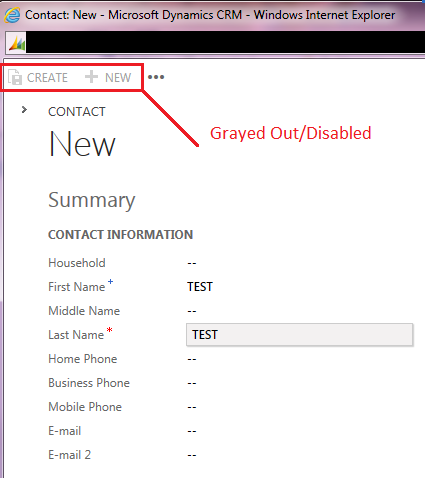
  • If they click 'Create' (top left corner) or 'Save' (bottom right corner) the form seems to freeze. 
  • The Create/Save buttons become disabled (grayed out). 
  • Users can still continue to enter data, but the record won't be retained. 
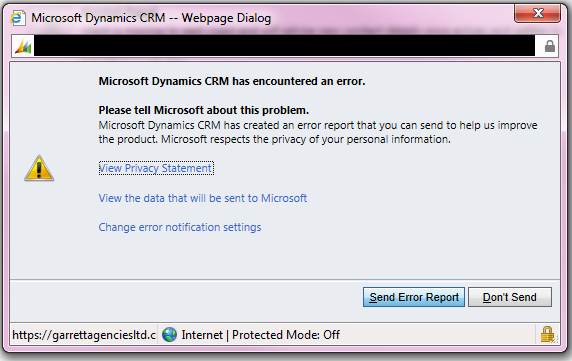
  • Then a dialog box appears requesting permission to send error data to Microsoft.

1172.Screenshot-3.png

4048.Screenshot-2.png

  • This occurs using CRM for Outlook, in Internet Explorer, and in Chrome.
  • Other entites appear to still be working (i.e. Leads/Opportunities etc). Only Contacts have an issue.
  • No client side scripting has been done on these Contact forms.
  • All the latest Windows/Office updates have been installed.
  • Using IE9
  • CRM 2011 Online (O365)

*This post is locked for comments

I have the same question (1)
  • AkramQ Profile Picture
    on at

    Hi Kyle,

    Would be a good idea to read "View the data that will be sent to Microsoft" on the Error Dialog.

    Feel free to post it here so someone can help.

    Cheers

  • _Alessandro_ Profile Picture
    615 on at

    do you have some Javascript customization on this entity?

    If so, probably it's something wrong in one of this scripts.

  • Kyle M Garrett Profile Picture
    315 on at

    Microsoft Dynamics CRM Error Report Contents

    <CrmScriptErrorReport>

     <ReportVersion>1.0</ReportVersion>

     <ScriptErrorDetails>

      <Message>Uncaught TypeError: Cannot call method 'trigger' of null</Message>

      <Line>572</Line>

      <URL>/_common/JsProvider.ashx?ids=1759665639-1968334880-1793205875-1547461133-1992083491-1194605645-1039841082-1314140682-232397045-1250882489-468302605-1405388298-1731109441-2029667886-399776211-1488912348-1503848635-1376927455-1030632819-1181113682-204060739-1025323794-513446117-1713948411-1625018438-1460109179-1088147315-706656670-542820515-1463979649-374257838-2050812538-512064351&ver=-2046522005</URL>

      <PageURL>/main.aspx?etc=2&extraqs=%3fetc%3d2%26pagemode%3diframe%26preloadcache%3d1379523859657&pagetype=entityrecord</PageURL>

      <Function></Function>

      <CallStack>

      </CallStack>

     </ScriptErrorDetails>

     <ClientInformation>

      <BrowserUserAgent>Mozilla/5.0 (Windows NT 6.1) AppleWebKit/537.36 (KHTML, like Gecko) Chrome/29.0.1547.66 Safari/537.36</BrowserUserAgent>

      <BrowserLanguage>undefined</BrowserLanguage>

      <SystemLanguage>undefined</SystemLanguage>

      <UserLanguage>undefined</UserLanguage>

     <ScreenResolution>1920x1080</ScreenResolution>

      <ClientName>Web</ClientName>

      <ClientTime>2013-09-18T11:04:28</ClientTime>

     </ClientInformation>

     <ServerInformation>

       <OrgLanguage>1033</OrgLanguage>

       <OrgCulture>1033</OrgCulture>

       <UserLanguage>1033</UserLanguage>

       <UserCulture>1033</UserCulture>

       <OrgID>{EDFFADEE-5D35-4DF8-A602-CD529813A60F}</OrgID>

       <UserID>{118599A2-5666-E211-A852-78E7D1620F5E}</UserID>

       <CRMVersion>5.0.9690.5010</CRMVersion>

     </ServerInformation>

    </CrmScriptErrorReport>

  • Kyle M Garrett Profile Picture
    315 on at

    @ Allessandro Cortese

    There has been no scripting on this entity whatsoever.

  • AkramQ Profile Picture
    on at

    Can you post a screenshot of the whole form?

  • Suggested answer
    Farhan Syed Profile Picture
    1,156 on at

    Hi  KYLE GARRETT,

    Is this being by the users having the system admin or customizer security roles ?

    Are you facing this other browsers as well ?

    You need to recheck the access rights at the contact and account entity for these users..

  • Kyle M Garrett Profile Picture
    315 on at

    @ Farhan Syed

    You appear to be correct.

    I'm the System Admin. I do not have any issues creating Contact records.

    All my other users on the other hand belong to a custom 'Default Security Role'. This security role worked fine up until very recently, but as you're aware, they cannot create Contact records.

    You'll note in the screenshot below, users with this security role assigned have full permissions for the Contact entity.

    We did change our organization's URL recently. It shouldn't affect things like this. But i'm starting to wonder if it's related given the timing.

  • Karth Profile Picture
    on at

    Kyle, can you check if the users are able to create contact records by switching to 'Classic' forms? If they are able to create contact records through the Classic form, check the Form assignment for the security role on Form Customizations.

    Also, were there any new relationship created with the Contact entity? If yes, check the 'Append' and 'Append To' privileges for that entity.

  • Kyle M Garrett Profile Picture
    315 on at

    @ Karth  @ Fahan Syed

    Classic Forms Work!

    If my users switch to Classic Forms they are able to Create/Edit 'Contact' records.

    If they use the 'Polaris' Forms they cannot...but I (System Admin) can.

    Also, 'Append' and 'Append To' privileges were (and continue to be) applied to all entities that my users interact with.

    I've also checked the 'Form Assignment' for the security role. They were (and continue to be) all enabled.

  • Valerie Pedreno Profile Picture
    35 on at

    We are having the exact same issue.  Is there a resolution?

    Thanks!

Under review

Thank you for your reply! To ensure a great experience for everyone, your content is awaiting approval by our Community Managers. Please check back later.

Helpful resources

Quick Links

Introducing the 2026 Season 1 community Super Users

Congratulations to our 2026 Super Stars!

Congratulations to our 2025 Community Spotlights

Thanks to all of our 2025 Community Spotlight stars!

Leaderboard > 🔒一 Microsoft Dynamics CRM (Archived)

#1
Varsha deshpande Profile Picture

Varsha deshpande 5

#2
NeerajPawar Profile Picture

NeerajPawar 2

#2
jlattimer Profile Picture

jlattimer 2

Last 30 days Overall leaderboard

Featured topics

Product updates

Dynamics 365 release plans