web
You’re offline. This is a read only version of the page.
close
Skip to main content
Community site session details

Community site session details

Session Id :
Microsoft Dynamics 365 | Integration, Dataverse...
Unanswered

Dynamics365 Chart xml not working.

(0) ShareShare
ReportReport
Posted on by

Hi Experts,

I have created a chart in the "campaign" entity. Later I am using XRM toolbox to modify the chart's XML.

I have created a "Bar" chart and I am trying to overlay bars by using property "DrawSideBySide=False"... Below is a short xml.

<Series BorderWidth="0" LabelForeColor="59, 59, 59" IsValueShownAsLabel="True" Color="183, 212, 51" LegendText="Raised Amount ($)" IsVisibleInLegend="True" ChartType="Bar" Font="Verdana, 7.5px" CustomProperties="DrawingStyle=Cylinder,DrawSideBySide=False,BarLabelStyle=Left,MaxPixelPointWidth=40,PointWidth=0.75">
<SmartLabelStyle Enabled="True" />
</Series>

When I am previewing the chart in the XRM itself it shows as expected (below image)... However, when i open the chart in Dynamics online , it is not overlaying bars...

Is there anything I am missing or doing wrong?
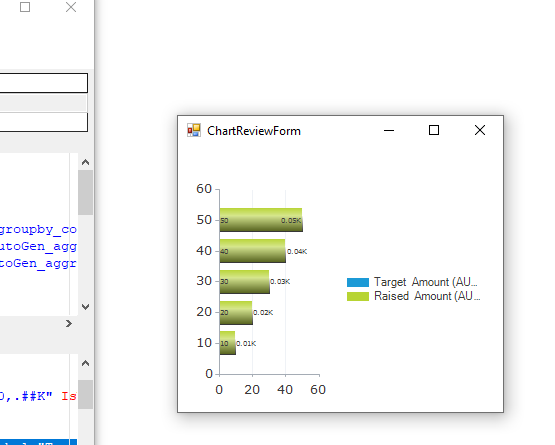
pastedimage1641859743143v1.png

I have the same question (0)
  • Nya Profile Picture
    29,060 on at
    RE: Dynamics365 Chart xml not working.

    Hi,

    Would you please share a screenshot to show the effect of the chart in Dynamics?

  • Community Member Profile Picture
    on at
    RE: Dynamics365 Chart xml not working.

    Hi Nya 

    Thanks for your reply.

    Below is the screen shot... As you can see the bars are not on top of each other.

    pastedimage1641938241304v3.png

  • Nya Profile Picture
    29,060 on at
    RE: Dynamics365 Chart xml not working.

    Hi,

    According to the second screenshot, it seems that the other properties you set are not taking effect either. E.g. DrawingStyle=Cylinder

    After you have modified the XML, did you update it successfully?

  • Community Member Profile Picture
    on at
    RE: Dynamics365 Chart xml not working.

    Yes, I did.. 

    Some properties work and some don't.

    Strange!

  • Deni Profile Picture
    15 on at
    RE: Dynamics365 Chart xml not working.

    I have the same problems! I can update the changes and most of them are applied but not DrawSideBySide=False.

    Anyone have any idea why it no longer works?

    Thanks

  • Tobin Eric Profile Picture
    5 on at
    RE: Dynamics365 Chart xml not working.

    Did you ever get this resolved? I am facing the same issue. Model driven app on the cloud doesn't seem to recognize the DrawingStyle=Cylinder xml attribute.

    pastedimage1680530007825v2.png

    However, when looking at the chart in design view inside the solution, it shows it properly:

    pastedimage1680530094624v3.png


  • PV-17050457-0 Profile Picture
    4 on at
    Dynamics365 Chart xml not working.
    Was this issue resolved ? Bcoz same thing is happening with me although r=the changes are reflecting fine in classic CRM but not in model driven app.
     
     
    Thanks

Under review

Thank you for your reply! To ensure a great experience for everyone, your content is awaiting approval by our Community Managers. Please check back later.

Helpful resources

Quick Links

Responsible AI policies

As AI tools become more common, we’re introducing a Responsible AI Use…

Neeraj Kumar – Community Spotlight

We are honored to recognize Neeraj Kumar as our Community Spotlight honoree for…

Leaderboard > Microsoft Dynamics 365 | Integration, Dataverse, and general topics

#1
#ManoVerse Profile Picture

#ManoVerse 105

#2
Siv Sagar Profile Picture

Siv Sagar 93 Super User 2025 Season 2

#3
Martin Dráb Profile Picture

Martin Dráb 81 Most Valuable Professional

Last 30 days Overall leaderboard

Product updates

Dynamics 365 release plans
