web
You’re offline. This is a read only version of the page.
close
Skip to main content

Notifications

Announcements

No record found.

Community site session details

Community site session details

Session Id :
Small and medium business | Business Central, N...
Answered

How to Union two tables and display them in the same List

(0) ShareShare
ReportReport
Posted on by 20

Hi,

 I want to be Union two tables together in AL code for Business Central for the cloud.

Similar to the way you would in SQL with a "UNION ALL" statement.

As the cloud version of business central does not let you get directly to the tables and create views, I need to do this in AL code.

I know I can create a new table and load the data from the 2 table into that table and then use that table on the page extension, but as the table grow, this would get slower and slower.

The 2 table I want to join together first is the following.

"Sales Invoice line"; //table 113

"Sales Cr.Memo line"; //table 115

-----------------------------------------------------------------------------

I know Query can join two tables show the some row,
But, I want two table data can show different row and the some List.

The schematic is as follows : 
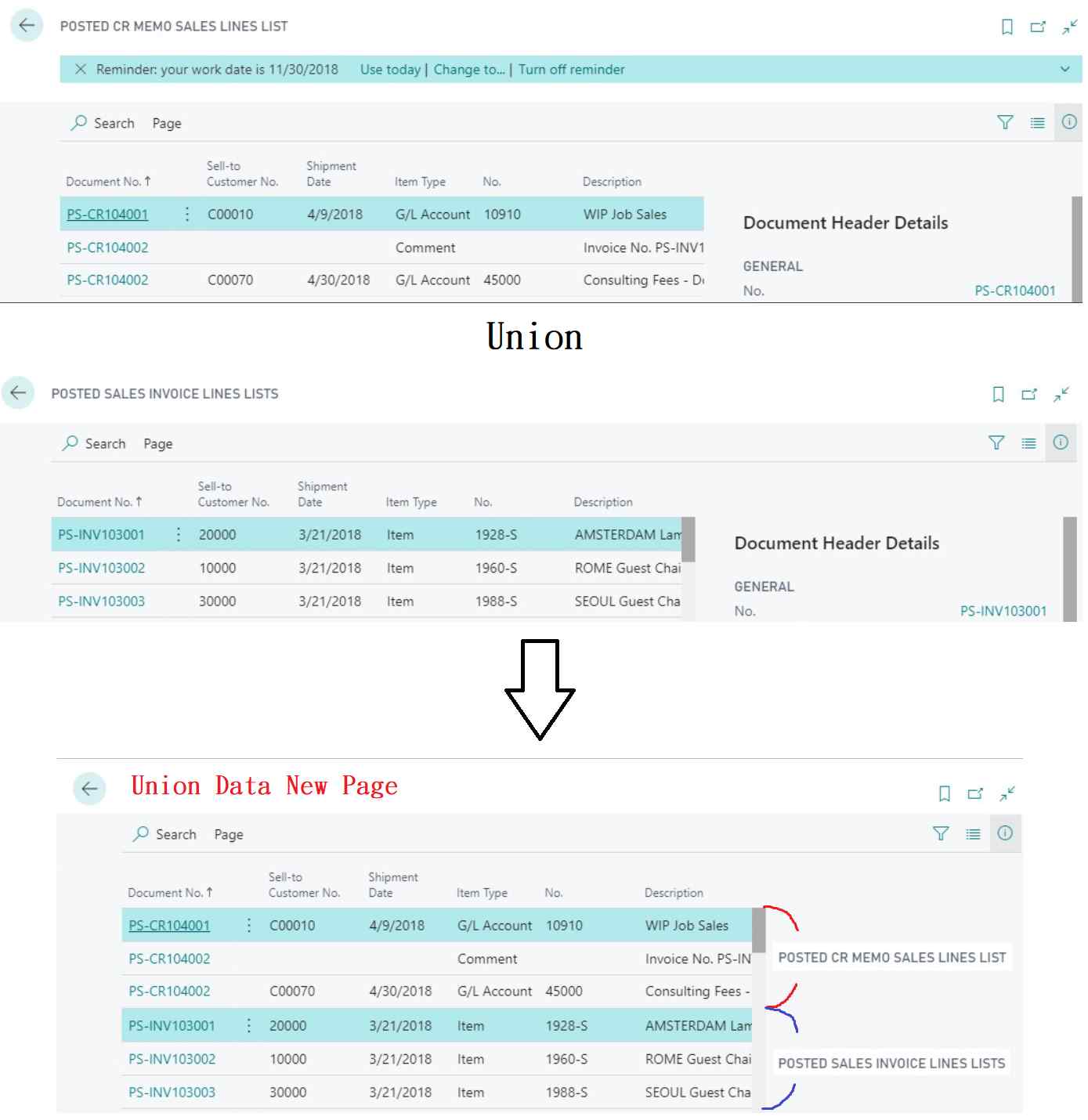
pastedimage1622800554008v1.png

copy by : community.dynamics.com/.../1169640

I have the same question (0)
  • Suggested answer
    JAngle Profile Picture
    133 on at

    Not as elegant as a query but you could devise a table which can house both sets of data and use it as a temporary table. Then have a routine which fills the table with the values from the two tables and displays that in a list page. To the user it is a one page experience.

    Not done this exact scenario but some of the things to use if you went for this approach can be seen below with some crude code snippets

    • Page action to open the page - the highlighted part calls a function in the page to populate it
      trigger OnAction()
                      var
                          QueryPage: Page "Query Page";
                      begin
                          
                          QueryPage.SetPageData();
                          QueryPage.Run();
                      end;
      The function on the page is like this for my scenario but you could get it to run multiple queries or just copy data from the tables. I'll add the page properties as well so you can see what I did there
      procedure SetPageData()
          var
              NextRowNo: Integer;
              JrnlQuery: Query "A Query";
          begin
              if (GenJnlTemplate = '') or (GenJnlBatch = '') then
                  error(Error001);

              JrnlQuery.Open();
              while JrnlQuery.Read() do begin
                  NextRowNo := NextRowNo + 1;
                  "Entry No." := NextRowNo;
                  "Field A" := JrnlQuery.SomeField;
                  Insert();
              end;
          end;
      PageType = List;
          ApplicationArea = All;
          UsageCategory = Administration;
          SourceTable = "Custom Table";
          SourceTableTemporary = true;
          Editable = false;
          DeleteAllowed = false;
          InsertAllowed = false;
  • Taiwan Profile Picture
    20 on at

    Hi~Josh,

    Thank you so much for the solution,

    I have successfully tried this solution to display two Tables Data in the same List, and the data can be sorted or filtered.

    But I have a big trouble,

    Because this solution is to use SourceTableTemporary,

    Therefore, it does not actually add data to the Table,

    So I cannot use "GetRecord Method" to get data.

    Do you have any ideas or methods to get the Datas on the List?

    Thank you again for your assistance

    Best regards,

    Wilkai

  • Verified answer
    Suresh Kulla Profile Picture
    50,247 Super User 2025 Season 2 on at

    The only other way is to create a brand new table, populate that table with existing values, and add the code in the Insert Trigger of those tables to insert data into your new table. That way you don't need to use SourceTableTemporary

  • Suggested answer
    JAngle Profile Picture
    133 on at

    My proposed idea which I’ve used for a different circumstance uses a custom table. I use the source as temporary as I only want to show the data per time the page is open. Of course that’s ok if you have a small amount of data. You will most likely want a routine that populates the new table each time and invoice or credit memo is created so you have the table filled and then a regular page could work.

  • Verified answer
    YUN ZHU Profile Picture
    95,763 Super User 2025 Season 2 on at

    1. Create a new table (Set the SourceTableTemporary true and set a new key, such as Entry No.)

    2. Create a new list page to display the fields in the new table

    3. Insert data in the trigger OnOpenpage()

    Here is a similar example, hope it will help.

    https://yzhums.com/4869/

  • Suggested answer
    Taiwan Profile Picture
    20 on at

    Thank Your Answer

Under review

Thank you for your reply! To ensure a great experience for everyone, your content is awaiting approval by our Community Managers. Please check back later.

Helpful resources

Quick Links

Responsible AI policies

As AI tools become more common, we’re introducing a Responsible AI Use…

Neeraj Kumar – Community Spotlight

We are honored to recognize Neeraj Kumar as our Community Spotlight honoree for…

Leaderboard > Small and medium business | Business Central, NAV, RMS

#1
OussamaSabbouh Profile Picture

OussamaSabbouh 2,116

#2
Khushbu Rajvi. Profile Picture

Khushbu Rajvi. 764 Super User 2025 Season 2

#3
YUN ZHU Profile Picture

YUN ZHU 635 Super User 2025 Season 2

Last 30 days Overall leaderboard

Featured topics

Product updates

Dynamics 365 release plans
