web
You’re offline. This is a read only version of the page.
close
Skip to main content

Announcements

No record found.

News and Announcements icon
Community site session details

Community site session details

Session Id :
Microsoft Dynamics CRM (Archived)

Error while trying to reassign records

(0) ShareShare
ReportReport
Posted on by

Hi,

I am trying to reassign all records associated with a user to myself since the other person has left the company and I need that professional licence for a new user. I go to Settings > Users > Reassign all records. When I click OK i receive an error message in the back ground as the screen shot below shows. The "reassign records...-window" was visible for a couple of hours before I closed down CRM when I run out of patience.  Does anyone have an idea why this is happening or how to get rid of it and make sure all records are reassigned? I still don't dear to disable the user, since I am afraid of losing the data associated with that user. How can I know if the records have been reassigned? I have tried reassigning records from another user and still receive the same error message. I have also tried using different browsers. 
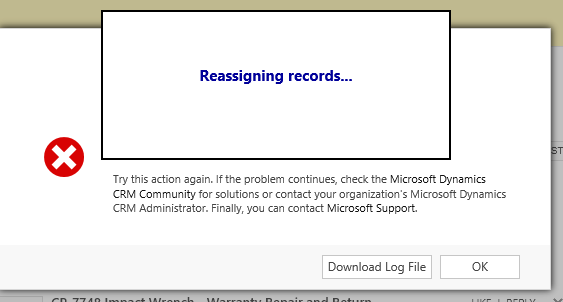
 

 7041.Capture4.PNG

Any help is highly appreciated, thank you!!

*This post is locked for comments

I have the same question (0)
  • Swetha Poojary Salaskar Profile Picture
    326 on at

    HI,

    Did you try downloading the log files from that popup screen?

    if not please download it.

    Also do you have any plugin or workflow registered on assigning record?

  • Community Member Profile Picture
    on at

    Hi Swetha,

    Thanks for your response! Yes, I have downloaded the log file. Please see below.

    Yes, believe there are both workflows and plugins on assigning records. However, I am not sure of how to verify this. Is there anywhere I can see what records are assigned to the specific user? 

    Thank you!

    <s:Envelope xmlns:s="schemas.xmlsoap.org/.../envelope"><s:Body><s:Fault><faultcode>s:Client</faultcode><faultstring xmlns:xml="www.w3.org/.../namespace" xml:lang="en-US">An unexpected error occurred.</faultstring><detail><OrganizationServiceFault xmlns="schemas.microsoft.com/.../Contracts" xmlns:i="www.w3.org/.../XMLSchema-instance"><ErrorCode>-2147220970</ErrorCode><ErrorDetails xmlns:a="schemas.datacontract.org/.../System.Collections.Generic" /><Message>An unexpected error occurred.</Message><Timestamp>2017-03-16T13:47:37.1021898Z</Timestamp><ExceptionSource i:nil="true" /><InnerFault><ErrorCode>-2147220970</ErrorCode><ErrorDetails xmlns:a="schemas.datacontract.org/.../System.Collections.Generic" /><Message>System.Exception: Microsoft Dynamics CRM has experienced an error. Reference number for administrators or support: #4EBA140F</Message><Timestamp>2017-03-16T13:47:37.1178149Z</Timestamp><ExceptionSource i:nil="true" /><InnerFault i:nil="true" /><OriginalException i:nil="true" /><TraceText i:nil="true" /></InnerFault><OriginalException i:nil="true" /><TraceText i:nil="true" /></OrganizationServiceFault></detail></s:Fault></s:Body></s:Envelope>

  • Suggested answer
    Swetha Poojary Salaskar Profile Picture
    326 on at

    Yes you can see record assigned to Specific user.

    Use advance find and add filter criteria where owner is that user.

    Refer below example:

    Where Entity is Account.

    you select filter for Owner equals your specific user.

    8468.Untitled2.jpg

    For checking if you have Plugin or workflow on assigning then please navigate to Settings=>Customizations=> Customize the system.

    Which will open popup screen

    8468.Untitled2.jpg

    Now select "Sdk Message Processing Step" and see if any SDK message is "Assign" for specific entity.

    Hope this helps! I'd appreciate if you'd mark this as Answering your question.

    Thanks,

    Swetha

  • Community Member Profile Picture
    on at

    Swetha,

    I did found recordscreated by this user in advanced find and there is a lot of them. And most of those records have workflows or processes running on the entity.  I am not sure what this tells me?

    I do have one SD Message set to "Assign",please see below. Could this be what is causing the problem? And do you have any suggestions on how to resolve this? 

    0116.Capture5.PNG

     Thank you!

  • Community Member Profile Picture
    on at

    I deactivated this SDK Message Processing Step and then tried to reassign the records again but I still receive the same error message.  

  • Swetha Poojary Salaskar Profile Picture
    326 on at

    Hi Isabell,

    I hope you have proper privileges for assigning records. Please check that.

    if you want I(you and me) can check your crm for this issue.

    we can do screen sharing to check this issue.

    my Skype Id: srsalaskar

    email id: swetha.poojary@gmail.com

  • Suggested answer
    Community Member Profile Picture
    on at

    Please verify if the User you are using to reassign the records to is System Admin.

  • Community Member Profile Picture
    on at

    Hi,

    Swetha - Yes, I am the System Administrator. The other user is not and actually didn't have the "Assign Record-privileges", but I changed that user to also have the System Administrator security role and it still didn't work.

    Thank you for offering to help, I have actually created a SR with Microsoft so that probably wont't be necessary, but thanks anyway!

    Mohd - Yes, the user I am trying to assign the records to are a System Administrator, is that a problem?

    Thanks!!

  • Community Member Profile Picture
    on at

    I would suggest you to run a trace using crmdiagtool. This will help to identify the real issue. The error log above is generic one.

Under review

Thank you for your reply! To ensure a great experience for everyone, your content is awaiting approval by our Community Managers. Please check back later.

Helpful resources

Quick Links

Introducing the 2026 Season 1 community Super Users

Congratulations to our 2026 Super Stars!

Meet the Microsoft Dynamics 365 Contact Center Champions

We are thrilled to have these Champions in our Community!

Congratulations to the March Top 10 Community Leaders

These are the community rock stars!

Leaderboard > 🔒一 Microsoft Dynamics CRM (Archived)

#1
AS-17030037-0 Profile Picture

AS-17030037-0 2

Last 30 days Overall leaderboard

Featured topics

Product updates

Dynamics 365 release plans
