web
You’re offline. This is a read only version of the page.
close
Skip to main content

Notifications

Announcements

No record found.

Community site session details

Community site session details

Session Id :
Microsoft Dynamics CRM (Archived)

Duplicate detection problem

(0) ShareShare
ReportReport
Posted on by 2,050

Hi,

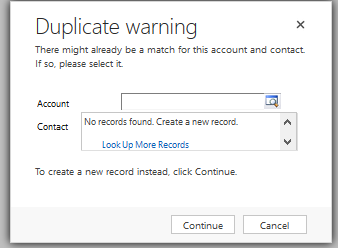
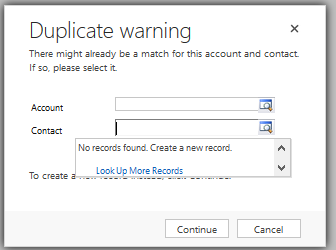
I am facing problems regarding duplicate detection.
DUplicate-2.png

Duplicate-_2D00_-1.png

And when i click on Account or Contact to show me duplicate values there is nothing, like you can see on pictures.  Can someone tell me why isn't CRM showing duplicate records

Thanks in advance

*This post is locked for comments

I have the same question (0)
  • Community Member Profile Picture
    on at

    I would check your duplication detection rules. You might have it setup to look at inactive records. This could be the reason why you are not seeing any record when you search the accounts and contacts. Those view should be looking at active records only.

  • Aileen Gusni Profile Picture
    44,524 on at

    Hi Davor

    It seems like conflict here.

    The rules including the inactive record or probably other records that are not allowed to show in the lookup field.

    The reason why it is not appearing is because the lookup more record you see is based on the lookup view filter criteria.

    So example if you filter the Account lookup view to show only those Active ones or example those Active with another status or with another special keyword meanwhile your duplicate detection you show all.

    Then when duplicate detection detects it is includes as a duplicate record, but when you click the lookup icon it will be filtered out because of the lookup view filter criteria.

    So they are two different featurs one is based on the duplicate rule that probably you include all records without exception meanwhile your lookup view you filter using some criteria that the duplicate records did not fulfilled the criteria.

    Hope this helps.

    Thanks.

  • Davor Sed Profile Picture
    2,050 on at

    Thank you for your reply.

    I figured where the problem is, i have a rule that detects if Lead company exists in existing accounts, and that if functionating great, only problem is when we qualify the lead.

    Than crm trys to creat New Account with the same name as Lead company.

    Can u tell me how to create rule that will look if the name of company entered in lead entity is the same as name of the company in existing Accounts? But without the problem when converting Lead to Acc.

  • Aileen Gusni Profile Picture
    44,524 on at

    Hi Davor

    Try to create a rule that base entity is Lead and the second entity is Account as matching entity or vice versa

    I dont have thr crm instance to try right now whether lead and account can be pair here

    community.dynamics.com/.../105742

    penrodcrm.com/.../crm-data-deduplication-dilemmas

    A rule can have one or more duplicate detection rule conditions that are represented by the duplicate rule condition (DuplicateRuleCondition) entity. The conditions are combined by the system as in logical AND operation. A duplicate detection rule specifies a base entity type and a matching entity type. A duplicate rule condition specifies the name of a base attribute and the name of a matching attribute. For example, specify an account as a base entity and a contact as a matching entity to compare last names and addresses. The matching criteria consist of operators such as exactly match, first n-number of characters, or last n-number of characters

    I hope this can work.

    Thanks

  • Community Member Profile Picture
    on at

    I'm experiencing the same problems as Davor.  I have a dupe detection rule set up between Lead and Account, which looks for an Exact Match on Company Name, ignoring blanks and inactive records.  This rule fires every time when I qualify a lead specifying a Company Name, I assume because the act of qualifying the lead will create an Account with the same Company Name, so there is never a case where a duplicate won't be created.  

    I've had to deactivate this rule, and just use an Account-Account rule which will catch duplicate Accounts created from Leads, but not factor in the source Lead itself.

  • Julie Wimer Profile Picture
    35 on at

    I'm working through this same issue in On Prem 8.2.3. Have you ever found an OOB solution other than disabling the Lead-Account rule? It would be nice for the duplicate warning to display upon trying to save a new lead if a matching account exists, but without triggering the misleading duplicate warning screen every time any new lead is qualified.

  • Paresh Jodhani Profile Picture
    67 on at

    I am also facing exactly similar problem in D365 On-Premises v8.2.5.4.

    I have created a duplicate detection rule with Base entity as Lead and Matching Record Type as Contact, criteria is set with matching Email attribute from both entities. This rules is configured to exclude Inactive records and blank values.

    This rule is working as expected on lead create/update operation but issue when qualifying a lead and displaying unnecessary duplicate detection popup.

    This popup displays even when there is no active contact available in system with similar email address as qualifying lead has.

    It seems like, dedupe rule is triggering when creating new contact from lead and checks whether a lead is available with same email as contact to be created? and raise the conflict.

    Please suggest if you have any idea about this conflict.

Under review

Thank you for your reply! To ensure a great experience for everyone, your content is awaiting approval by our Community Managers. Please check back later.

Helpful resources

Quick Links

Responsible AI policies

As AI tools become more common, we’re introducing a Responsible AI Use…

Neeraj Kumar – Community Spotlight

We are honored to recognize Neeraj Kumar as our Community Spotlight honoree for…

Leaderboard > 🔒一 Microsoft Dynamics CRM (Archived)

#1
SA-08121319-0 Profile Picture

SA-08121319-0 4

#1
Calum MacFarlane Profile Picture

Calum MacFarlane 4

#3
Alex Fun Wei Jie Profile Picture

Alex Fun Wei Jie 2

Last 30 days Overall leaderboard

Featured topics

Product updates

Dynamics 365 release plans