web
You’re offline. This is a read only version of the page.
close
Skip to main content

Announcements

No record found.

News and Announcements icon
Community site session details

Community site session details

Session Id :
Supply chain | Supply Chain Management, Commerce
Suggested Answer

Print Shipping Labels for containers - error: Shipping carrier tracking number not found, label cannot be printed.

(0) ShareShare
ReportReport
Posted on by 95

Hello, experts, 

I'm getting this error trying to Print Shipping Labels from the Warehouse management > Packing and containerization > Containers screen: Shipping carrier tracking number not found, label cannot be printed.
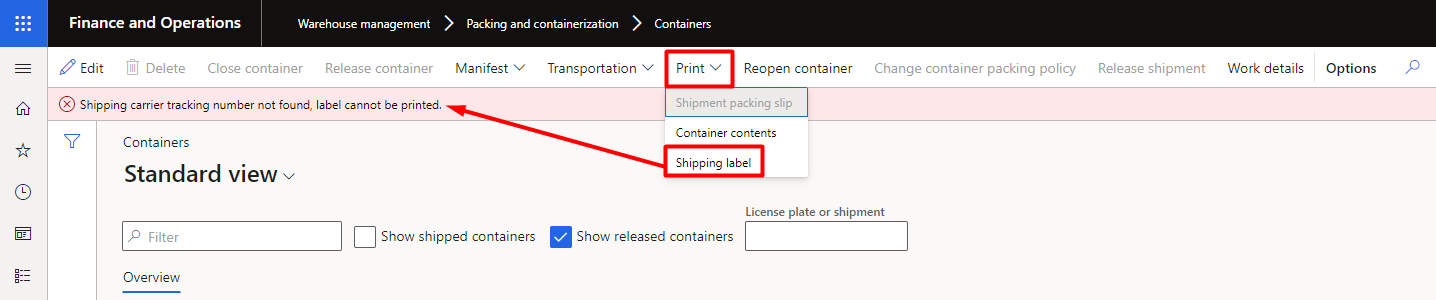
pastedimage1657651255298v1.png

I've added the tracking number to the packing slip, but this does not help:
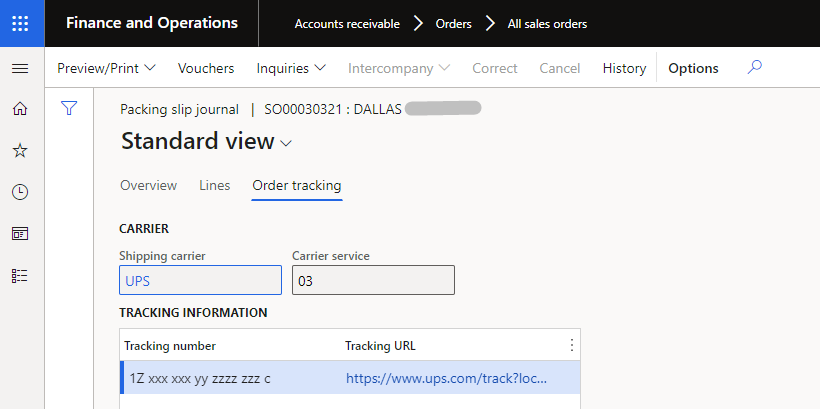
pastedimage1657651430179v2.png

Do I miss some other place where this tracking number should be added?

I have the same question (0)
  • Suggested answer
    huijij Profile Picture
    19,813 on at

    Hi Jana,

    Would you specify if the "Shipping Labels" is custom? As it does not appear on the standard form.

  • Jana K. Profile Picture
    95 on at

    Hi Judy, 

    No, it's not custom. I'm not sure what exactly enables this print option, I have enabled several setups and features:

    1. License configuration key  "Warehouse and Transportation Management" under System Administration > Setup > License configuration > Trade node (this is the most likely "suspect", because the system name of this button is "TMSContainerPrintLabel", looks like TMS prefix = Transportation Management System)

    2. "Consolidate shipments" feature

    3. "Small parcel shipping" feature

    After enabling all these, I've found the button "Shipping Labels"...

  • Suggested answer
    nunomaia Profile Picture
    27 Moderator on at

    You need update value "Container manifest id" in Containers to print label.

  • Suggested answer
    AliceBarendregt Profile Picture
    1,470 on at

    Hi Jana,

    This button is available after enabling the SPS feature. In order to retrieve the tracking number you need to manifest the container first. Depending on your config you either receive the option to specify this tracking number manually or if you have a proper integration with the associated carrier the tracking number will automatically be generated. After the manifest is successful you should be able to review this tracking number via the container form. After this you can generate the associated shipping label.

    This post might be helpful for you: docs.microsoft.com/.../small-parcel-shipping

  • Jana K. Profile Picture
    95 on at

    Alice,

    thank you for the explanation!

    How can I specify this tracking number manually?

Under review

Thank you for your reply! To ensure a great experience for everyone, your content is awaiting approval by our Community Managers. Please check back later.

Helpful resources

Quick Links

Introducing the 2026 Season 1 community Super Users

Congratulations to our 2026 Super Stars!

Meet the Microsoft Dynamics 365 Contact Center Champions

We are thrilled to have these Champions in our Community!

Congratulations to the April Top 10 Community Leaders

These are the community rock stars!

Leaderboard > Supply chain | Supply Chain Management, Commerce

#1
André Arnaud de Calavon Profile Picture

André Arnaud de Cal... 122 Super User 2026 Season 1

#2
Zain Mehmood Profile Picture

Zain Mehmood 89 Most Valuable Professional

#3
Laurens vd Tang Profile Picture

Laurens vd Tang 86 Super User 2026 Season 1

Last 30 days Overall leaderboard

Product updates

Dynamics 365 release plans
