web
You’re offline. This is a read only version of the page.
close
Skip to main content

Notifications

Announcements

No record found.

Community site session details

Community site session details

Session Id :
Microsoft Dynamics CRM (Archived)

Iphone app issues

(0) ShareShare
ReportReport
Posted on by

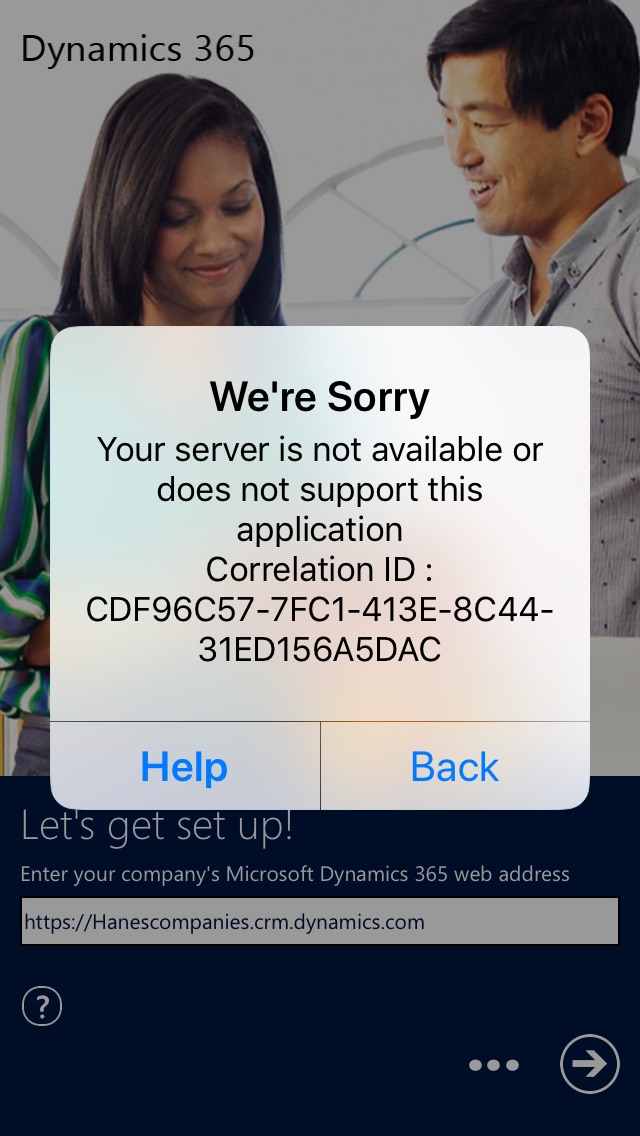
We are running Dynamics 365 CRM ONLINE 8.2.2 and have several users that use the Dynamics 365 Iphone app.  I have one user that continues to get this error  "We're Sorry Your Server is not available or does not support this application  Correlation id: CD96C57-7FC1-413E-8C44-31ED156A5DAC

He deleted the app, and reinstalled it this afternoon and when he types in our CRM address hanescompanies.crm.dynamics.com it will not prompt him for our ADFS/credential site instead he gets that error.  He has tired this with his old and new iphones and has never gotten it to work.   Now has an Iphone 7 with the most current IOS.

Does anyone have any ideas on how to get past this?
8524.Image_2D00_1.jpg

*This post is locked for comments

I have the same question (0)
  • Community Member Profile Picture
    on at

    Hi,

    Whether other users could login to Dynamics 365 for Mobile through the affected user's phone? Or whether the affected user could login to Dynamics 365 for Mobile through other normal phones?

    This error can occur with an online organization if your organization is federated with Office 365 and the certificate for your federation server, such as ADFS, is not trusted.

    Make sure the SSL certificate used is trusted by using a publicly trusted certificate or add the Certificate Authority certificate for the certificate of the Microsoft Dynamics CRM website and the federation server to the device.

    Adding the Certificate Authority certificate to the proper device will require you to export the Certificate Authority certificate from a device that has it and then import it. In most cases, you can simply get the exported certificate on the device and open it to install/import it.
    Hope it makes sense.
    BR,
    Judy
  • Brad Lorick Profile Picture
    on at

    The strange part for us it that this is the only Phone out of about 100 that is having this issue. 

  • Suggested answer
    Ben Thompson Profile Picture
    6,350 on at

    Can he connect to the instance using Safari on the phone? This will show if its a network / phone issue or something else

    Equally does he have an offline profile (see step 3.1 in the document below) https://docs.microsoft.com/en-us/dynamics365/customer-engagement/mobile-app/configure-mobile-offline-synchronization-dynamics-365-phones-tablets

  • Brad Lorick Profile Picture
    on at

    The user is able to login to the CRM instance with his iPhone using safari with no issues.  

  • Suggested answer
    Ben Thompson Profile Picture
    6,350 on at

    That to me means it sounds like a permissions issues. Check that he has an offline profile (see the link in my previous post) and ensure he has the same roles as the other mobile users.

    If it's not that the next place to look would be to ensure his phone has proper rights management installed. See docs.microsoft.com/.../secure-manage-phones-tablets for details about that.

  • Community Member Profile Picture
    on at

    i having the same issue on, unfortunately, it's an issue with WiFi connection. I got help from Google that recommends me to fix WiFi issues, I checked that and reset works me.

    WiFi Not Working on iPhone

    Hope you must help like me! 

  • Varun Singh Profile Picture
    943 on at

    Hi Brad,

    We faced the same issue. What Microsoft suggest that login issue can occur if the time on the device is not within a certain variance of the Dynamics 365 server. For example: you may encounter this issue if the time on the server is 2 PM on November 11th but the device is set to 2 PM on November 12th. So kindly set the time on the mobile  to local time zone.

Under review

Thank you for your reply! To ensure a great experience for everyone, your content is awaiting approval by our Community Managers. Please check back later.

Helpful resources

Quick Links

Responsible AI policies

As AI tools become more common, we’re introducing a Responsible AI Use…

Neeraj Kumar – Community Spotlight

We are honored to recognize Neeraj Kumar as our Community Spotlight honoree for…

Leaderboard > 🔒一 Microsoft Dynamics CRM (Archived)

#1
SA-08121319-0 Profile Picture

SA-08121319-0 4

#1
Calum MacFarlane Profile Picture

Calum MacFarlane 4

#3
Alex Fun Wei Jie Profile Picture

Alex Fun Wei Jie 2

Last 30 days Overall leaderboard

Featured topics

Product updates

Dynamics 365 release plans
