web
You’re offline. This is a read only version of the page.
close
Skip to main content

Notifications

Announcements

No record found.

Community site session details

Community site session details

Session Id :
Microsoft Dynamics GP (Archived)

Modifying Reconcile_Scroll window

(0) ShareShare
ReportReport
Posted on by 202

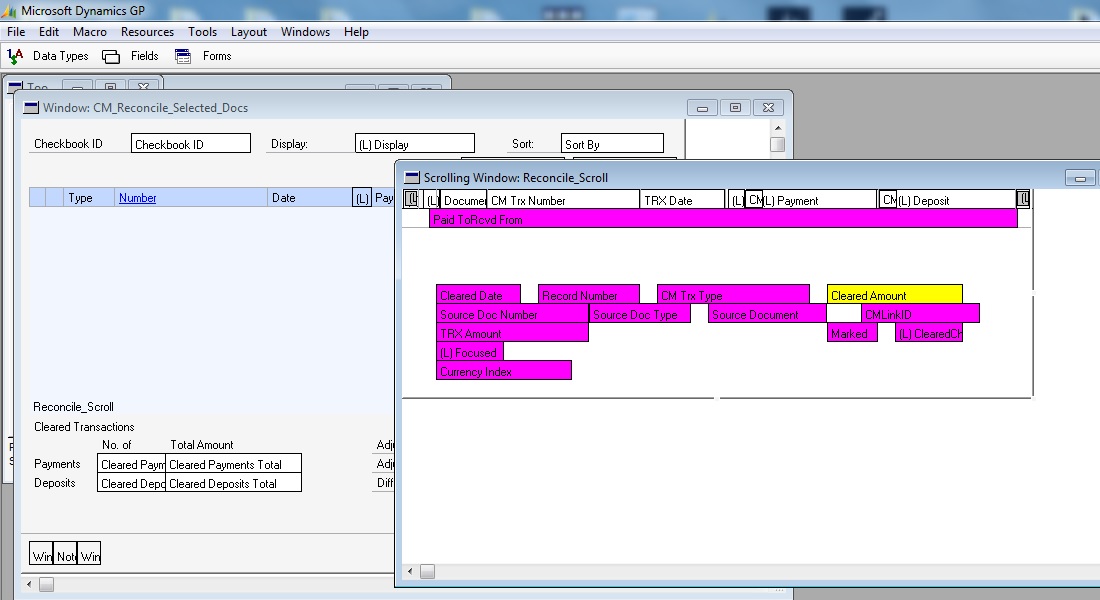
I am trying to modify Reconcile_Scroll window to add in / show PaidToRcvdFrom on the scrolling window of bank reconciliation but I can't figure out how to add set PaidToRcvdFrom as Big Line item of the scrolling window.

thanks for helping.
5822.Untitled.jpg

*This post is locked for comments

I have the same question (0)
  • Suggested answer
    MG-16101311-0 Profile Picture
    26,225 on at

    Marking a big line is not an option in Modifier. To perform this customization, you will need to use Dexterity to create an alternate window, or you will need to sacrifice space by making both text and field lengths smaller to accommodate for the Paid ToRcvd From field with Modifier.

    big_5F00_line.png

  • HFLo Profile Picture
    202 on at

    thanks

Under review

Thank you for your reply! To ensure a great experience for everyone, your content is awaiting approval by our Community Managers. Please check back later.

Helpful resources

Quick Links

Responsible AI policies

As AI tools become more common, we’re introducing a Responsible AI Use…

Neeraj Kumar – Community Spotlight

We are honored to recognize Neeraj Kumar as our Community Spotlight honoree for…

Leaderboard > 🔒一 Microsoft Dynamics GP (Archived)

#1
Community Member Profile Picture

Community Member 2

#2
Victoria Yudin Profile Picture

Victoria Yudin 1

#2
mtabor Profile Picture

mtabor 1

Last 30 days Overall leaderboard

Featured topics

Product updates

Dynamics 365 release plans
