web
You’re offline. This is a read only version of the page.
close
Skip to main content

Notifications

Announcements

No record found.

Community site session details

Community site session details

Session Id :
Small and medium business | Business Central, N...
Suggested Answer

Bank accounts

(0) ShareShare
ReportReport
Posted on by 65

Hello does anyone know when you link bank accounts why they don't show up on balance sheet? 

I have the same question (0)
  • Gavin Profile Picture
    2,508 on at

    Hi Lanai,

    In Business Central you link the bank account to a Posting Group which holds the GL code which is updated when you post to the bank account. (G/L entries will be posted against the GL code and Bank Account Ledger Entries will be posted against the bank account)

    For example in by demo company this bank account is linked to a Posting Group called "CHECKING".
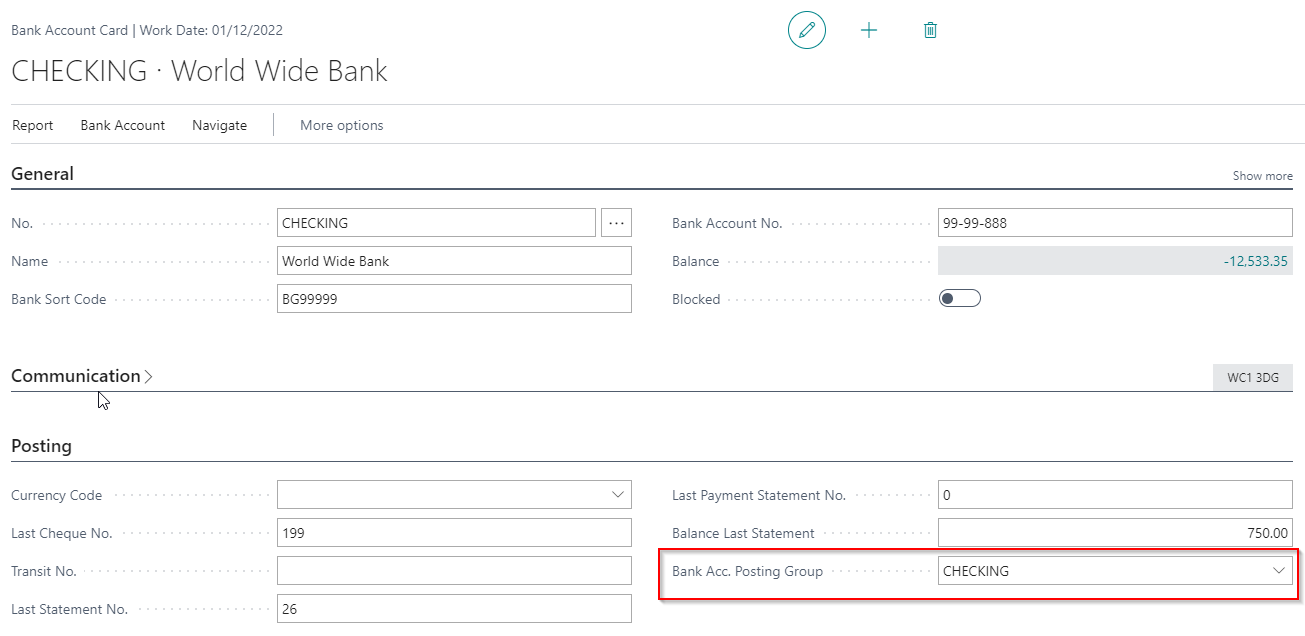
    pastedimage1617092248513v1.png

    If I look at the Posting Group you can see this is linked to a GL code 40100

    pastedimage1617092316026v2.png

    Which is in turn shown in the Chart of Accounts:

    pastedimage1617092367024v3.png

    ** Please note you won't be able to post to the bank account until its been linked to a GL code.

    As mentioned above when I post to this bank account G/L entries will be created against this GL code and bank account ledger entries against the bank account.

    Hope this helps

    Thanks

    Gavin

  • Suggested answer
    Maria Chambel Profile Picture
    on at

    Hi Lanai, 

    In this link you can also find a quick explanation about the Posting Group for Bank Accounts:

    The Bank Account Posting Group - Microsoft Dynamics 365 Business Central - YouTube

    Hope it helps.

  • Lanai Norris Profile Picture
    65 on at

    Got it. I got both bank account and amex card linked. Now when I assign transactions to post to certain accounts. What account am I assigning the amex payment? For ex. transactions came over for amex and there are debits & credit transaction. What G/L account should I post the amex payment?

    Sorry so new to D365 BC.

  • Suggested answer
    Maria Chambel Profile Picture
    on at

    Hello Lanai,

    I cannot specify the G/L Account you should use, but check this link – it might give you an idea of the process:

    Credit card set-up - Dynamics 365 Business Central Forum Community Forum

  • Suggested answer
    Community Member Profile Picture
    on at

    Lanai,

    The Chart of Accounts, GL Account, is linked to Bank Accounts via the Bank Posting Group definition on the Bank Account Card. So for example, if my GL Account for Checking = 11000, the I might setup a Bank Posting Group = Checking and enter this on the Bank Account Card called Checking. This is a requirement when transacting and posting against Bank Accounts.

    Hope this helps.

    Thanks,

    Steve

Under review

Thank you for your reply! To ensure a great experience for everyone, your content is awaiting approval by our Community Managers. Please check back later.

Helpful resources

Quick Links

Responsible AI policies

As AI tools become more common, we’re introducing a Responsible AI Use…

Neeraj Kumar – Community Spotlight

We are honored to recognize Neeraj Kumar as our Community Spotlight honoree for…

Leaderboard > Small and medium business | Business Central, NAV, RMS

#1
OussamaSabbouh Profile Picture

OussamaSabbouh 2,362

#2
YUN ZHU Profile Picture

YUN ZHU 867 Super User 2025 Season 2

#3
Sumit Singh Profile Picture

Sumit Singh 607

Last 30 days Overall leaderboard

Featured topics

Product updates

Dynamics 365 release plans
