web
You’re offline. This is a read only version of the page.
close
Skip to main content

Announcements

No record found.

News and Announcements icon
Community site session details

Community site session details

Session Id :
Microsoft Dynamics CRM (Archived)

Script for Filtering lookup Not Working

(0) ShareShare
ReportReport
Posted on by 314

Hello All,

I have created a script that triggers on clicking on the Lookup field so to show only filter the records as per requirements.  we all know that to apply filter on the lookup field the First step is getting the lookup control,  then setting the event(addPreSearch) and then pass the function as an action, for eg

1. Xrm.Page.getControl("nfs_project").addPreSearch(addFilter);

Second step we create the filter criteria inside the function and then again get the lookup control and set the filter using addCustomFilter for eg.

2.

function addFilter(){

var filter ="....";

Xrm.Page.getControl("nfs_project").addCustomFilter(filter);

}

-but in my scenario this is not working, what my requirement is i have added project lookup on my custom entity, i want only those projects shows which are of Template Type.

The project are of type template only when its field Is Template is True. so i have set the criteria according to it, I am sharing full code please view and help me to understand.

Full code

function preFilterLookup()
{
Xrm.Page.getControl("nfs_project").addPreSearch(addFilter);
}

function addFilter()
{
debugger;
var filter = "<filter type='and'>" +
"<condition attribute='msdyn_istemplate' operator='eq' uitype='msdyn_project' value='1' />" +
"</filter>";

Xrm.Page.getControl("nfs_project").addCustomFilter(filter);
}

Result 
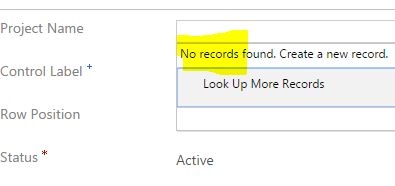
prelukuperror.JPG

*This post is locked for comments

I have the same question (0)
  • Suggested answer
    gdas Profile Picture
    50,091 Moderator on at

    Hi Ishan,

    Try with this -

            function preFilterLookup()
            {          
                Xrm.Page.getControl("nfs_project").addPreSearch(function () {
                    addFilter();
                });
            }
    
            function addFilter()
            {
                var filter = "<filter type='and'><condition attribute='msdyn_istemplate' operator='eq' value='1' /></filter>";
                Xrm.Page.getControl("nfs_project").addCustomFilter(filter); 
            }


  • Suggested answer
    RaviKashyap Profile Picture
    55,410 Moderator on at

    Hi Ishan,

    if you just want  to load Project Template records for that lookup field then you don't need to write custom javascript. You can simply achieve this by setting the project Template view in the lookup properties and disabling the view selector. Refer below screenshot-

    projecttemplate.png

    Hope this helps.

  • Suggested answer
    Anas Rafik Profile Picture
    365 on at

    Try to use your script on onload event instead

    here is an example i use it before :

    function onLoad()
    {
        addEventHandler();
    }
     
    function addEventHandler() {
        
        Xrm.Page.getControl("header_process_ans_etablissementconventionne").addPreSearch(addFilter);
    }
     
    function addFilter() {
    
       
       var fetchXml =   "<filter type='and'>"+
                                "<condition attribute='customertypecode' operator='eq' value='5' />"+
                                "</filter>";
     
        //add filter
        Xrm.Page.getControl("header_process_ans_etablissementconventionne").addCustomFilter(fetchXml);
    }


Under review

Thank you for your reply! To ensure a great experience for everyone, your content is awaiting approval by our Community Managers. Please check back later.

Helpful resources

Quick Links

Introducing the 2026 Season 1 community Super Users

Congratulations to our 2026 Super Stars!

Meet the Microsoft Dynamics 365 Contact Center Champions

We are thrilled to have these Champions in our Community!

Congratulations to the April Top 10 Community Leaders

These are the community rock stars!

Leaderboard > 🔒一 Microsoft Dynamics CRM (Archived)

#1
ScottDurow Profile Picture

ScottDurow 2

#2
GJones Profile Picture

GJones 1

Last 30 days Overall leaderboard

Featured topics

Product updates

Dynamics 365 release plans
