web
You’re offline. This is a read only version of the page.
close
Skip to main content

Announcements

No record found.

News and Announcements icon
Community site session details

Community site session details

Session Id :
Small and medium business | Business Central, N...
Suggested Answer

Custom field in a list page showing wrong records when filtered

(7) ShareShare
ReportReport
Posted on by 332
I have a status field with options (Open, Partials, Finished, Blank) in a list page which updates based on multiple conditions, its working fine but when I filtered the status Open its showing records of other status as well , please check below screenshots
 
see i have set the status to open the condition for open status is when Folding Glueing Glued Pcs is 0 the status will be open
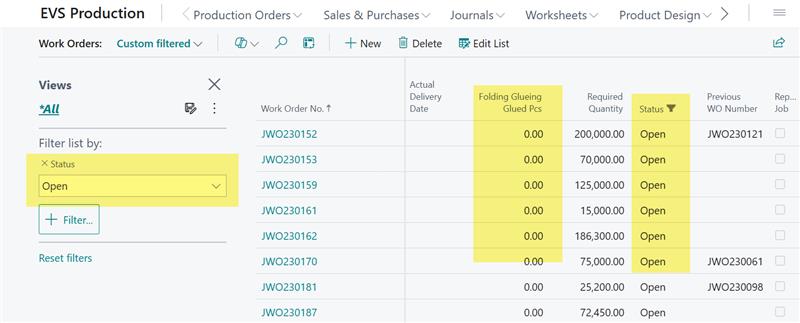
 

but see the status is Open where there is value in Folding Glueing Glued Pcs but see the Work Order No
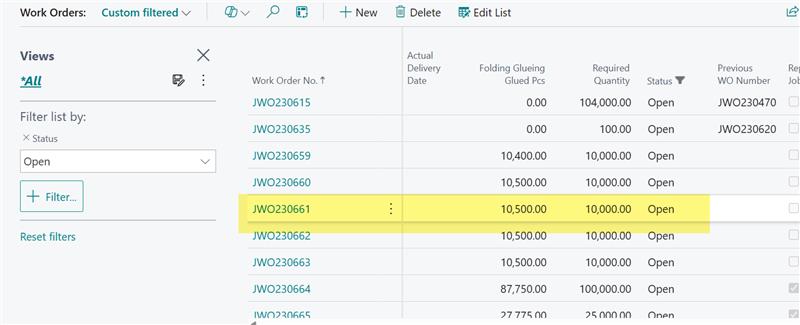
 

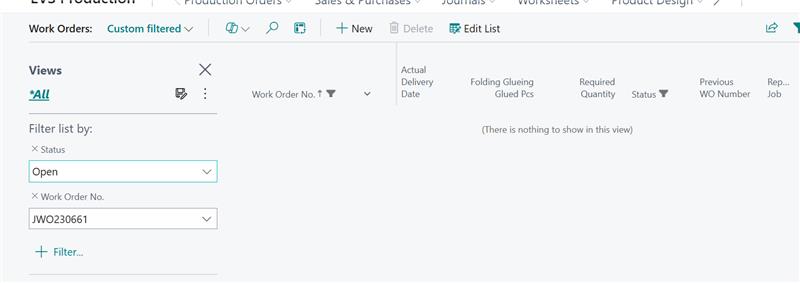
when i filtered the Work Order No the Line vanishes


but then i removed the filter of status the line is showing with status blank which is correct as the condition for blank status is Folding Glueing Glued Pcs greater than Required Quantity
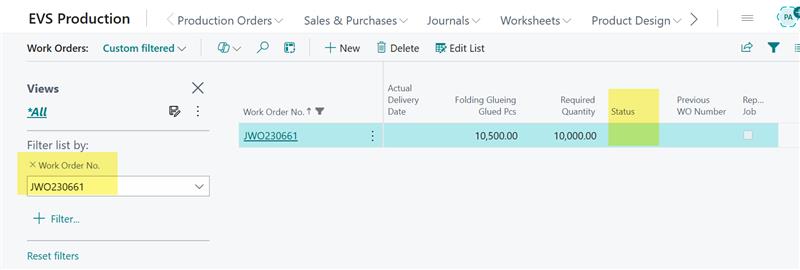
 

So this is the issue the status is calculating properly but on filtering its showing wrong records


the code done is below, please guide what to do to resolve this issue or whats done wrong here.

trigger OnAfterGetRecord()
    var
        myInt: Integer;
    begin
        UpdateStatus(rec."Work Order No");
    end;
 
local procedure UpdateStatus(WorkOrderNo: Code[20])
    var
        tblWorkOrder: Record EVS_WorkOrderHeader;
    begin
        tblWorkOrder.Init();
        tblWorkOrder.Reset();
        tblWorkOrder.SetRange(tblWorkOrder."Work Order No", WorkOrderNo);
        if tblWorkOrder.FindSet() then begin
            if tblWorkOrder."Word Order Status" <> tblWorkOrder."Word Order Status"::Finished then begin
                if tblWorkOrder."FG Glued Pcs" = 0 then begin
                    tblWorkOrder."Word Order Status" := tblWorkOrder."Word Order Status"::Open;
                end else if tblWorkOrder."FG Glued Pcs" < tblWorkOrder."Required Quantity" then begin
                    tblWorkOrder."Word Order Status" := tblWorkOrder."Word Order Status"::Partial;
                end else if tblWorkOrder."FG Glued Pcs" = tblWorkOrder."Required Quantity" then begin
                    tblWorkOrder."Word Order Status" := tblWorkOrder."Word Order Status"::Finished;
                end else if tblWorkOrder."FG Glued Pcs" > tblWorkOrder."Required Quantity" then begin
                    tblWorkOrder."Word Order Status" := tblWorkOrder."Word Order Status"::" ";
                end;
                tblWorkOrder.Modify();
            end;
        end;
    end;
 
 
I have the same question (0)
  • Suggested answer
    OussamaSabbouh Profile Picture
    12,965 Super User 2026 Season 1 on at
    Hello ,
     
    What’s “wrong” here is *where* you update the status: you’re calling `Modify()` inside **OnAfterGetRecord** (i.e., while the page is reading/displaying records). The list is filtered by SQL **before** OnAfterGetRecord runs, then you change the status afterward — so the UI can show a line that *was Open when it was fetched*, but becomes Blank/Partial after your code runs. When you add another filter (Work Order No.), the page re-queries/refreshes and the line “vanishes” because the stored status has now changed and no longer matches the original filter.
    Fix: **never modify the record in OnAfterGetRecord**. Either (A) calculate a **display-only** status (page variable / unbound field) and don’t store it, or (B) store the status but update it **when the driving fields change** (e.g., in table OnValidate of “FG Glued Pcs” / “Required Quantity”, or in the posting/process codeunits that update those fields), or via a scheduled job — then filtering will work consistently because the stored field is always correct *before* the list query runs.
     
    Regards,
    Oussama Sabbouh
     
  • Suggested answer
    Mahek Mehta Profile Picture
    288 on at
    The issue arises because you’re modifying the record inside OnAfterGetRecord. In Business Central, filtering is applied by the database before OnAfterGetRecord runs. Since you are updating the status after the query has been applied, the UI can show records that no longer match the filter after modification.
    You should never modify data in OnAfterGetRecord. Instead:
    • Calculate the status in a display-only field (no Modify), or
    • Update and save status earlier — e.g., in table OnValidate triggers for the fields that determine status, or via a background process.
    This ensures filtering works correctly because the status in the database already matches the expected values before the list is filtered. The code in your page is doing this:

    trigger OnAfterGetRecord()
      UpdateStatus(rec."Work Order No");
     
    Inside that procedure you modify the record:
    tblWorkOrder.Modify();
  • CU11120629-0 Profile Picture
    332 on at
    The other two fields are also updating in a procedure called in Onaftergetrecord trigger 
     
     
  • Suggested answer
    YUN ZHU Profile Picture
    99,086 Super User 2026 Season 1 on at
    Try moving this code to the OnOpenPage (Page) trigger?
     
    Thanks.
    ZHU
  • Nimsara Jayathilaka. Profile Picture
    4,950 Super User 2026 Season 1 on at

    Dear @Yun Zhu
     
    I have a question: If this logic is added to the OnOpenPage trigger, so that it runs every time the page is opened, will it cause performance issues (become slow) as the number of records increases?
     
    I think the best approach is Use the Table-level approach (OnValidate trigger).
     
    Thanks
    Nimsara
  • CU11120629-0 Profile Picture
    332 on at
    there are so many records so on onopenpage trigger the page will take alot of time to open and the onvalidate trigger on table cant be used as there are exisiting records for both the fields required quantity and flued glueing pcs on comparing these fields i am updating the status
     
    The problem is only happening when i filter the status to Open its showing all other status records too with the status open while other status are fine
     
    I have also tried that when the flued glueing pcs field is mapped i tried to update the status just before that but didnt work
  • Suggested answer
    Dhiren Nagar Profile Picture
    2,898 Super User 2026 Season 1 on at
    Hi,
     
    The code is not proper. You can not use Modify on the record in OnAfterGetRecord.
     
    This is the exact reason when you apply filter of Work order number it does not show because system recalculates the value and as the value is Blank and not Open it does not show in filter.
     
    So why does it show in the first place? Well it must be because for those orders FG glue pcs must be 0, so status updated to Open. Now it stays open even though value in field FG glue pcs changes, why? Because you are not using table triggers.
     
    So the status remains Open untill you select that record in the list page and then only it updates the status to blank and as it does it is filtered out from open status filter.
     
    I think other experts are trying to say the same thing.
     
    You need to do following
     
    What I understand is your entire logic depends on just 2 fields, FG glued pcs and Required quantity, so on both the field use table triggers, Onvalidate or Onaftervalidate, run the same code on Rec and update value of status.
    Now your next question is what about existing orders?
    To update status of all the existing orders, run the procedure in background task(Report or codeunit) or on action or on Onopenpage. This will be temporary and one time only. Once it runs remove that code. All new or updated records will be updated based on table triggers.
     
    This solution will be both fast and effective. If you have any question tag me and ask.
     

    Tick the checkbox below to mark the answer as verified, if it helped resolve your question.

    Regards,
    Dhiren.
     

Under review

Thank you for your reply! To ensure a great experience for everyone, your content is awaiting approval by our Community Managers. Please check back later.

Helpful resources

Quick Links

Introducing the 2026 Season 1 community Super Users

Congratulations to our 2026 Super Stars!

Meet the Microsoft Dynamics 365 Contact Center Champions

We are thrilled to have these Champions in our Community!

Congratulations to the March Top 10 Community Leaders

These are the community rock stars!

Leaderboard > Small and medium business | Business Central, NAV, RMS

#1
OussamaSabbouh Profile Picture

OussamaSabbouh 2,005 Super User 2026 Season 1

#2
YUN ZHU Profile Picture

YUN ZHU 1,148 Super User 2026 Season 1

#3
Khushbu Rajvi. Profile Picture

Khushbu Rajvi. 557 Super User 2026 Season 1

Last 30 days Overall leaderboard

Featured topics

Product updates

Dynamics 365 release plans
