web
You’re offline. This is a read only version of the page.
close
Skip to main content

Announcements

No record found.

News and Announcements icon
Community site session details

Community site session details

Session Id :
Microsoft Dynamics CRM (Archived)

How to calculate Sum and Average of static rows and columns of tables in CRM Dynamics Online

(0) ShareShare
ReportReport
Posted on by 74

Hello,

I have two entities like Booking  and payment List and there is 1:N relationship between them and  i am using both Entity fields in my table .

I have group the records in static columns, and i want only those records Sum.
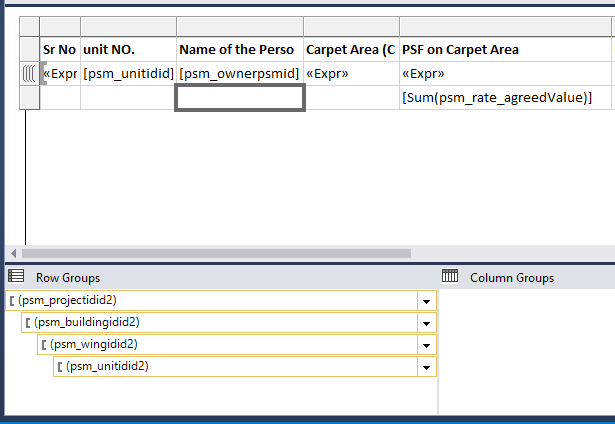
reportissue.PNG

 Here is my report preview. it is capturing all records sum. The sum of PSF on carpet area should be 77,400
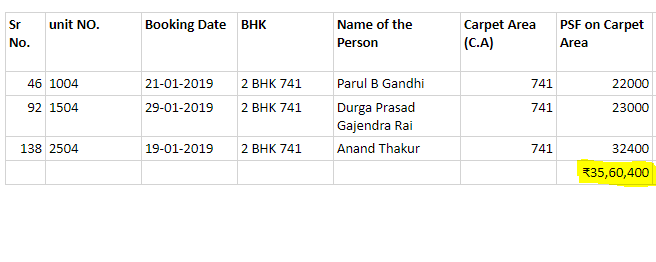
ReportCapture.PNG

Please help me in this.

Thank you.

*This post is locked for comments

I have the same question (0)
  • David Jennaway Profile Picture
    14,065 on at

    The sum expression is sum(psm_rate_agreedValue) , whereas the value for this column in the detailed rows is an expression, and not the psm_rate_agreedValue field. Try changing the sum to be a Sum of the same expression in that is in the detailed rows

  • Suggested answer
    Abby Kong Profile Picture
    6 on at

    Hi Suraj,

    Observe the group bracket in front of the row in report editor, Sum[psm_rate_agreedValue] is not in a group, thus this sum is a total not a sub-total for groups.

    See below:

    sum.png

    Also as David suggested, check the detail row <<Expr>> is psm_rate_agreedValue, we can't tell from the picture. 

    Regards,

    Abby

  • Suraj Jadhav Profile Picture
    74 on at

    Hello ,

    If i use detail row in table,  that give me multiple records and i don't want that

    find below images.

    report-2Capture.PNG

    this is report in preview

    report-2Capture.PNG

  • Abby Kong Profile Picture
    6 on at

    Hi Suraj,


    Detail rows are useful during development so you get an idea of the actual dataset you are dealing with. If you don't want to show detail rows in your report, simply take it out.

    The sample provided earlier is just to show three types:

    • Detailed Row has a three-dash sign
    • Aggregated values (SUM, AVG ...)  inside a group are inside a group bracket
    • Aggregated values on Dataset level are not inside any group bracket (like the one in your original post)

    Hope this helps.

    Regards,

    Abby

Under review

Thank you for your reply! To ensure a great experience for everyone, your content is awaiting approval by our Community Managers. Please check back later.

Helpful resources

Quick Links

Introducing the 2026 Season 1 community Super Users

Congratulations to our 2026 Super Stars!

Meet the Microsoft Dynamics 365 Contact Center Champions

We are thrilled to have these Champions in our Community!

Congratulations to the April Top 10 Community Leaders

These are the community rock stars!

Leaderboard > 🔒一 Microsoft Dynamics CRM (Archived)

Last 30 days Overall leaderboard

Featured topics

Product updates

Dynamics 365 release plans
