web
You’re offline. This is a read only version of the page.
close
Skip to main content

Announcements

No record found.

News and Announcements icon
Community site session details

Community site session details

Session Id :
Small and medium business | Business Central, N...
Active Discussion

Permission Sets and Managing Custom Permisson Sets and Major/Minor Business Central Online Updates

(0) ShareShare
ReportReport
Posted on by 126

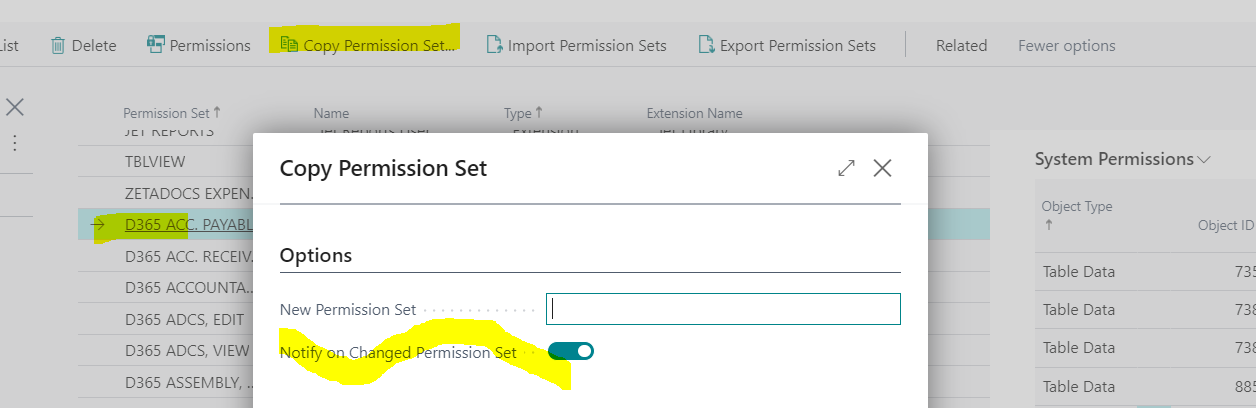
Twice a year Microsoft issues a Major Update, we just received the Fall 2021 Update. Minor Updates come out monthly. These Updates provide much new functionality, but they can have system impacts for Customers using User-Defined Permission Sets. Luckily, if you created your User-Defined Permission Sets by copying them from a System Permission Set, and you set the "Notify..." flag to "Yes" (below) you will get notified that changes have occurred.

This short video shows you an easy process for using Excel to compare the SYSTEM Permission Set with changes to the User-Defined Permission Set you have created. Once you realize what changes have occurred in the SYSTEM Permission Set you can take action. You can perform this prior to the Update by creating a Preview Sandbox of the changes to come, and prepare before your system is updated. 
pastedimage1637605496971v1.png

[View:/cfs-file/__key/communityserver-discussions-components-files/758/Meeting-with-Simeon-White_2D00_20211122_5F00_114820_2D00_Meeting-Recording.mp4:320:240]

Best regards!

Simeon

  • Marco Mels Profile Picture
    Microsoft Employee on at

    Great video.

    Thanks.

  • SimeonW Profile Picture
    126 on at

    Thanks Marco! There are complex ways to figure this out.... I went for the easiest approach! Some of these updates put a splash screen on the front of the Role Center so Users cannot even get the client opened. I have to assume many Users have dealt with this recently.

Under review

Thank you for your reply! To ensure a great experience for everyone, your content is awaiting approval by our Community Managers. Please check back later.

Helpful resources

Quick Links

Introducing the 2026 Season 1 community Super Users

Congratulations to our 2026 Super Stars!

Congratulations to our 2025 Community Spotlights

Thanks to all of our 2025 Community Spotlight stars!

Leaderboard > Small and medium business | Business Central, NAV, RMS

#1
OussamaSabbouh Profile Picture

OussamaSabbouh 1,870 Super User 2026 Season 1

#2
YUN ZHU Profile Picture

YUN ZHU 1,138 Super User 2026 Season 1

#3
Dhiren Nagar Profile Picture

Dhiren Nagar 915 Super User 2026 Season 1

Last 30 days Overall leaderboard

Featured topics

Product updates

Dynamics 365 release plans
