web
You’re offline. This is a read only version of the page.
close
Skip to main content

Announcements

No record found.

News and Announcements icon
Community site session details

Community site session details

Session Id :
Microsoft Dynamics CRM (Archived)

Dynamics 365 record hanging

(0) ShareShare
ReportReport
Posted on by

Hi,

Currently on Dynamics 365 (online) and have come across an issue when opening any record. For some users when opening a record (of any type) it hangs on the "Requesting data from Dynamics 365":
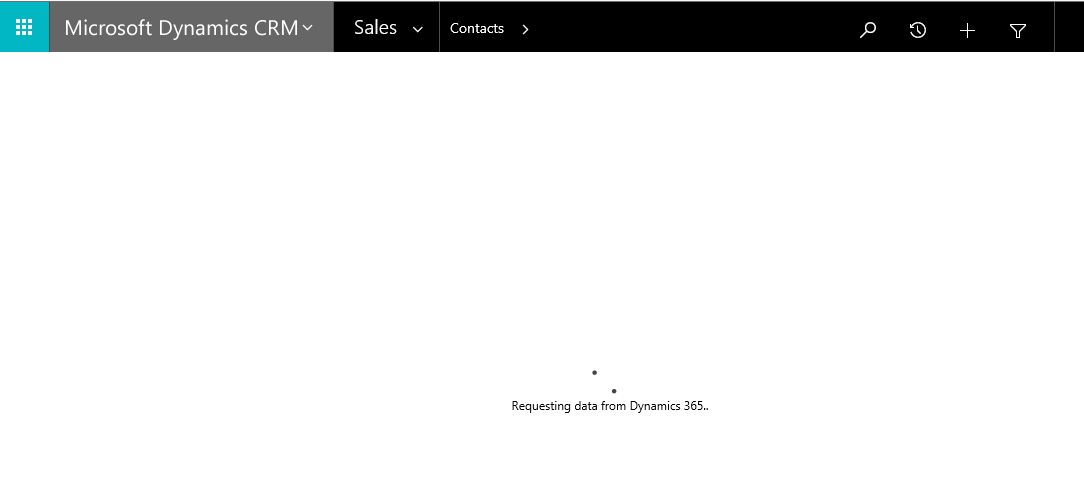
1108.Capture.PNG

This is not affecting all users, and only happens in IE. All users are on IE11. The problem does not happen in Chrome, Firefox or Edge.

I've tried getting clearing cache and resetting IE, but no luck. 

Any suggestions?

Thanks.

*This post is locked for comments

I have the same question (0)
  • Verified answer
    Varadarajan_84 Profile Picture
    on at

    Can you Check the compatibility View Settings of your IE11 Browser Try adding your CRM Online URL or “dynamics.com” to your compatible viewed sites. You can do this by selecting Tools > Compatibility View Settings and then adding “dynamics.com” to your compatible viewed sites.

  • Markus Dorfer Profile Picture
    on at

    Hi,

    I had the same issue with Dyn365Online in IE11 yesterday (did not try Chrome, Firefox).

    Today it's working fine...

    Hhmm?

  • Community Member Profile Picture
    on at

    It's very strange. Since posting this, it has now mysteriously started working some some affected users, but not others.

    Varadarajan - I tried the compatibility view setting but no difference I'm afraid...

  • Varadarajan_84 Profile Picture
    on at

    Hello Rich,

    The issue might probably due to Cache. To further narrow down this we can use In Private Browsing and check the behavior.

    You can try the steps mentioned in the following blog for affected users: www.crmsoftwareblog.com/.../internet-explorer-settings-microsoft-dynamics-crm-compatibility

  • Community Member Profile Picture
    on at

    I also have been experiencing this issue with 365 online, we just upgraded on Saturday night, and if I go to InPrivate, as suggested, it does work automatically.  What I'm not now sure is how to get it to work when not InPrivate?  I have deleted cache, I have added to compatibility view, I have it in trusted sites, and in popup blocker.  I can't seem to still get it to work in IE.  Thanks, Rhonda

  • Cyclefitness Profile Picture
    on at

    Same here.  We have had an open ticket with Microsoft since our upgrade two weeks ago.  It is a nightmare for us.  I'm even getting 2 min timeouts from ADX Studios auto numbering plug in because it's so slow.

  • Cyclefitness Profile Picture
    on at

    Running "In Private" resolves the issue, but why do we have to do that?  Why does not clearing the cache work?  I have a governmental user base who is not knowledgeable enough to remember to run In Private.

  • Cyclefitness Profile Picture
    on at

    This resolved my issue I have been struggling with since the release.  Our record commit time was exceeding ADX Studio's 2:20 mn timeout.  Once I added dynamics.com, no more issue.  Why is this?  And now I have a border around buttons in the navigation bar.

  • Community Member Profile Picture
    on at

    That's very interesting, and very annoying! Thank you for commenting Deb!

  • Jimmy Harris Profile Picture
    on at

    I am seeing the same problem, but *only* with Firefox. It is occurring with Firefox 51.0.1 and is consistent with two completely different customers who have converted from CRM to 365.

Under review

Thank you for your reply! To ensure a great experience for everyone, your content is awaiting approval by our Community Managers. Please check back later.

Helpful resources

Quick Links

Introducing the 2026 Season 1 community Super Users

Congratulations to our 2026 Super Stars!

Meet the Microsoft Dynamics 365 Contact Center Champions

We are thrilled to have these Champions in our Community!

Congratulations to the March Top 10 Community Leaders

These are the community rock stars!

Leaderboard > 🔒一 Microsoft Dynamics CRM (Archived)

#1
JS-09031509-0 Profile Picture

JS-09031509-0 3

#2
AS-17030037-0 Profile Picture

AS-17030037-0 2

#2
Mark Eckert Profile Picture

Mark Eckert 2

Last 30 days Overall leaderboard

Featured topics

Product updates

Dynamics 365 release plans
