web
You’re offline. This is a read only version of the page.
close
Skip to main content

Notifications

Announcements

No record found.

Community site session details

Community site session details

Session Id :
Small and medium business | Business Central, N...
Suggested Answer

Calculate Invoice Discount automatically. What does it mean?

(0) ShareShare
ReportReport
Posted on by 245

Good Day!

I want to know how to calculate invoice discount automatically in Business Central.

I have to click Calculate Invoice Discount always.
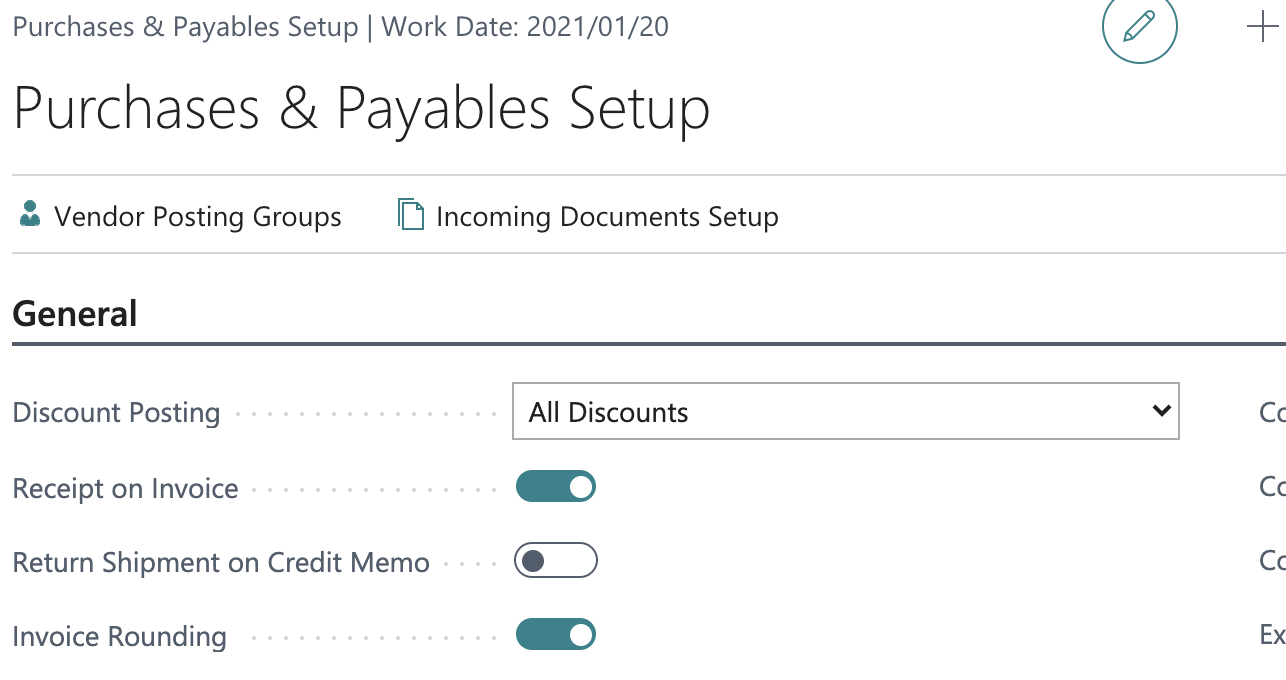
I setup All Discounts in Discount Posting field in Purchases & Payable Setup.
pastedimage1611380764301v1.png

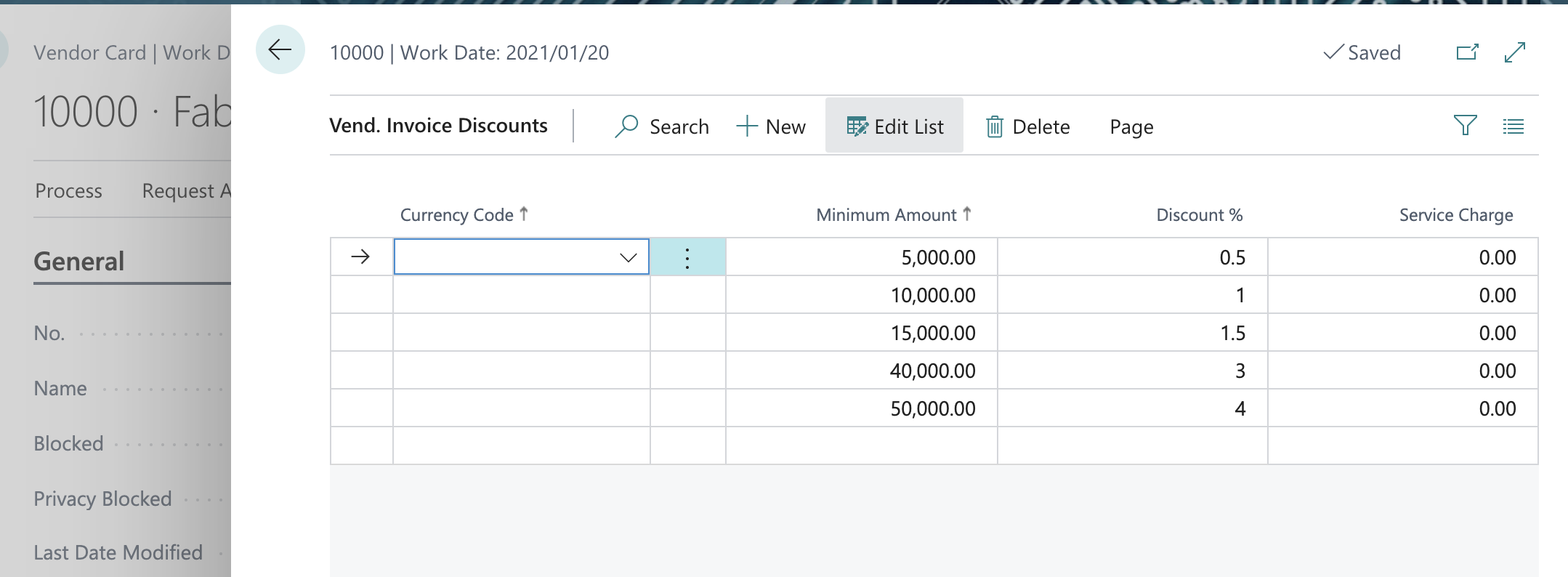
I setup Vendor Invoice Discount in Vendor Card 10000.
pastedimage1611380853014v2.png

Then I created Purchase Order.
pastedimage1611380993122v3.png

But Invoice Discount % and Inv Discount Amount were not set up automatically.
I tried this process on Purchase Invoice, too. The result was same.

What I want to know is what automatic invoice discount calculation in Business Central.
When I click "Calculate Invoice Discount" on Purchase Order and Invoice, Invoice Discount Amount is always calculated no matter what Discount Posting value in Purchase & Receivable Setup.
Is this the automatic invoice discount calculation functionality in BC?

I tested this in my Sandbox environment, Version: W1 17.2 (Platform 17.0.19353.21069 + Application 17.2.19367.19525)

Thank you!

I have the same question (0)
  • Suggested answer
    JAngle Profile Picture
    133 on at

    Looking at the code on a sales order page it spends more time resetting it to 0 than it does to the actual figure which happens when you go to order statistics or the button you mentioned. Modification wise it would make sense to add the below line to a page extension after the bill-to customer no. has been validated.

    SalesCalcDiscountByType.ResetRecalculateInvoiceDisc(Rec);

    It is using Codeunit "Sales - Calc Discount By Type";

  • Suggested answer
    Bilal Haider Profile Picture
    412 on at

    Hi,

    There are two things in your question.

    First is that Discount Posting has nothing to do with the automatic calculation of Discounts. It is related to the posting of discount amounts wither separately or just subtract the discount amount from total and post remaining in Purchase Account.

    Second the setting for Automatic Calculation of discounts is based on the option Calc. Inv. Discount that is also in Purchases & Payables Setup. If you enable this then it will calculate automatically discounts. May be it will not show you at the same time but if you reopen page they will be calculated.

  • Suggested answer
    JAngle Profile Picture
    133 on at

    If you have development resource you could look to add a currpage.update(true); after the supplier reference has been added so the page updates. The print out of the PO will have the data for that visual. It’s just the page visual that needs refreshing. You can use F5 on the keyboard to do it manually

  • yohi2020 Profile Picture
    245 on at

    Thank you guys!

    Your replies are very helpful for me.

    I misunderstood the functionality of invoice discount automatic calculation. This function is not the same as line discount.

    I thought if I set values in Invoice Discounts of Customer/Vendor page, its functionality works automatically, like Line Discount functionality.

  • Suggested answer
    Bilal Haider Profile Picture
    412 on at

    Hi,

    Invoice Discounts also work automatically if you set them and enabled in P&P setup but the page updates them after refresh.

Under review

Thank you for your reply! To ensure a great experience for everyone, your content is awaiting approval by our Community Managers. Please check back later.

Helpful resources

Quick Links

Responsible AI policies

As AI tools become more common, we’re introducing a Responsible AI Use…

Neeraj Kumar – Community Spotlight

We are honored to recognize Neeraj Kumar as our Community Spotlight honoree for…

Leaderboard > Small and medium business | Business Central, NAV, RMS

#1
OussamaSabbouh Profile Picture

OussamaSabbouh 3,229

#2
Jainam M. Kothari Profile Picture

Jainam M. Kothari 1,867 Super User 2025 Season 2

#3
YUN ZHU Profile Picture

YUN ZHU 1,153 Super User 2025 Season 2

Last 30 days Overall leaderboard

Featured topics

Product updates

Dynamics 365 release plans
