web
You’re offline. This is a read only version of the page.
close
Skip to main content

Announcements

No record found.

News and Announcements icon
Community site session details

Community site session details

Session Id :
Small and medium business | Business Central, N...
Answered

Notification of Late Delivery of Purchase Order

(0) ShareShare
ReportReport
Posted on by 29

Dear helpful colleagues

I receive email notices regularly from shipping companies letting us know when a ship is delayed and the expected new arrival time at port.

I would like to add this info into NAV on the relevant purchase order, so staff can find it easily without trawling through emails

I was thinking of just changing Planned Receipt Date on the Purchase Order Lines, and adding a note there.

But I wondered if anyone has any other solutions?
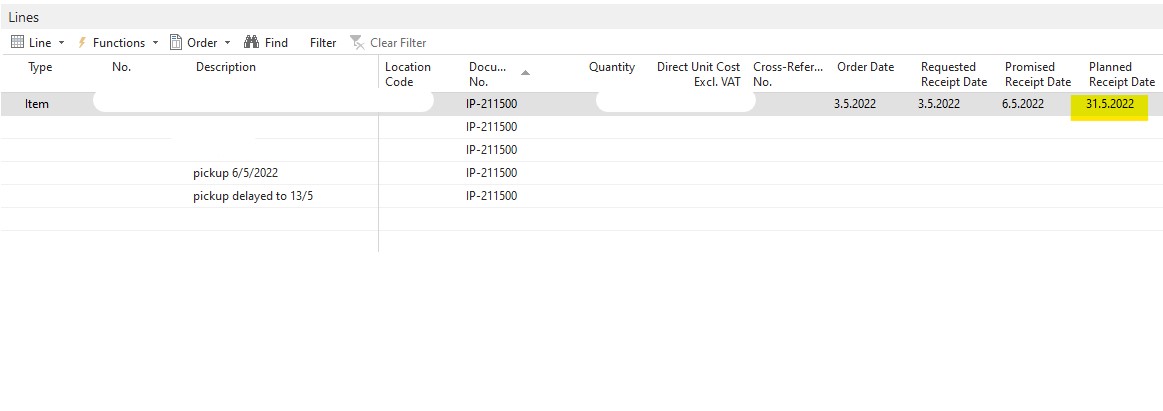
Planned-receipt-date.jpg

I have the same question (0)
  • Suggested answer
    Nitin Verma Profile Picture
    21,812 Moderator on at

    Hi Lovisa,

    What kind of solution you are looking for?

    Are you looking for to automatic fill this information in the PO lines? If yes, I am sure you need to take help from your development partner to write some custom logic for your by reading the email and then modify the values in particular Line. Or you can ask your vendors to provide you any Data in CSV format so that you can directly create an XML port and read them through your Development partner's help.

    Check if it work for you.

  • Lovisa LH Profile Picture
    29 on at

    Good afternoon Nitin,

    No nothing as complicated as that. I will write a note manually on the PO lines.

    Just want to hear if this s the best way to share info about late deliveries, or if there is some better way to do it!

    Louise

  • Suggested answer
    Nitin Verma Profile Picture
    21,812 Moderator on at

    Hi Lovisa,

    Yes I did the same thing in the past, but I had always received the CSV file from my vendors, and kept in my FTP folder, and wrote a custom routine so that I can read those CSV file and automatically insert or put the values in PO lines.

    So I dont think we have any other way out to fill the values in particular PO line except any custom changes in the system.

    Thanks.

  • Lovisa LH Profile Picture
    29 on at

    Good to know! Thanks for your input

Under review

Thank you for your reply! To ensure a great experience for everyone, your content is awaiting approval by our Community Managers. Please check back later.

Helpful resources

Quick Links

Introducing the 2026 Season 1 community Super Users

Congratulations to our 2026 Super Stars!

Meet the Microsoft Dynamics 365 Contact Center Champions

We are thrilled to have these Champions in our Community!

Congratulations to the April Top 10 Community Leaders

These are the community rock stars!

Leaderboard > Small and medium business | Business Central, NAV, RMS

#1
OussamaSabbouh Profile Picture

OussamaSabbouh 2,012 Super User 2026 Season 1

#2
YUN ZHU Profile Picture

YUN ZHU 986 Super User 2026 Season 1

#3
Teagen Boll Profile Picture

Teagen Boll 659 Super User 2026 Season 1

Last 30 days Overall leaderboard

Featured topics

Product updates

Dynamics 365 release plans
