web
You’re offline. This is a read only version of the page.
close
Skip to main content

Notifications

Announcements

Community site session details

Community site session details

Session Id :
Small and medium business | Business Central, N...
Suggested Answer

How does the status of Job changes in Business Central?

(0) ShareShare
ReportReport
Posted on by 625

Hi All,

pastedimage1595941479666v1.png

Can someone pls explain how the value for the status field is changed in a Job in detail? is there any process that changes its value ?

Thanks in Advance

I have the same question (0)
  • Suggested answer
    Renni Profile Picture
    960 on at

    This specifies the current status of the job, similar to sales orders.

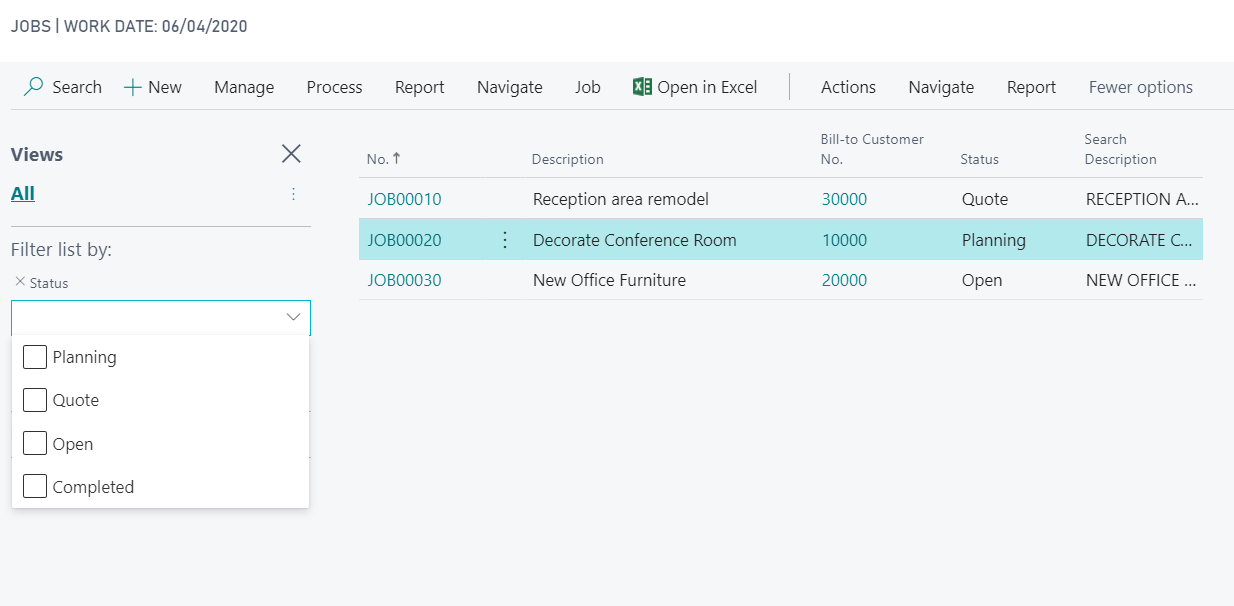
    It is so you can get a quick overview of jobs in the main jobs list and filter by Open, Planning, Quote and Completed

    This is manually changed and is for the overall job

    pastedimage1595944740225v1.png

  • AXBOY Profile Picture
    625 on at

    Thank you for the reply,

    If the status is manually changed can u pls explain in which which all cases do we change to each of the status value?

  • Suggested answer
    Renni Profile Picture
    960 on at

    It would depend on the job.

    Set it at quote if it is still in quote stage (may not be used much depending on the company)

    Set it as Completed when finished

    Set as Planning when it has been planned\scheduled 

    Set as Open When creating and waiting for all the details

    You can then on the main job screen filter by these statuses to see jobs relevant to you (i.e. you only want to see completed jobs)
    Snip-7.PNG

    It is up to you which ones you use and is mainly useful if you have lots of jobs on the go

  • RM QUs Profile Picture
    5 on at

    Two Questions on this!

    - Is there a way to have the status automatically change to completed once all items (Purchase Orders & Sales Orders, in my case) have been completed? This seems plausible, as this is an items that causes an error message when completing, as all SO's and PO's must be posted or deleted prior to changing job status to completed.

    - Is there a way to close multiple jobs at one time?

  • Suggested answer
    Inge M. Bruvik Profile Picture
    1,111 Moderator on at

    You have to change the job status manually and you can not close multiple jobs at one time.

    That is the behavior of the standard system. If you want to meet your requirement you will have to customize it.

Under review

Thank you for your reply! To ensure a great experience for everyone, your content is awaiting approval by our Community Managers. Please check back later.

Helpful resources

News and Announcements

Season of Giving Solutions is Here!

Quick Links

Responsible AI policies

As AI tools become more common, we’re introducing a Responsible AI Use…

Neeraj Kumar – Community Spotlight

We are honored to recognize Neeraj Kumar as our Community Spotlight honoree for…

Leaderboard > Small and medium business | Business Central, NAV, RMS

#1
OussamaSabbouh Profile Picture

OussamaSabbouh 1,703

#2
YUN ZHU Profile Picture

YUN ZHU 803 Super User 2025 Season 2

#3
Khushbu Rajvi. Profile Picture

Khushbu Rajvi. 750 Super User 2025 Season 2

Last 30 days Overall leaderboard

Featured topics

Product updates

Dynamics 365 release plans
