web
You’re offline. This is a read only version of the page.
close
Skip to main content

Announcements

No record found.

News and Announcements icon
Community site session details

Community site session details

Session Id :
Small and medium business | Business Central, N...
Answered

Fixed Assets Posting Error

(0) ShareShare
ReportReport
Posted on by 70

Hello,

I am trying to post my "Aquire" journal entry in the test environmentt and I keep getting this error message. As far as I know, I have set up all the tables related to the Fixed Assets. Any response is truly appreciated. Thank you!!

pastedimage1622677891306v1.png

I have the same question (0)
  • Suggested answer
    Akash Shukla Profile Picture
    367 on at

    Hi Kami,

    Below error is showing that in Line 1 please check depreciation field, in that field remove the value currently i.e. "GAAP', and then try to post that.

    Hope this will helpful.

    Please mark verify if this will helpful to you.

    Thank You

  • Suggested answer
    Community Member Profile Picture
    on at

    Hello,

    Your Acquisition Entry is not correct. Let me explain. First, the Fixed Asset Card, have you created it for the Asset to be Acquired? If yes, your Depreciation Book, for the Fixed Asset I am guessing is GAAP. Is the Depreciation Book Integrated to the G/L flagged = TRUE? If yes, then you must first use the Fixed Asset G/L Journals. This is because the Acquisition Entry will book the the General Ledger and Sub-Ledger (Fixed Asset). Your Entry above has the Account Type = G/L Account and the Bal. Account Type = G/L Account so therefore no Asset is being posted too and the Depreciation Book Code is invalid. The entry will look like this:
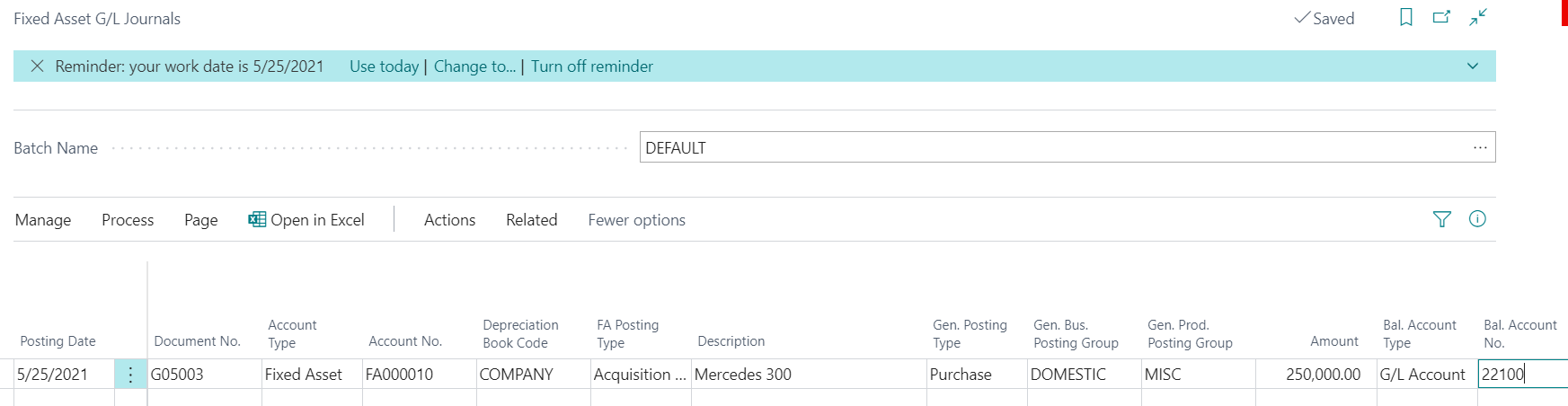
    pastedimage1622722798223v1.png

    My Bal. Account No. offset to the G/L Account the actual Purchase Invoice dollars posted too, maybe a CIP or Clearing account. If the Purchase was already posted to the G/L and you only want to create the Fixed Asset to begin depreciating, you can book the above in the Fixed Asset Journal and the entry will look like this:
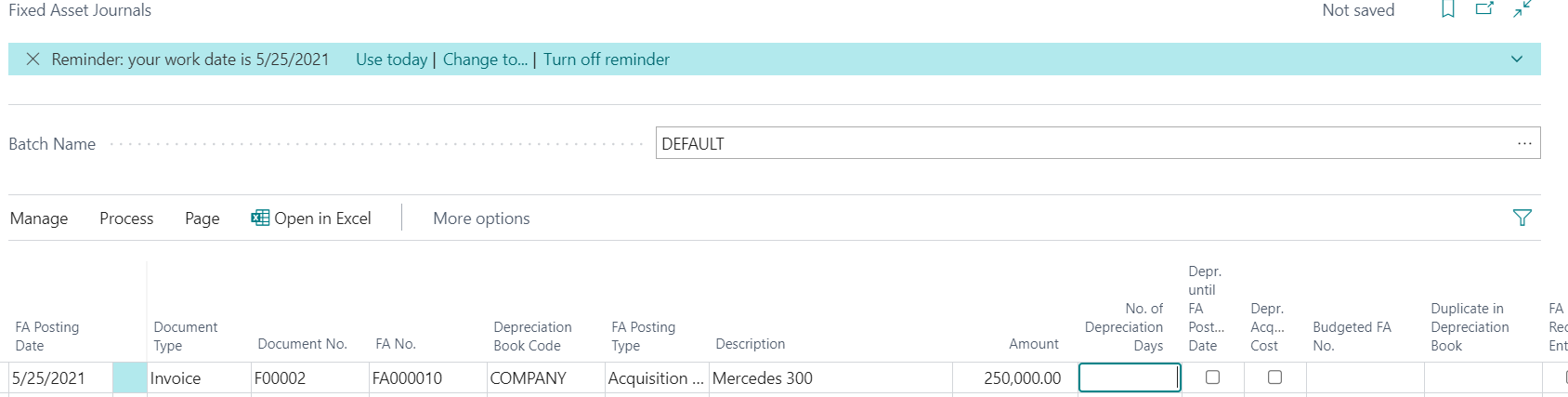
    pastedimage1622722929298v2.png

    Hope this helps.

    Thanks,

    Steve

  • Kami09 Profile Picture
    70 on at

    Hi Akash, thank you!

  • Verified answer
    Kami09 Profile Picture
    70 on at

    Thank you Steve!

    Best,

    Kami

Under review

Thank you for your reply! To ensure a great experience for everyone, your content is awaiting approval by our Community Managers. Please check back later.

Helpful resources

Quick Links

Introducing the 2026 Season 1 community Super Users

Congratulations to our 2026 Super Stars!

Meet the Microsoft Dynamics 365 Contact Center Champions

We are thrilled to have these Champions in our Community!

Congratulations to the April Top 10 Community Leaders

These are the community rock stars!

Leaderboard > Small and medium business | Business Central, NAV, RMS

#1
OussamaSabbouh Profile Picture

OussamaSabbouh 2,086 Super User 2026 Season 1

#2
YUN ZHU Profile Picture

YUN ZHU 1,290 Super User 2026 Season 1

#3
AndrewThomas81 Profile Picture

AndrewThomas81 1,218

Last 30 days Overall leaderboard

Featured topics

Product updates

Dynamics 365 release plans
