web
You’re offline. This is a read only version of the page.
close
Skip to main content

Notifications

Announcements

No record found.

Community site session details

Community site session details

Session Id :
Microsoft Dynamics CRM (Archived)

associate message doesn't appear on create plugin window

(0) ShareShare
ReportReport
Posted on by 3,674

dear all, good day,

i have entity called request, and another entity called skills there is a N:N relation between them,

i add a skills sub grid in the request entity form.

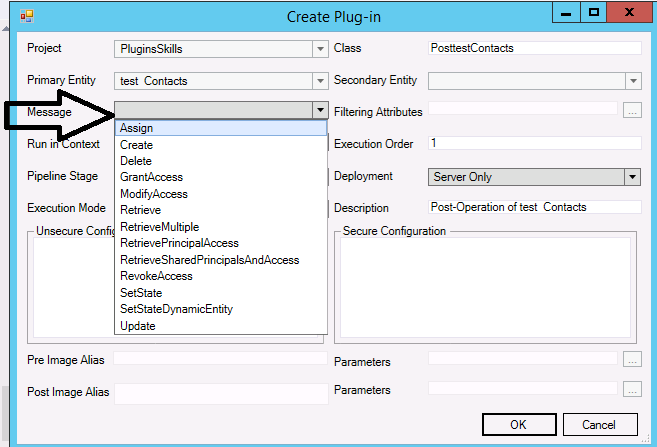
i need when a new skill is associated to a request to fire a plugin, when i want to create a plugin there is no Associate Message displayed to me like below image:
i used VS 2012 professional,

so please advice me>>>>>>>>>>>>>>>>>>>.

*This post is locked for comments

I have the same question (0)
  • Verified answer
    Nuno Profile Picture
    2,005 on at

    Hi,

    When you register a plugin on Associate message, you must not select any entity in “Primary and Secondary” in plugin registration tool.

    rajeevpentyala.wordpress.com/.../associatedisassociate-plugin-messages-in-crm

  • Verified answer
    Aileen Gusni Profile Picture
    44,524 on at

    Hi Hamzeh,

    The Associate/Disassociate request doesn't need Entity as Primary Entity in the plugin registration.

    www.procentrix.com/.../crm-2011-plugin-associate-message.aspx

    "One important note is that when you register your plugin step don't include entity names, leave both the primary and secondary entity fields blank, just register the plugin assembly and create the step on the main/parent entity."

    Then after that you will need the code next logic to be executed just if meet condition based on your parent entity name or relationship name

    // Now get the "Relationship" from context. The term "Relationship here is literal not

    // Not to be confused with the name of your entities relationship name.

    if (context.InputParameters.Contains("Relationship"))

    {

    relationship = context.InputParameters["Relationship"].ToString();

    }

    // Get the parent entity reference from the Target context

    if (context.InputParameters.Contains("Target") && context.InputParameters["Target"] is EntityReference)

    {

    parentEntity = (EntityReference)context.InputParameters["Target"];

    }

    Hope this helps.

    Thanks.

  • Hamzeh Zawahreh Profile Picture
    3,674 on at

    ok aileen but my question is:

    from where i create a Association message. please guide me from the beginning,

    i opened the VS .net 2012 professional and create CRM package then i add a plugin project.

    but when i go to crm explorer to add plugin (like we do on create or update ) i didn't see Associate message like update or create or assign .....etc (as i attach image above.

  • Hamzeh Zawahreh Profile Picture
    3,674 on at

    hi nuno, but from where i create the Associate message, it's not appear to me form plugin create window.......?????

  • Aileen Gusni Profile Picture
    44,524 on at

    Hamzeh,

    Can you choose None for the primary entity?

    Thanks.

  • Hamzeh Zawahreh Profile Picture
    3,674 on at

    i can't choose none it's disabled

  • Aileen Gusni Profile Picture
    44,524 on at

    Hamzeh,

    If this is not possible using developer toolkit.

    I recommend you to just use the Plugin Registration Tool.

    Personally, I always use Plugin Reg tool.

    Thank you.

  • Hamzeh Zawahreh Profile Picture
    3,674 on at

    thanks aileen, i did it by using  developer toolkit but with some tricks ;)

    read this : zhongchenzhou.wordpress.com/.../create-plug-in-for-message-with-no-primary-entity-associated-using-dynamics-crm-2011-developer-toolkit

    thanks for your concern, i verified your answer....

  • Community Member Profile Picture
    on at

    Hi Hamzeh,

    Thanks for the link. I have to implement similar functionality.

    But when I copied following lines in the plugin class file

    base.RegisteredEvents.Add(new Tuple<int, string, string, Action<LocalPluginContext>>(10, "Associate", "", new Action<LocalPluginContext>(Execute)));

    It shows syntax error : PluginBase does not contain a definition for 'RegisteredEvents'

    What lines of Code should I add in PluginBase.cs or please suggest some way to fix this issue.

    Thanks.

Under review

Thank you for your reply! To ensure a great experience for everyone, your content is awaiting approval by our Community Managers. Please check back later.

Helpful resources

Quick Links

Responsible AI policies

As AI tools become more common, we’re introducing a Responsible AI Use…

Neeraj Kumar – Community Spotlight

We are honored to recognize Neeraj Kumar as our Community Spotlight honoree for…

Leaderboard > 🔒一 Microsoft Dynamics CRM (Archived)

#1
SA-08121319-0 Profile Picture

SA-08121319-0 4

#1
Calum MacFarlane Profile Picture

Calum MacFarlane 4

#3
Alex Fun Wei Jie Profile Picture

Alex Fun Wei Jie 2

Last 30 days Overall leaderboard

Featured topics

Product updates

Dynamics 365 release plans


