web
You’re offline. This is a read only version of the page.
close
Skip to main content

Announcements

No record found.

News and Announcements icon
Community site session details

Community site session details

Session Id :
Microsoft Dynamics CRM (Archived)

Unable to Publish Solution in Ribbon Workbench

(0) ShareShare
ReportReport
Posted on by 958

Hi All,

I am facing an issue and this is very important to resolve this issue asap for me.

So, As I made some changes in ribbon workbench and try to publish it gives me an error and Stop to publish the solution.

Please suggest.
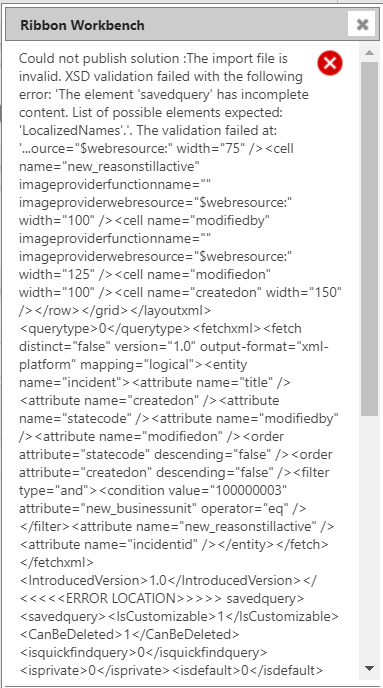
2335.R1.PNG

4035.R2.PNG

Please see the attached screenshots.

*This post is locked for comments

I have the same question (0)
  • Suggested answer
    Pawar Pravin Profile Picture
    5,237 on at

    Hi Shakti,

    I would rather suggest you to add manually ribbonxml code from ribbon solution into customization.xml file.

  • Shakti Singh Rajput Profile Picture
    958 on at

    Sorry, I am unable to understand what you are saying.

    Can you please elaborate?

  • Suggested answer
    Pawar Pravin Profile Picture
    5,237 on at

    1212122121212Capture.JPG

    As shown in screenshot you can copy from here and manually add in customization.xml file

  • Suggested answer
    Ammar Zaied Profile Picture
    1,670 on at

    Hi,

    you must check your customizations.xml file.

    check the link: crmandsilverlight.wordpress.com/.../fix-for-importingsolution

  • Shakti Singh Rajput Profile Picture
    958 on at

    Thanks, Pravin and Ammar

    I am able to export the Case Entity solution and comment all the lines related  to the <savedquery> </savedquery>

    After this, If I import the Case solution again then what about existing Case Solution?

    Do I need to delete the existing one and then import newly updated solution or something else?

    Please suggest.

  • Suggested answer
    Ammar Zaied Profile Picture
    1,670 on at

    You can delete the existing and import again

  • Shakti Singh Rajput Profile Picture
    958 on at

    If I delete the existing solution then Is there any chances that it affects the functionality?

    Like the commands, web resources and etc.

  • Ammar Zaied Profile Picture
    1,670 on at

    sure, but you can test it in sandbox environment.

    or update the existing solution (without delete).

  • Shakti Singh Rajput Profile Picture
    958 on at

    And one more question can I change the sequence of the standard button "Start Dialog" because this is not visible on the new UI on the Case Form.

  • Suggested answer
    Ammar Zaied Profile Picture
    1,670 on at

Under review

Thank you for your reply! To ensure a great experience for everyone, your content is awaiting approval by our Community Managers. Please check back later.

Helpful resources

Quick Links

Introducing the 2026 Season 1 community Super Users

Congratulations to our 2026 Super Stars!

Meet the Microsoft Dynamics 365 Contact Center Champions

We are thrilled to have these Champions in our Community!

Congratulations to the April Top 10 Community Leaders

These are the community rock stars!

Leaderboard > 🔒一 Microsoft Dynamics CRM (Archived)

Last 30 days Overall leaderboard

Featured topics

Product updates

Dynamics 365 release plans
