web
You’re offline. This is a read only version of the page.
close
Skip to main content

Notifications

Announcements

No record found.

Community site session details

Community site session details

Session Id :
Small and medium business | Business Central, N...
Answered

Monthly sales on items also filtered to a dimension

(0) ShareShare
ReportReport
Posted on by 52

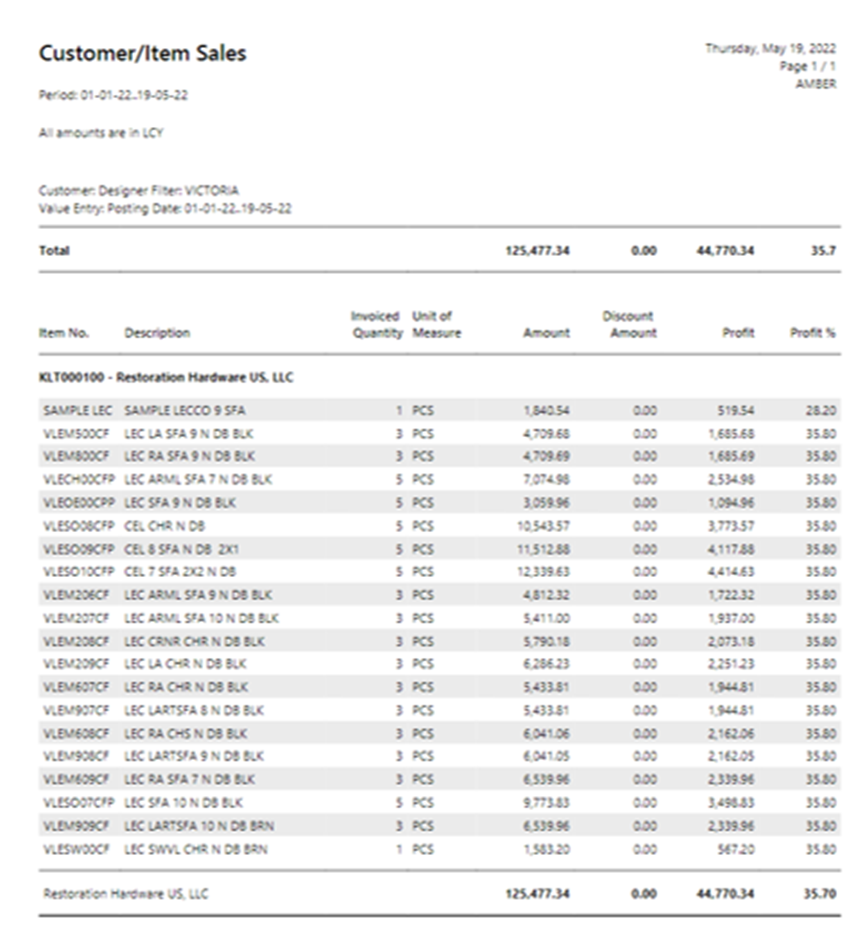
I would like to be able to pull up my the monthly posted sales per SKU item and filter on a dimension code

Is this possible and can anyone help me?

I have the same question (0)
  • Verified answer
    Alok.kulshreshtha Profile Picture
    934 on at

    Hi ,

    Look for customer/Item sales where filter on Posting date column for month wise and use Filter Total By for section for dimension filter.

    Regards,

    Alok Kulshreshtha

    Please Verify my answer if you find my post helpful.

  • AmberPFC Profile Picture
    52 on at

    Hi Alok,

    Thank you, great! This worked,  see below print screen.

    But now I need to change the actual report layout, and remove the profit and proft% column, and discount amount column also.  Basically I need to customize this report in "Custom Reports Layout"

    To do that I need the report ID.  Where can I find the report ID?  can you help me with that?

    We need this report to pay commission on items sold to the designer .
    pastedimage1652984583824v4.png

  • Verified answer
    Alok.kulshreshtha Profile Picture
    934 on at

    Hi,

    it's 113. to find Go to Report layout and search for Customer/Item Sales.

    Regards,

    Alok

    Please Verify my answer if you find my post helpful.

  • AmberPFC Profile Picture
    52 on at

    Unfortunately this does not show up in Custom Report Layout

    But is does show up in Report Layout (Without the Custom).  I don'tt know how to change the layout in REport Layout, but I do in Custom Report Layout.

    do you know?

  • Verified answer
    Alok.kulshreshtha Profile Picture
    934 on at

     To add in custom layout, click on new. system will show you a new popup screen.

    pastedimage1652985610069v1.png

    pastedimage1652985645995v2.png

    Enter Report ID i.e,. 113, select which layout you want to add in customer layout report list. here I have selected "Insert RDLC layout". and press OK. 

    pastedimage1652985740506v3.png

    Regards,

    Alok Kulshreshtha

  • AmberPFC Profile Picture
    52 on at

    Alok, you are a star!  You solved in a few minutes what I asked our BC partner for for many times and they did not know!

    Thank you so much!!

  • Suggested answer
    Alok.kulshreshtha Profile Picture
    934 on at

    Many Thanks for Appreciation.  it means a lot for me

    Regards,

    Alok Kulshreshtha

Under review

Thank you for your reply! To ensure a great experience for everyone, your content is awaiting approval by our Community Managers. Please check back later.

Helpful resources

Quick Links

Responsible AI policies

As AI tools become more common, we’re introducing a Responsible AI Use…

Neeraj Kumar – Community Spotlight

We are honored to recognize Neeraj Kumar as our Community Spotlight honoree for…

Leaderboard > Small and medium business | Business Central, NAV, RMS

#1
OussamaSabbouh Profile Picture

OussamaSabbouh 3,143

#2
Jainam M. Kothari Profile Picture

Jainam M. Kothari 1,694 Super User 2025 Season 2

#3
YUN ZHU Profile Picture

YUN ZHU 1,067 Super User 2025 Season 2

Last 30 days Overall leaderboard

Featured topics

Product updates

Dynamics 365 release plans
