web
You’re offline. This is a read only version of the page.
close
Skip to main content

Notifications

Announcements

Community site session details

Community site session details

Session Id :
Microsoft Dynamics CRM (Archived)

Multiple forms in single entity

(0) ShareShare
ReportReport
Posted on by

I have 3 forms in the accounts entity. AccountA (default out of the box form), AccountB, AccountC

I have created a custom field (type: single line of text) to store the value of the form the record was created in. 

I used the following javascript to open the correct form based on the field value. Although the correct form is opening onLoad, I'm now experiencing other issues: When I create a new record and click on "save and close" or "save" it saves and automatically opens a new AccountA form. When I try to switch to AccountB or Account C form from the dropdown, it gives this the following pop up and again opens AccountA form.
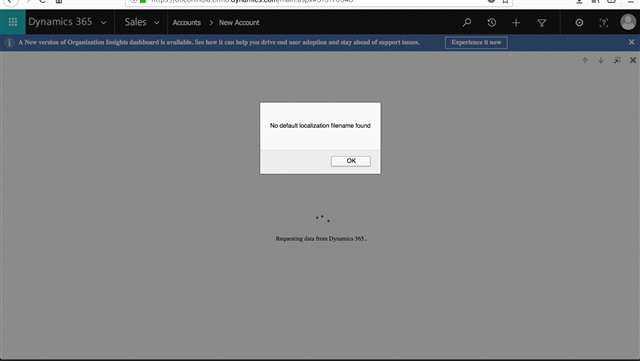
Screen-Shot-2017_2D00_11_2D00_28-at-1.23.30-PM.jpg_2D00_640x480.jpg

Here is the code I used: 

function onLoad()
{

//if the form is update form
if (Xrm.Page.ui.getFormType()==2)
   // variable to store the name of the form
   var lblForm;
   // get the value picklist field
   var relType = Xrm.Page.getAttribute("new_formname").getValue();
   // switch statement to assign the form to the picklist value
   //change the switch statement based on the forms numbers and picklist values
   switch (relType) {
       case 'AccountC':
           lblForm = "AccountC";
           break;
       case 'AccountB':
           lblForm = "AccountB";
           break;
       default:
           lblForm = "AccountA";
   }
   //check if the current form is form need to be displayed based on the value
   if (Xrm.Page.ui.formSelector.getCurrentItem().getLabel() != lblForm) {
       var items = Xrm.Page.ui.formSelector.items.get();
       for (var i in items) {
           var item = items[i];
           var itemId = item.getId();
           var itemLabel = item.getLabel()
           if (itemLabel == lblForm) {
               //navigate to the form
               item.navigate();
			   return;
           } //endif
       } //end for
   } //endif
}//endif


Please help me solve this problem. Thank you!  


*This post is locked for comments

I have the same question (0)
  • Community Member Profile Picture
    on at

    If new_formname field is option set then your code wont work. getValue will give you optionset value not the label. to get label use this line

    var relType = Xrm.Page.getAttribute("new_formname").getText();

  • Community Member Profile Picture
    on at

    changing it to getText() throws a script error onload of form

  • Verified answer
    Community Member Profile Picture
    on at

    Hi,

    I think you have a bracket problem.

    Could you please try this:

    function onLoad()
    {
    
    //if the form is update form
    if (Xrm.Page.ui.getFormType()==2){
    	   // variable to store the name of the form
    	   var lblForm;
    	   // get the value picklist field
    	   var relType = Xrm.Page.getAttribute("new_formname").getValue();
    	   // switch statement to assign the form to the picklist value
    	   //change the switch statement based on the forms numbers and picklist values
    	   switch (relType) {
    		   case 'AccountC':
    			   lblForm = "AccountC";
    			   break;
    		   case 'AccountB':
    			   lblForm = "AccountB";
    			   break;
    		   default:
    			   lblForm = "AccountA";
    	   }
    	   //check if the current form is form need to be displayed based on the value
    	   if (Xrm.Page.ui.formSelector.getCurrentItem().getLabel() != lblForm) {
    		   var items = Xrm.Page.ui.formSelector.items.get();
    		   for (var i in items) {
    			   var item = items[i];
    			   var itemId = item.getId();
    			   var itemLabel = item.getLabel()
    			   if (itemLabel == lblForm) {
    				   //navigate to the form
    				   item.navigate();
    				   return;
    			   } //endif
    		   } //end for
    	   } //endif
    	}
    }//endif


  • Community Member Profile Picture
    on at

    It worked thanks so much! Can't believe it was such a small mistake.

Under review

Thank you for your reply! To ensure a great experience for everyone, your content is awaiting approval by our Community Managers. Please check back later.

Helpful resources

News and Announcements

Season of Giving Solutions is Here!

Quick Links

Responsible AI policies

As AI tools become more common, we’re introducing a Responsible AI Use…

Neeraj Kumar – Community Spotlight

We are honored to recognize Neeraj Kumar as our Community Spotlight honoree for…

Leaderboard > 🔒一 Microsoft Dynamics CRM (Archived)

#1
Shidin Haridas Profile Picture

Shidin Haridas 2

#2
Abdullah13 Profile Picture

Abdullah13 1

Last 30 days Overall leaderboard

Featured topics

Product updates

Dynamics 365 release plans
