web
You’re offline. This is a read only version of the page.
close
Skip to main content

Announcements

No record found.

News and Announcements icon
Community site session details

Community site session details

Session Id :
Small and medium business | Business Central, N...
Suggested Answer

What is the workdate displayed on a page?

(5) ShareShare
ReportReport
Posted on by 625

Hi All,

I have created a custom page of type worksheet, but near the name(caption) of the page , i see Work date. I havent added that date on my page. I believe it comes from the standard.

What is that date? Can we change its value it or remove it? Also from where it gets its value from default?
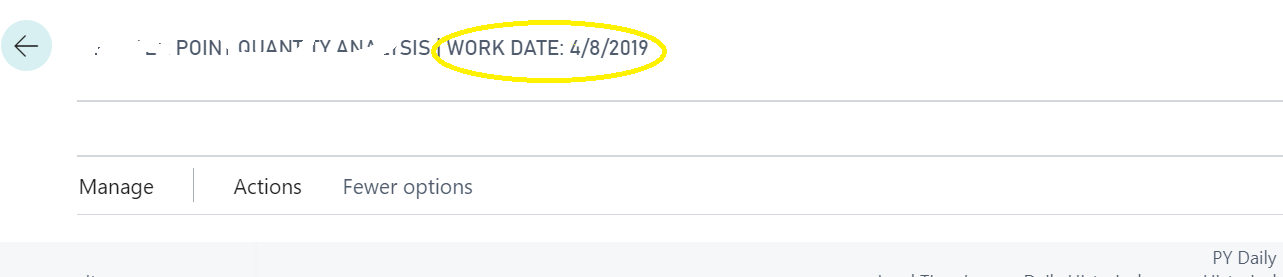
pastedimage1584598410333v1.png

Please help!

Thanks in advance.

I have the same question (0)
  • Suggested answer
    I Gusti Made Ari Profile Picture
    3,608 on at

    If you are using No. Series for the document no., the generated document no. is based on your work date. This is why by default it is showing on worksheet page so user know what is their work date settings without go to settings --> My Settings.

    pastedimage1584600469740v1.png

  • AXBOY Profile Picture
    625 on at

    There is no Document No. i am using my worksheet page or table. But yes, the work date matches on the page matches on the date on the settings. What exactly is that Work date though?

  • AXBOY Profile Picture
    625 on at

    Also can i remove that work date from my page?

  • Suggested answer
    I Gusti Made Ari Profile Picture
    3,608 on at

    yes, you can . System by default showing if your work date different from today date , so this is what you need to do.

    open my settings

    - Change Work Date same as Today Date

    - Open notifications

    pastedimage1584602897216v1.png

    scroll down and search "Work  Date Reminder" and untick

    pastedimage1584602934510v2.png

    Open any worksheet such as Item Journal, work date info won't be showing anymore .

    pastedimage1584603147092v3.png

  • AXBOY Profile Picture
    625 on at

    The "Work  Date Reminder" is already unticked in my sandbox :

    pastedimage1584604387169v1.png

    But still work date is displayed on opening any random worksheet page : 

    pastedimage1584604464192v2.png

  • Suggested answer
    I Gusti Made Ari Profile Picture
    3,608 on at

    set your work date same as today date . e.q : 03/19/2020

  • Suggested answer
    vaclav@jaromersky.org Profile Picture
    4 on at
    Hi, little bit late, but hope that'll help someone.
     
    If Work Date != Today and
    1. Work Date Reminder = TRUE, than notification banner appears in header
    2. Work Date Reminder = FALSE, than Work Date appears in page header

Under review

Thank you for your reply! To ensure a great experience for everyone, your content is awaiting approval by our Community Managers. Please check back later.

Helpful resources

Quick Links

Introducing the 2026 Season 1 community Super Users

Congratulations to our 2026 Super Stars!

Meet the Microsoft Dynamics 365 Contact Center Champions

We are thrilled to have these Champions in our Community!

Congratulations to the March Top 10 Community Leaders

These are the community rock stars!

Leaderboard > Small and medium business | Business Central, NAV, RMS

#1
OussamaSabbouh Profile Picture

OussamaSabbouh 1,993 Super User 2026 Season 1

#2
YUN ZHU Profile Picture

YUN ZHU 1,116 Super User 2026 Season 1

#3
Khushbu Rajvi. Profile Picture

Khushbu Rajvi. 557 Super User 2026 Season 1

Last 30 days Overall leaderboard

Featured topics

Product updates

Dynamics 365 release plans
