web
You’re offline. This is a read only version of the page.
close
Skip to main content

Announcements

No record found.

News and Announcements icon
Community site session details

Community site session details

Session Id :
Microsoft Dynamics CRM (Archived)

Sub Grid Entity pointing to wrong Views

(0) ShareShare
ReportReport
Posted on by

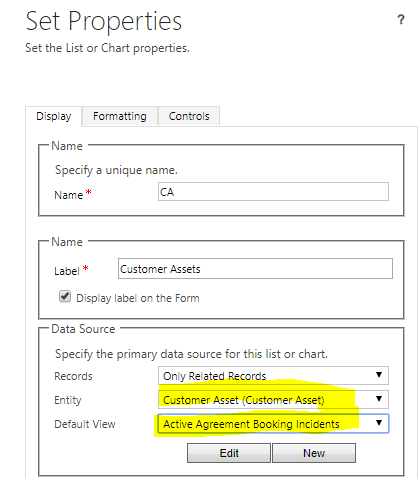
Has anyone seen this in Field Service?  I am adding a sub grid to a form and the Customer Assets Entity is displaying default views for the Agreement Booking Incidents Entity.   Image attached...

I am about to remove and re-add, Save As a new form and try again, but am open to other suggestions.  FS-SubGrid-error.png
*This post is locked for comments

I have the same question (0)
  • Thomas David Dayman Profile Picture
    11,323 on at

    Hi,

    This looks correct. Its the same in FieldOne Sky as well. What are you trying to achieve exactly?

  • Community Member Profile Picture
    on at

    I want the Sub Grid for Customer Assets to point to the right Views.  The sub Grid for Customer Assets is pointing to the wrong Entity Views (for agreement booking incidents).  It almost seems like a bug or a MS ticket is needed.

  • Suggested answer
    Thomas David Dayman Profile Picture
    11,323 on at

    I assume what you are doing is adding a subgrid to the Customer Asset Form and looking for related Customer Assets. I think what that Customer Asset (Customer Asset) Relationship is looking at is this:

    82111.Screenshot_5F00_2.png

    There is a relationship in the Agreement Booking Incident where it has a N:1 to the Customer Asset. This might be where its getting its views from.

    I suppose there wouldn't be any related records to itself unless there was another lookup looking at the same entity.

  • Community Member Profile Picture
    on at

    Exactly.  There is a lookup on the Customer Asset looking at the same entity (Parent Equipment (lookup to Customer Assets), which is why I find it odd that the relationship is not there to pull in the Sub Grid to the form.  

  • Community Member Profile Picture
    on at

    1NrelationshipCustAsset.png

  • Verified answer
    Thomas David Dayman Profile Picture
    11,323 on at

    But isn't the Sub Asset Sub grid already looking at Parent Assets?

    3582.Screenshot_5F00_3.png

  • Community Member Profile Picture
    on at

    That was the fix - thanks Thomas, I appreciate it.  

Under review

Thank you for your reply! To ensure a great experience for everyone, your content is awaiting approval by our Community Managers. Please check back later.

Helpful resources

Quick Links

Introducing the 2026 Season 1 community Super Users

Congratulations to our 2026 Super Stars!

Congratulations to our 2025 Community Spotlights

Thanks to all of our 2025 Community Spotlight stars!

Leaderboard > 🔒一 Microsoft Dynamics CRM (Archived)

#1
Varsha deshpande Profile Picture

Varsha deshpande 5

#2
JS-09031509-0 Profile Picture

JS-09031509-0 3

#3
Ciprian  P Profile Picture

Ciprian P 2

Last 30 days Overall leaderboard

Featured topics

Product updates

Dynamics 365 release plans
