web
You’re offline. This is a read only version of the page.
close
Skip to main content

Announcements

No record found.

News and Announcements icon
Community site session details

Community site session details

Session Id :
Supply chain | Supply Chain Management, Commerce
Unanswered

Purchase order lines with open status locked for update

(0) ShareShare
ReportReport
Posted on by

Hi all,

I am trying to change a PO line that was Stopped from "Yes" to "No", but keep getting these error messages:

Cannot make changes to any other fields on the line level as well. Changing fields on the PO header works fine.

The line is fully open without any receipt. It is linked to a Project with a Project ID. The related project status is "In progress".

How to make the PO line editable in this case? 

Not sure why this line is stopped by the user in the first place, but now we're trying to make changes to the line and can't.
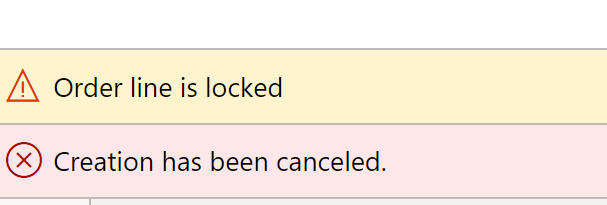
Order line is locked. Creation has been canceled.

The PO header is "Approved" and "Open order" status.

PO line status is "Open order"

This PO line has only one entry in the Inventory transactions table:

Inventory transactions

For this PO, if I create a 2nd line, and then set "Stopped" flag to true, I am still able to edit all other fields on the line. So I think some other logic is locking the first line for any update, Not the "Stopped" field.

Thank you all for reading!

I have the same question (0)
  • AR-01121610-0 Profile Picture
    4,971 Moderator on at

    Hy,

    if the PO Is derived from a project requirement of this item you could try to edit the original project requirement of this.

    How did you create the PO?

    is Workflow enabled?

    and what is the action you perform before you get this error?

  • Community Member Profile Picture
    on at

    Hello Andreas,

    Thank you for taking time to read and help with my question. We're currently investigating how were those PO lines get created in the first place. Workflow is enabled.

    Editing any fields on the PO line will trigger this error.

    thanks,

    Fen

  • Community Member Profile Picture
    on at

    In the end we found out that the locked PO lines has corresponding SO lines that are "Stopped".

    These are direct delivery sales order lines.

    Once we remove the "Stopped" flag on SO lines, we can update the PO lines.

    Thank you all for reading and helping, I really appreciate it!

Under review

Thank you for your reply! To ensure a great experience for everyone, your content is awaiting approval by our Community Managers. Please check back later.

Helpful resources

Quick Links

Introducing the 2026 Season 1 community Super Users

Congratulations to our 2026 Super Stars!

Congratulations to our 2025 Community Spotlights

Thanks to all of our 2025 Community Spotlight stars!

Leaderboard > Supply chain | Supply Chain Management, Commerce

#1
Mallesh Deshapaga Profile Picture

Mallesh Deshapaga 254

#2
Laurens vd Tang Profile Picture

Laurens vd Tang 188 Super User 2026 Season 1

#3
André Arnaud de Calavon Profile Picture

André Arnaud de Cal... 131 Super User 2026 Season 1

Last 30 days Overall leaderboard

Product updates

Dynamics 365 release plans
