web
You’re offline. This is a read only version of the page.
close
Skip to main content

Announcements

No record found.

News and Announcements icon
Community site session details

Community site session details

Session Id :
Microsoft Dynamics CRM (Archived)

Enable Server Based SharePoint integration fails

(0) ShareShare
ReportReport
Posted on by 5,241

I'm preparing two demo's and for both demo's I want to show the Office365 groups integration. To do this, I want to enable the Server based SharePoint integration, but that fails with the message:

Failed authentication

And the error:

<errorlog><sites>
  <site>
    <url>mod484719.sharepoint.com/.../crm&lt;/url>
    <exception>Object reference not set to an instance of an object.</exception>
    <errorcode>-2147088205</errorcode>
  </site>
</sites></errorlog>
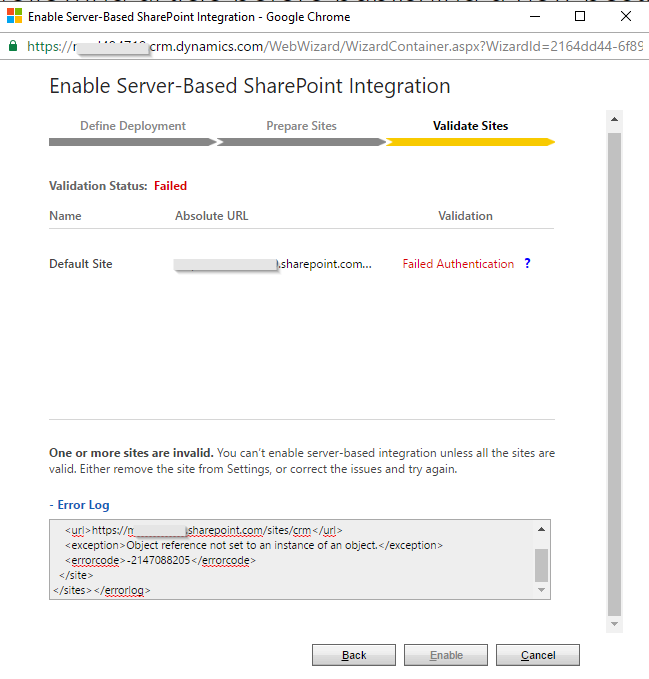
2161.screenshot.png

I've been through alle online documentation I can find, but so far no success. There's also not much to configure. I did make sure that this user has the permissions on the SharePoint site collection.

As said, I'm preparing two demo's and it's the same for both.

Any ideas on how to solve this?

*This post is locked for comments

I have the same question (0)
  • Inogic Profile Picture
    748 on at

    Hi Martijn,

    We got the below error on 2 cases:

    • You get this error when you try to configure SharePoint whose Organization is different from the CRM Organization name. If this is the case then you can’t enable the Server Based Integration.
    • If your SharePoint site is not configured properly then you get this error. So just open the site url in another browser and then try again.

    Let us know in which case are you getting this error, so that we could help you in detail.


    Thanks!
    Sam

  • JohnAnonymous Profile Picture
    5,241 on at

    Both are not the same for me, as far is I know.

    • Can you explain this one? CRM and SharePoint are both in the same tenant, but does it need something else to be the same?
    • I've opened the sites several times, and they seem very normal. I've also tried to connect to the root sites, and those didn't work either.

    Thanks.

  • Inogic Profile Picture
    748 on at

    Hi Martijn,

    You may refer this blog where it is mentioned that for server based integration both the org names in CRM & SharePoint should be same.

    http://www.inogic.com/blog/2014/07/server-based-sharepoint-integration-for-microsoft-dynamics-crm/ 

    Hope this helps.


    Thanks!
    Sam

  • BDRSteve Profile Picture
    on at

    Hi Martijn

    I am suffering with exactly the same error with Dynamics Online Version 2016 Update 1.  CRM Instances (Prod and Sandbox) are in the same tenant as all the Sharepoint sites but the URLs will never match as they are unique to each business instance.

    Did you find any official resolution to this problem?

    When I look at the Inogic link provided in one of the replies its based on a 2014 version of Dynamics Online.  I am struggling to find any more recent data on the any other forums!

    I think my next step is to raise a support ticket with Microsoft, but that will likely involve days of troubleshooting and screen sharing with MSFT when this error points to some logic issues on their side.

    Previously I have configured 10 instances using exactly the same account, in the same way, and with the same type of URL syntax without issue.

    Many thanks in advance

    Steve

  • JohnAnonymous Profile Picture
    5,241 on at

    Hi Steve,

    No, I'm actually in the middle of a case with Microsoft for a new tenant. In that tenant I can configure the sandbox environment with SharePoint but not the production environment.

    I'll update this thread if I have any news. But it looks like there's nothing you can do yourself. So open a case if it doesn't work.

    Regards,

    Martijn

  • Community Member Profile Picture
    on at

    Hi Martijn,

    I know it's a long time ago, but we are currently struggling with this issue for 2 months. We've raised a ticket at Microsoft but no success so far.

    Did you had any success on solving this issue?

    I hope to hear from you.

    With kind regards,

    Ritchey Hazeu

Under review

Thank you for your reply! To ensure a great experience for everyone, your content is awaiting approval by our Community Managers. Please check back later.

Helpful resources

Quick Links

Introducing the 2026 Season 1 community Super Users

Congratulations to our 2026 Super Stars!

Congratulations to our 2025 Community Spotlights

Thanks to all of our 2025 Community Spotlight stars!

Leaderboard > 🔒一 Microsoft Dynamics CRM (Archived)

#1
JS-09031509-0 Profile Picture

JS-09031509-0 3

#2
AS-17030037-0 Profile Picture

AS-17030037-0 2

#2
Mark Eckert Profile Picture

Mark Eckert 2

Last 30 days Overall leaderboard

Featured topics

Product updates

Dynamics 365 release plans
