web
You’re offline. This is a read only version of the page.
close
Skip to main content

Announcements

No record found.

News and Announcements icon
Community site session details

Community site session details

Session Id :
Small and medium business | Business Central, N...
Answered

Power Automate Workflow -Error

(0) ShareShare
ReportReport
Posted on by 19

Hi Expert’s,

I am new to BC and Power Automate.

I tried to create a General journal Batch approval via Power Automate (Cloud Flow). I have used the available template from PA and updated few necessary fields.

(This is Trial Version of BC)

I always get an error at the final step of Workflow Approval.

Error : 

"ErrorCode: Application_DialogException  User USERNAME does not have the permission necessary to act on the item. Make sure the user is set as approver or substitute in page Approval User Setup, or check the "Workflows" section of the documentation. "


The user is already configured in "Approval User Setup", still PA throws an error.

Also the approving user is a SUPER user in BC.
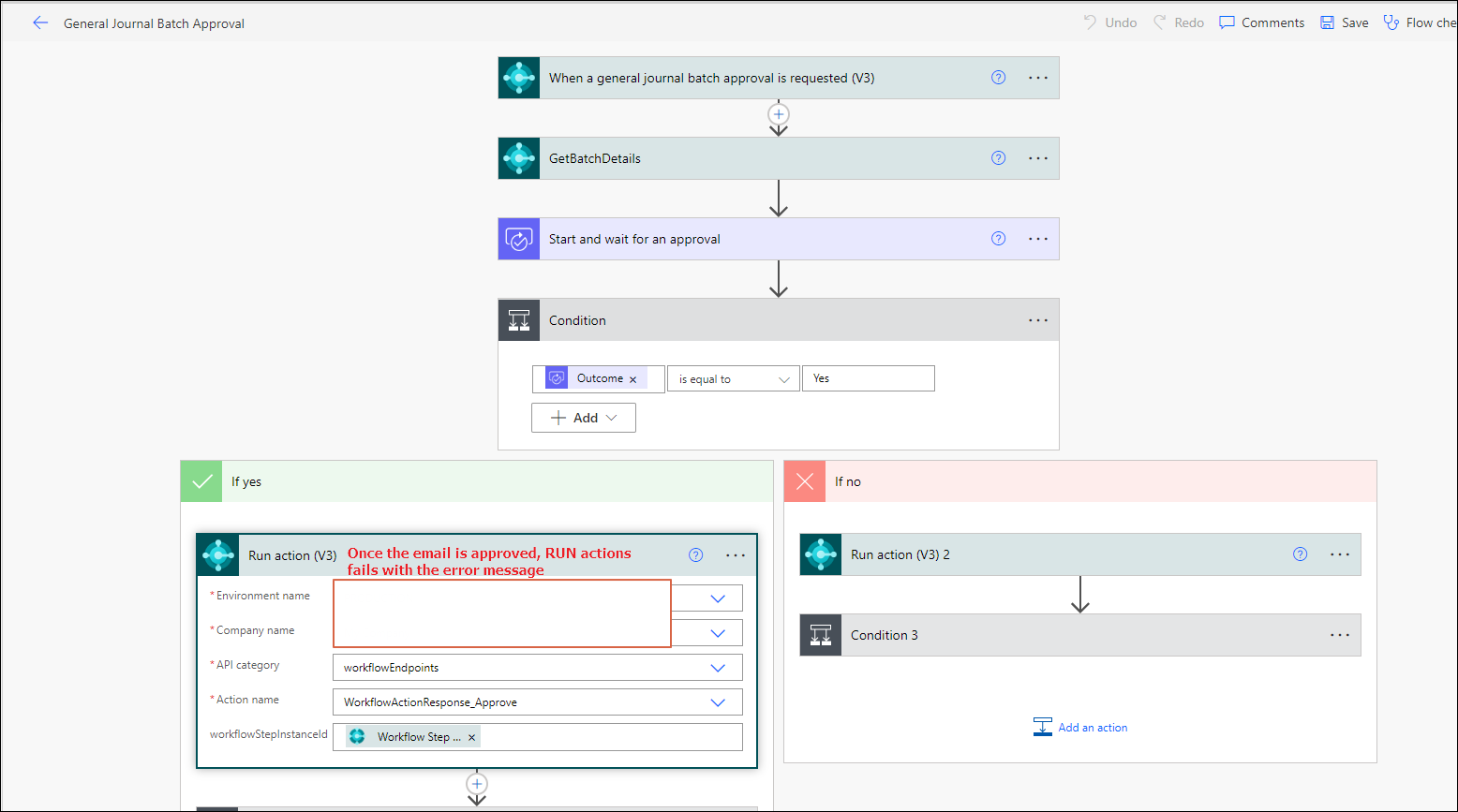
Workflow_5F00_01.png

Workflow_5F00_02.png

Did someone faced similar issues? 

I did checked the Webservice Access key is blank in "Manage Power Automate Flows". 

TIA

Amol

I have the same question (0)
  • Verified answer
    Marco Mels Profile Picture
    Microsoft Employee on at

    Hello,

    In Business Central and search for Approval User Setup. Ensure the user is added there.

    Hope it helps.

    Thank you.

  • Amolm Profile Picture
    19 on at

    Thanks Marco!

    I have already added " Approval User Setup". Am I mising anything something in the Setup ?

  • Amolm Profile Picture
    19 on at

    I think I changed few setups in "Approval User Setup"  and that worked!

    I added the user as "Approval" and the workflow worked!

    Thanks !

  • Suggested answer
    Theo Kersten Profile Picture
    165 on at
    I had this same error on an existing Power Automate approval flow, after I changed the user account for the connections to BC. Only after I turned off and then turn back on the Power Automate flow, it ran successfully.

Under review

Thank you for your reply! To ensure a great experience for everyone, your content is awaiting approval by our Community Managers. Please check back later.

Helpful resources

Quick Links

Introducing the 2026 Season 1 community Super Users

Congratulations to our 2026 Super Stars!

Congratulations to our 2025 Community Spotlights

Thanks to all of our 2025 Community Spotlight stars!

Leaderboard > Small and medium business | Business Central, NAV, RMS

#1
OussamaSabbouh Profile Picture

OussamaSabbouh 2,032 Super User 2026 Season 1

#2
Dhiren Nagar Profile Picture

Dhiren Nagar 1,049 Super User 2026 Season 1

#3
YUN ZHU Profile Picture

YUN ZHU 1,029 Super User 2026 Season 1

Last 30 days Overall leaderboard

Featured topics

Product updates

Dynamics 365 release plans

