web
You’re offline. This is a read only version of the page.
close
Skip to main content

Notifications

Announcements

No record found.

Community site session details

Community site session details

Session Id :
Supply chain | Supply Chain Management, Commerce
Answered

Set up batch job for sending Approved Purchase orders to External Vendors - Only for vendors which have Vendor Collaboration active

(3) ShareShare
ReportReport
Posted on by

I intend to have a batch job set up for sending Approved purchase orders to external vendors putting them in "In external review" and sending them to Vendor portal for confirmation using late selection. Out of the box functionality does not have "Late Selection" option available. I extended class to make that visible and its working and batch job runs.  

pastedimage1623874900434v2.png

Selection criteria for batch job is given below
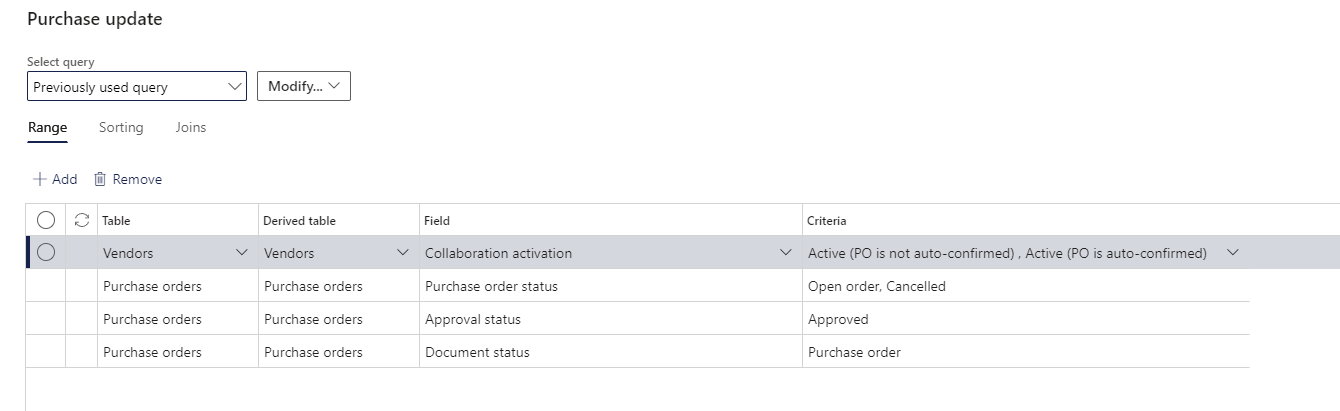
pastedimage1623875014627v3.png

Issue: I have added Vendors table by using join but batch job does not run when I have join criteria added for Vendor collaboration field active. And if I don't add join criteria, batch job sends all purchase orders (whether vendor collaboration active or not) in to external review which I do not want. 

Any idea whats wrong with the join ?
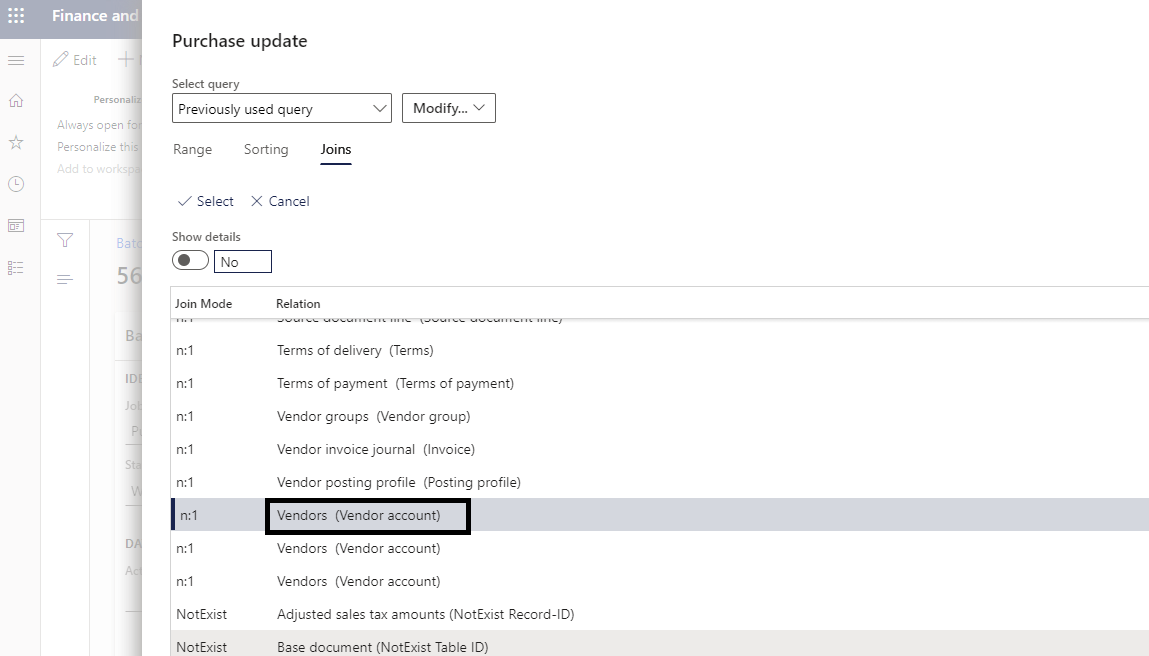
pastedimage1623875533301v4.png

I have the same question (0)
  • WillWU Profile Picture
    22,363 on at

    Hi Talbia,

    I think you could debug the batch job to find out the issue, it seems that something is going to wrong in the query. Please make sure that the table join relationship is correct.

  • André Arnaud de Calavon Profile Picture
    301,158 Super User 2025 Season 2 on at

    Hi Talbia,

    Does it use records when you set the filter on another field on the vendor table? If so, check what happens if you add the same filter value on e.g. a report with vendor base data or test the query range on a form query.

  • Community Member Profile Picture
    on at

    I haven't tried the same filter value on anything else.. Can you please elaborate how do you want me to try it?

    Also I have set up another batch job for Auto confirmation of approved POs for which vendor collaboration is = Not Active..For that, I have used the same join and filter value is set to vendor collaboration =Not Active but that batch job runs fine..

  • Suggested answer
    André Arnaud de Calavon Profile Picture
    301,158 Super User 2025 Season 2 on at

    Hi Talbia,

    It could be related to the brackets as part of the label. The value Active (PO is auto confirmed) and the second one do have the brackets which are usually considered to contain a SQL statement in query values. However, in this case it is the enumeration values. You can try to use double quotes around the option values like:

    "Active (PO is auto confirmed)","Active (PO is not auto confirmed)"

  • Community Member Profile Picture
    on at
    [quote]

    Hi Talbia,

    It could be related to the brackets as part of the label. The value Active (PO is auto confirmed) and the second one do have the brackets which are usually considered to contain a SQL statement in query values. However, in this case it is the enumeration values. You can try to use double quotes around the option values like:

    "Active (PO is auto confirmed)","Active (PO is not auto confirmed)"

    [/quote]

    Thank you so much for your response.
    I also tried updating the query with double quotes as shown in the screenshot.

    Screenshot-_2800_19_2900_.png

    Batch job still doesn't work for "Send for Confirmation" to Vendor Collaboration. I wonder if its the join or the query or the batch itself. If I apply the same filters criteria as shown in the screenshot above for a single PO which does have Vendor Collaboration "Active" and meets the rest of the criteria as well and do not put it in batch job, it still does not work. Any idea why is it happening?

  • André Arnaud de Calavon Profile Picture
    301,158 Super User 2025 Season 2 on at

    Hi Talbia,

    Can you check what happens if you place the same filter values on the vendor form? On the option tab, there is an option to open the advanced query editor. Then you can add the range values and check if there are still vendors visible when you apply the filter.

  • heyitsvinhh Profile Picture
    5 on at

    Hi Talbia,

    Did you get a chance to figure this out? I am trying to accomplish the same task of setting a batch to send the PO's to vendors for confirmation, or auto-send for confirmation of approved PO's.

  • Wangwang Dui Profile Picture
    66 on at
    Hi All.
     
    Does any one solved this issue? 
  • Verified answer
    Wangwang Dui Profile Picture
    66 on at
    Hi Every one, 
     
    I fix this issue. You need to select the 4th vendors when you join the table, means invoice vendor table. 
    Let me know if it works for you. 

Under review

Thank you for your reply! To ensure a great experience for everyone, your content is awaiting approval by our Community Managers. Please check back later.

Helpful resources

Quick Links

Responsible AI policies

As AI tools become more common, we’re introducing a Responsible AI Use…

Neeraj Kumar – Community Spotlight

We are honored to recognize Neeraj Kumar as our Community Spotlight honoree for…

Leaderboard > Supply chain | Supply Chain Management, Commerce

#1
Laurens vd Tang Profile Picture

Laurens vd Tang 303 Super User 2025 Season 2

#2
André Arnaud de Calavon Profile Picture

André Arnaud de Cal... 122 Super User 2025 Season 2

#3
Siv Sagar Profile Picture

Siv Sagar 105 Super User 2025 Season 2

Last 30 days Overall leaderboard

Product updates

Dynamics 365 release plans
