web
You’re offline. This is a read only version of the page.
close
Skip to main content

Notifications

Announcements

No record found.

Community site session details

Community site session details

Session Id :
Small and medium business | Business Central, N...
Answered

Looking at making the jump to Business Central

(0) ShareShare
ReportReport
Posted on by 250

How hard it is to change the format of the chart of accounts inside BC?

I have the same question (0)
  • Dallefeld Profile Picture
    211 User Group Leader on at

    What do you mean 'change the format'? Are you currently on NAV? Can you give an example?

  • Deanne CWCO Profile Picture
    250 on at

    if we want to change the format of the gl accounts (00-0000-00 to 00-00-00-0000) is it possible to do after we get to BC?  

  • Suggested answer
    MahGah Profile Picture
    15,529 on at

    Hi

    I highly suggest to make a change before moving to BC. We have been told this is possible and yes it is possible but takes lots of time and effort. This is an example from our environment. We have change from 1103 to different format. BC asks to update transaction and that is the part it took long time. 

    In addition, we needed to double check our Account Schedule, Power BI reports, other reports to make sure they are all matching. 

    But I am sure Kim Dallefeld  can provide more info here. 

    pastedimage1645033167677v1.png

    pastedimage1645033177366v2.png

    pastedimage1645033185303v3.png

  • Suggested answer
    Deanne CWCO Profile Picture
    250 on at

    THAT'S what I need to know - thank you

  • Suggested answer
    Dallefeld Profile Picture
    211 User Group Leader on at

    It feels like you are not taking advantage of dimensions. Typically we see the segmented chart of accounts when the account number is Division-Account-Department. Best Practice, says to set your chart of accounts to the Account segment and create dimensions for division and department. This allows you a smaller chart of accounts and more flexibility in data analysis and reporting.

  • Suggested answer
    Inge M. Bruvik Profile Picture
    1,105 Moderator on at

    You can not set a mask on the G/L account no. in BC unless you do a customization.

    But the G/L account no. field supports the format you want. So you can change it before or after you data is in BC.

  • Suggested answer
    YUN ZHU Profile Picture
    95,329 Super User 2025 Season 2 on at

    Hi, adding to others' replies, ithere is No. 2 field in n Accounts, you may also consider using this.

    pastedimage1645061508891v1.png

    Hope this will help.

    Thanks.

    ZHU

  • Gavin Profile Picture
    2,508 on at

    Hi,

    Out of interest are you thinking of making the move from Dynamics GP to Business Central. Its just the account format you use is very similar to how the chart of accounts is setup in Dynamics GP.

    If so as Kim and others have mentioned, when moving to BC you'd use the "Main Segment" (Dynamics GP term) as the "No." in the Chart of Accounts in BC, and create the other segments as dimensions. In my opinion this gives greater flexibility than GP as you aren't stuck to a rigid format. You also don't have to create lots of codes if you introduce a new dimension (again something Kim mentioned)

    Therefore using the Dynamics GP Fabrikam company as an example, and based on the account format below, you'd use "Account" as the "No." in the Chart of accounts and create "Division" and "Department" as dimensions. Then you could create additional dimensions as and when you needed.
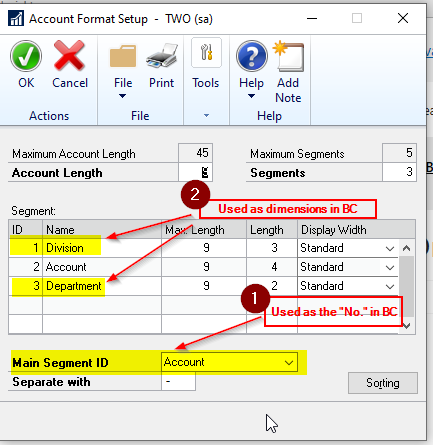
    pastedimage1645092551126v1.png

    I've also blogged about the differences between the chart of accounts setup in Dynamics GP and Business Central in this post thedynamicsexplorer.com/.../

    Even if you don't use GP I hope this helps 

    Thanks

    Gavin

  • Verified answer
    Deanne CWCO Profile Picture
    250 on at

    Gavin - this info is awesome!  Thank you sooooooo much!

Under review

Thank you for your reply! To ensure a great experience for everyone, your content is awaiting approval by our Community Managers. Please check back later.

Helpful resources

Quick Links

Responsible AI policies

As AI tools become more common, we’re introducing a Responsible AI Use…

Neeraj Kumar – Community Spotlight

We are honored to recognize Neeraj Kumar as our Community Spotlight honoree for…

Leaderboard > Small and medium business | Business Central, NAV, RMS

#1
OussamaSabbouh Profile Picture

OussamaSabbouh 3,226

#2
Jainam M. Kothari Profile Picture

Jainam M. Kothari 2,047 Super User 2025 Season 2

#3
YUN ZHU Profile Picture

YUN ZHU 1,257 Super User 2025 Season 2

Last 30 days Overall leaderboard

Featured topics

Product updates

Dynamics 365 release plans
