web
You’re offline. This is a read only version of the page.
close
Skip to main content

Notifications

Announcements

No record found.

Community site session details

Community site session details

Session Id :
Microsoft Dynamics CRM (Archived)

Portal - Contacts in proper web role still have Web Page edit access

(0) ShareShare
ReportReport
Posted on by 25

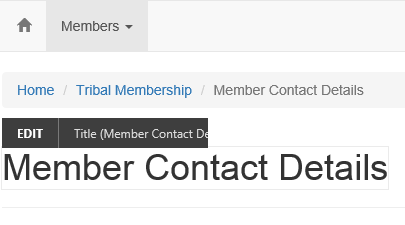
I have configured a ADX Portal using 7.0.0022 on-premise and have created a new portal for our custom solution.  I have contacts that want to be able to log into the portal so we setup the username and password for the contact.  I configured a new web role for these users to remove permissions to edit page content.  They should be able to add/update their own records within the portal but the page content edit controls keep showing up. 

Created Website Access Permissions with all settings=NO.  Also created Web Page Access Control Rule for "Restrict Read Access" trying to prevent the page content editing.  I've read the documentation multiple times and followed the instructions but cannot get the permissions set correctly.  Thoughts?
Portal-page-control.png

*This post is locked for comments

I have the same question (0)
  • Suggested answer
    Nadeeja Bomiriya Profile Picture
    6,804 on at

    Hi Bryan,

    To troubleshoot the issue, I would do the following (you may have already done this).

    1. Compare the OOTB Administrator and OOTB Authenticated User Web Roles
    2. Compare the OOTB Administrator and your custom Web Roles
    3. Compare the Website Access Permissions records (add all fields in Advanced Find to compare)
    4. Assign a new contact to the Authenticated User Web Role, run IISRESET, close all browser windows, clear cache (browser) and try again.

    Also, you can try removing the custom Website Access Permission record you created for your custom Web Role.  Check if the contact you tested has multiple Web Roles.

    Please let us know how you go.

    Cheers,

    Nadeeja

  • Craig P. Fleming Profile Picture
    950 on at

    Nadeeja is on the right track here, an additional website access record is not required to deny access. You will want to closely inspect the webroles that the authenticated contact is a member of. If those appear to be correct then look at the associated web roles relationships to the default website access permission. For good measure also verify that you have not inadvertently assigned Accounts to webroles. This is a lesser used feature whereby the Account can be used rather than individual contacts.  The contacts use the Parent Account relationship to assume the webrole assignment from the account.

  • Verified answer
    Bryan Schmidt Profile Picture
    25 on at

    Thanks for the tips Nadeeja.  I did the comparison and the custom role I created were the same as what came out of the box for "Basic Portal" site.  Still getting the fields to show.  I started deactivating permissions to essentially take away permissions till I was able to get the controls to NOT display.  Appears that removing the administrator Web Role resolved the issue.  Even though it existed but was not hooked up, was causing the permissions to be elevated.  Even though the Contact was not assigned on the Admin Web Role.

    Now only have 1 Web Role for the user to look up their contact and edit.

  • Craig P. Fleming Profile Picture
    950 on at

    Bryan is there any chance that you might have had the "authenticated users" checked on for the Administrators role? That would produce the results you are indicating. Removing the administrators role effectively disables the default security for the front side editing entirely which is ok unless you are expecting to use the front side CMS features.

  • Suggested answer
    Naveen Ganeshe Profile Picture
    3,397 User Group Leader on at

    I was also facing the same issue but after implementing the resolution told by Craig all the things are working perfectly.

    Thanks, Craig

Under review

Thank you for your reply! To ensure a great experience for everyone, your content is awaiting approval by our Community Managers. Please check back later.

Helpful resources

Quick Links

Responsible AI policies

As AI tools become more common, we’re introducing a Responsible AI Use…

Neeraj Kumar – Community Spotlight

We are honored to recognize Neeraj Kumar as our Community Spotlight honoree for…

Leaderboard > 🔒一 Microsoft Dynamics CRM (Archived)

#1
SA-08121319-0 Profile Picture

SA-08121319-0 4

#1
Calum MacFarlane Profile Picture

Calum MacFarlane 4

#3
Alex Fun Wei Jie Profile Picture

Alex Fun Wei Jie 2

Last 30 days Overall leaderboard

Featured topics

Product updates

Dynamics 365 release plans
