web
You’re offline. This is a read only version of the page.
close
Skip to main content

Announcements

No record found.

News and Announcements icon
Community site session details

Community site session details

Session Id :
Supply chain | Supply Chain Management, Commerce
Suggested Answer

Power Platform integration is required to install add-ins

(2) ShareShare
ReportReport
Posted on by 40

As the result of a reason change in LCS, Power Platform integration is required to install add-ins – including Planning Optimization add-in.

This change apply to new add-in installations, already installed add-ins are not affected. Hence environments with existing Planning Optimization add-ins are not affected, only new installations of Planning Optimization.


We have updated the Get started with Planning Optimization documentation to reflect this and point to the details in the Power Platform integration documentation:

Your system must be set up for Power Platform integration. For more information, see Prerequisites for setting up add-ins and Set up add-ins.

I have the same question (0)
  • Ashik Patel Profile Picture
    277 on at

    Hello ,

    How to Enabling the Microsoft Power Platform integration in D365 finOps UAT Env ?

  • Suggested answer
    ANInnoSolutions Profile Picture
    293 on at

    Hi Ashik Patel,

    basically, to enable the Power Platform Integration for Dynamics 365 FO, follow these steps:
    https://docs.microsoft.com/en-us/dynamics365/fin-ops-core/dev-itpro/power-platform/enable-power-platform-integration

    To summarize it, you have to activate the Power Platform Integration in

    - Lifecycle Services (LCS) and the Power Platform

    When everything went well, you will see in your LCS by selecting the specific environment in the Tab "Power Platform Integration" more detailed data as the following example shows:

    pastedimage1637060279907v1.png

    Moreover you will have a new environment in your Power Platform Admin Center (or combined) as the following example shows:
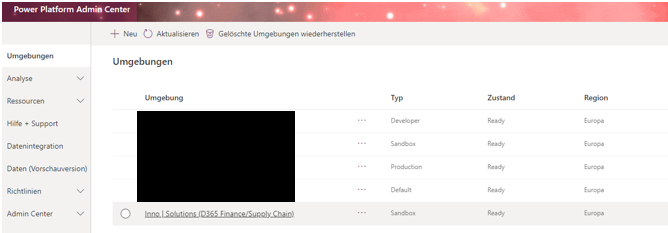
    pastedimage1637060605038v2.png

    All belonging components between LCS and the Power Platform for this environment will now be enabled for the Dynamics 365 project. As not all components will be activated/setup with the integration you need to go on with the work manually. Therefore you can easily select/setup the needed features in Dynamics 365.

    Rg,

    Alexander

    *Due to the complex and different possibilities of deploying Dynamics 365 I highly recommend not to setup the application without some expert/partner or support. (For more information contact me under anassl@inno-solutions.info or visit www.inno-solutions.de)

    *The Information comes directly from the manufacturer or provider and are validated (not guaranteed) up to date of creation of the posting.

    References:

    1. Microsoft Licensing Guide
    2. Microsoft Doc`s/Learn

Under review

Thank you for your reply! To ensure a great experience for everyone, your content is awaiting approval by our Community Managers. Please check back later.

Helpful resources

Quick Links

Introducing the 2026 Season 1 community Super Users

Congratulations to our 2026 Super Stars!

Meet the Microsoft Dynamics 365 Contact Center Champions

We are thrilled to have these Champions in our Community!

Congratulations to the March Top 10 Community Leaders

These are the community rock stars!

Leaderboard > Supply chain | Supply Chain Management, Commerce

#1
Mallesh Deshapaga Profile Picture

Mallesh Deshapaga 287

#2
Laurens vd Tang Profile Picture

Laurens vd Tang 212 Super User 2026 Season 1

#3
Syed Haris Shah Profile Picture

Syed Haris Shah 145 Super User 2026 Season 1

Last 30 days Overall leaderboard

Product updates

Dynamics 365 release plans
