web
You’re offline. This is a read only version of the page.
close
Skip to main content

Notifications

Announcements

No record found.

Community site session details

Community site session details

Session Id :
Microsoft Dynamics GP (Archived)

Word Template Errors When Printing - screenshots attached.

(0) ShareShare
ReportReport
Posted on by

Hi, I have had several GP software companies tell me that even Microsoft has not come up with a solution to a problem I'm having.

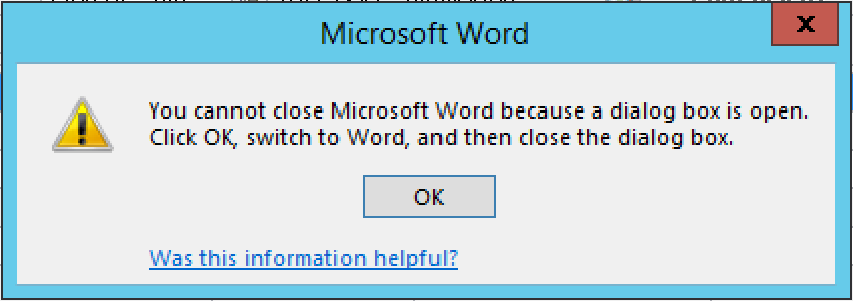
When printing documents (ie. Sales Order+Picking Ticket+Packing Slip) I am getting multiple errors.

My assumption is due to GP having to open the Word printer driver, it causes the next document trying to print to butt heads with that driver, since it's already open.
Microsoft-Word.png

This happens when I simply go to: File\print\check boxes as following:
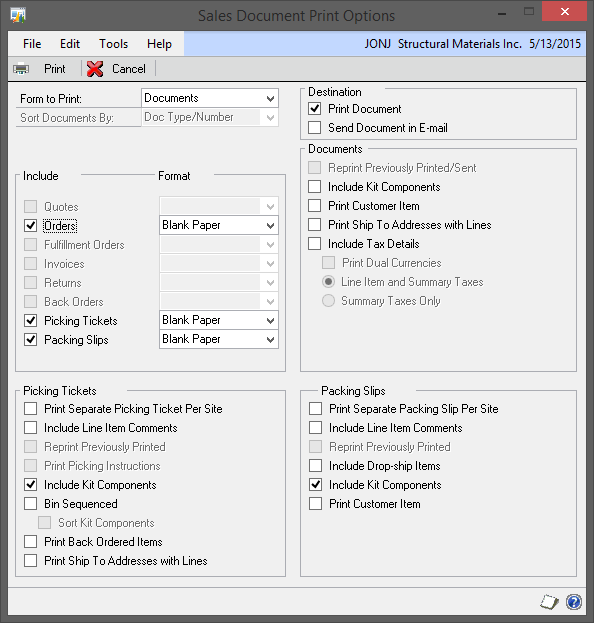
2015_2D00_05_2D00_13-10_5F00_45_5F00_00_2D00_Sales-Document-Print-Options.png

When I do this and follow through the normal commands, It get that error, and then the Microsoft Word sits in the upper left hand of my screen, sometimes the whole screen since Microsoft Word doesn't close.

Is there a solution to this?

I can't believe that if I want to print a pick ticket, and a packing slip, just those two documents, that I have to individually open the order twice to print those documents.

Any Insight?

*This post is locked for comments

I have the same question (0)
  • Community Member Profile Picture
    on at

    word-template-error-message-blank-packing-slip.PNG

    This is my error message.

  • Community Member Profile Picture
    on at

    Unfortunately, I do not have the answer to that one :/

  • ddoss Profile Picture
    35 on at

    Jon,

    I clicked the wrong thing and now my word template is not showing properly. How do I fix it back? It should display the page number not all those characters:-(. Thanks for your help.

    wordtemplatechange.PNG

  • Community Member Profile Picture
    on at

    Sorry for the late response. My guess? You clicked the type of document when you were printing was different than normal, possibly trying to print it into a form you do not have. 

    I know our documents are WORD templates, so when we click print, we have to select "type" and the drop down arrow shows us "template" and we select that. 

    Any idea what you did click?

  • ddoss Profile Picture
    35 on at

    Thank God for Google. I was able to trace my steps and figured out where I went wrong. In the Advanced Tab in the Tools Option I clicked "Show Field Codes instead of their values":-(.

    I really really appreciated it:-) you taking time to reply. Thanks!

  • Community Member Profile Picture
    on at

    Did you ever find any resolve to this error?  I keep getting the error on and off.  I feel like a process isn't being closed before another one is opened.  Driving the staff mad.  Regarding the multiple copy issue.  We have a word template and when we want to do the multiple copies of the picking ticket we print to screen then do a multiple copy print from word.

Under review

Thank you for your reply! To ensure a great experience for everyone, your content is awaiting approval by our Community Managers. Please check back later.

Helpful resources

Quick Links

Responsible AI policies

As AI tools become more common, we’re introducing a Responsible AI Use…

Neeraj Kumar – Community Spotlight

We are honored to recognize Neeraj Kumar as our Community Spotlight honoree for…

Leaderboard > 🔒一 Microsoft Dynamics GP (Archived)

#1
Community Member Profile Picture

Community Member 2

#2
mtabor Profile Picture

mtabor 1

#2
Victoria Yudin Profile Picture

Victoria Yudin 1

Last 30 days Overall leaderboard

Featured topics

Product updates

Dynamics 365 release plans
