web
You’re offline. This is a read only version of the page.
close
Skip to main content

Announcements

No record found.

News and Announcements icon
Community site session details

Community site session details

Session Id :
Supply chain | Supply Chain Management, Commerce
Unanswered

how to enable/disable action pane buttons ( Edit, New and Delete) on a form and assign it to the particular users based on enum value?

(0) ShareShare
ReportReport
Posted on by 110

Hi all,

Please help me how to acieve this scenario.

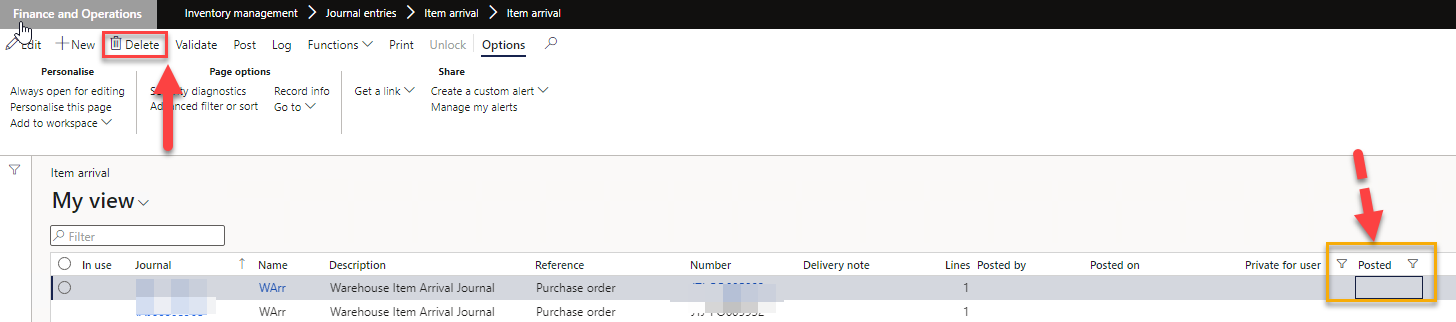
I want to disable a delete button based on enumvalue and assign it to the security role or privilege.

in this case, posted is enumvalue(checkbox), if posted is Yes, the delete button has to disable for the particular users. only system admin and some user can  have rights to the delete button.

I have tried with creating a security configurations, but it didn't work. 

FORM Name: WMSJournalTable
5127.pastedimage1654732053303v2.png

Thanks and regards

Seshu Nara

I have the same question (0)
  • Martin Dráb Profile Picture
    239,069 Most Valuable Professional on at

    Role-based security isn't bound to particular values in some table field. You'll need to do it in code, IMHO.

  • Seshu Nara Profile Picture
    110 on at

    Thanks for the reply Martin, i haven't find the right solution to do it.

  • Andre Ghazaleh Profile Picture
    870 on at

    Hi,

    You can set the main Form Datasource "AllowCreate" "AllowEdit" and "AllowDelete" properties to false if Posted value is Yes and the user has a specific role that you query for in code.

    By setting these properties of the datasource the New,Edit and Delete buttons will be disabled and the corresponding keyboard shortcuts will be disabled as well.

  • Martin Dráb Profile Picture
    239,069 Most Valuable Professional on at

    Doing it on modification can't be sufficient. You need to evaluate the condition when you active the record, even if you don't change anything.

Under review

Thank you for your reply! To ensure a great experience for everyone, your content is awaiting approval by our Community Managers. Please check back later.

Helpful resources

Quick Links

Introducing the 2026 Season 1 community Super Users

Congratulations to our 2026 Super Stars!

Meet the Microsoft Dynamics 365 Contact Center Champions

We are thrilled to have these Champions in our Community!

Congratulations to the March Top 10 Community Leaders

These are the community rock stars!

Leaderboard > Supply chain | Supply Chain Management, Commerce

#1
Mallesh Deshapaga Profile Picture

Mallesh Deshapaga 330

#2
Laurens vd Tang Profile Picture

Laurens vd Tang 251 Super User 2026 Season 1

#3
Syed Haris Shah Profile Picture

Syed Haris Shah 151 Super User 2026 Season 1

Last 30 days Overall leaderboard

Product updates

Dynamics 365 release plans
