web
You’re offline. This is a read only version of the page.
close
Skip to main content

Announcements

No record found.

News and Announcements icon
Community site session details

Community site session details

Session Id :
Small and medium business | Business Central, N...
Suggested Answer

Request page Auto fill on custom Report

(0) ShareShare
ReportReport
Posted on by 70

I have created a copy of business central report. I have added my custom fields which are displaying on the report as required.
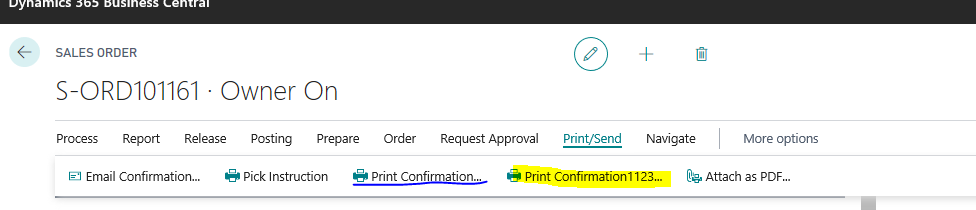
pastedimage1589744449148v5.png

However, i am not getting auto fill fields for my report as in standard report reports.

standard report 
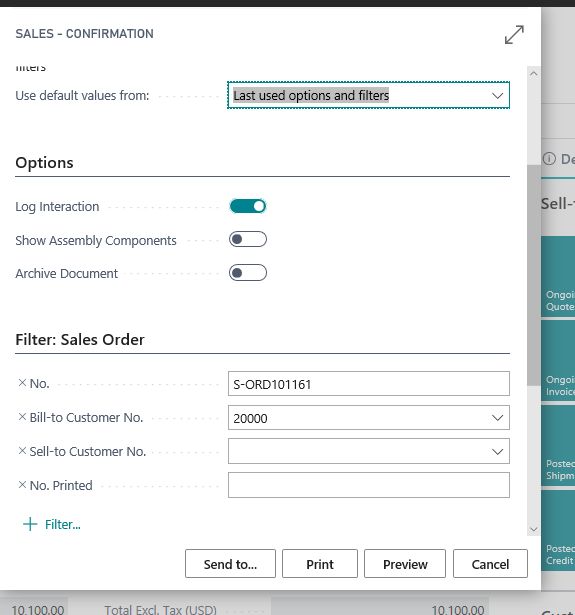
pastedimage1589744729824v6.png

My sales confirmation report :

pastedimage1589744787912v7.png

Please let me know how can i fill values on my custom sales confirmation report for the current record selected

thanks in advance.

I have the same question (0)
  • Suggested answer
    Teddy Herryanto (That NAV Guy) Profile Picture
    14,300 Super User 2026 Season 1 on at

    You don't need to create your own action.

    For sales confirmation, search for Report Selection - Sales, go to Usage Order, and change the report ID there to your new report ID.

  • Suggested answer
    Genie Cetas Profile Picture
    472 on at

    You can use Report.Runmodel method to run the report with the current record selected.

    Syntax:

    Report.RunModal(Report::"Report Name",[Request Window Booleon],[System Printer: Booelon],Record)

    In the above syntax, you can pass the report name with your customized report name and record as a filtered record variable

    Example:

    var

        SalesHeader: Record "Sales Header";

    SalesHeader.get(Rec."Document Type",Rec."No.");

    Report.RunModal(Report::"Sales",true,true,SalesHeader);

  • tanya07 Profile Picture
    1,638 on at

    Hi ZeeshanAXPulse ,

    We had similar issue , please try the mentioned below :

    Example:

    var

       SalesHeader: Record "Sales Header";

    SalesHeader.setrange("Document Type","Document Type");

    SalesHeader.setrange("No", "No");

    If SalesHeader.FINDFIRST THE BEGIN

    Report.RunModal(Report::"Sales",true,true,SalesHeader);

    END;

Under review

Thank you for your reply! To ensure a great experience for everyone, your content is awaiting approval by our Community Managers. Please check back later.

Helpful resources

Quick Links

Introducing the 2026 Season 1 community Super Users

Congratulations to our 2026 Super Stars!

Congratulations to our 2025 Community Spotlights

Thanks to all of our 2025 Community Spotlight stars!

Leaderboard > Small and medium business | Business Central, NAV, RMS

#1
OussamaSabbouh Profile Picture

OussamaSabbouh 1,870 Super User 2026 Season 1

#2
YUN ZHU Profile Picture

YUN ZHU 1,138 Super User 2026 Season 1

#3
Dhiren Nagar Profile Picture

Dhiren Nagar 915 Super User 2026 Season 1

Last 30 days Overall leaderboard

Featured topics

Product updates

Dynamics 365 release plans
