web
You’re offline. This is a read only version of the page.
close
Skip to main content

Notifications

Announcements

No record found.

Community site session details

Community site session details

Session Id :
Microsoft Dynamics CRM (Archived)

What are the minimum security role requirements to access CRM

(0) ShareShare
ReportReport
Posted on by

Hi, I'm following the guidance from MSDN for CRM 2016 but the minimum security role described appears to be incomplete/outdated, all the blog posts I can find mirror this documentation:

https://technet.microsoft.com/en-us/library/dn531130.aspx

I get the error

"Principal User is missing prvReadRole privilege"
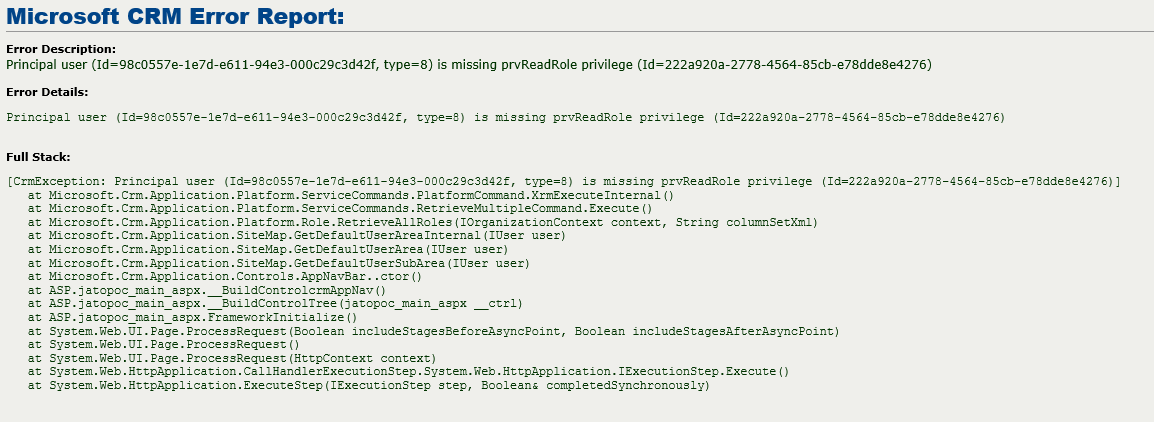
security-role-error.PNG

I only want to provide access to Accounts and Workflow usage in a proof of concept I'm building, so I've granted the following permissions:

  • Core
    • Account
      • Create – user
      • Read – user
      • Write – user
      • Append/To - organistional
    • User Entity UI Settings
    • Connection Role - using Access Teams
      • Read
      • Append/To
    • Relationship Role
      • Read
      • Append/To
      • Create - user
      • Read - user
      • Write - user
  • Business Management
    • User Settings
      • Read - user
    • Misc
      • Read Licence Info - don't really know what this does, but seems important
      • Perform in sync rollups on goals - for the next step in my POC so please ignore
  • Customization
    • Customizations
      • Read
    • System Form
      • Read
    • View
      • Read
    • Web Resource
      • Read

Execute Workflow Job

*This post is locked for comments

I have the same question (0)
  • Verified answer
    TheMarkChristie Profile Picture
    10,328 Moderator on at

    Hi John

    What I would suggest is copying the basic Sales Security roles and then remove permissions from the entities that you don't want then to have access to.

  • Verified answer
    Nick.Doelman Profile Picture
    1,947 Most Valuable Professional on at

    As Mark suggested, you would be better off to start with a copy of an existing security role and working backwards.

    Your user would also need access to some other CRM objects such as the sitemap and read access to Business units, plus some others just to navigate CRM.

    There are also some security access rights given to CRM objects that are NOT surfaced in the security role UI, so that is why making a copy of an existing security role is a better practice.

    I believe Mark has given the solution, I hope my information provides some context.

    Cheers
    Nick

Under review

Thank you for your reply! To ensure a great experience for everyone, your content is awaiting approval by our Community Managers. Please check back later.

Helpful resources

Quick Links

Responsible AI policies

As AI tools become more common, we’re introducing a Responsible AI Use…

Neeraj Kumar – Community Spotlight

We are honored to recognize Neeraj Kumar as our Community Spotlight honoree for…

Leaderboard > 🔒一 Microsoft Dynamics CRM (Archived)

#1
SA-08121319-0 Profile Picture

SA-08121319-0 4

#1
Calum MacFarlane Profile Picture

Calum MacFarlane 4

#3
Alex Fun Wei Jie Profile Picture

Alex Fun Wei Jie 2

Last 30 days Overall leaderboard

Featured topics

Product updates

Dynamics 365 release plans
