web
You’re offline. This is a read only version of the page.
close
Skip to main content

Announcements

No record found.

News and Announcements icon
Community site session details

Community site session details

Session Id :
Microsoft Dynamics CRM (Archived)

Plugin development and debugging

(0) ShareShare
ReportReport
Posted on by

Hi:
I have developed a plugin and it is registered with an online Dynamics CRM 2016.
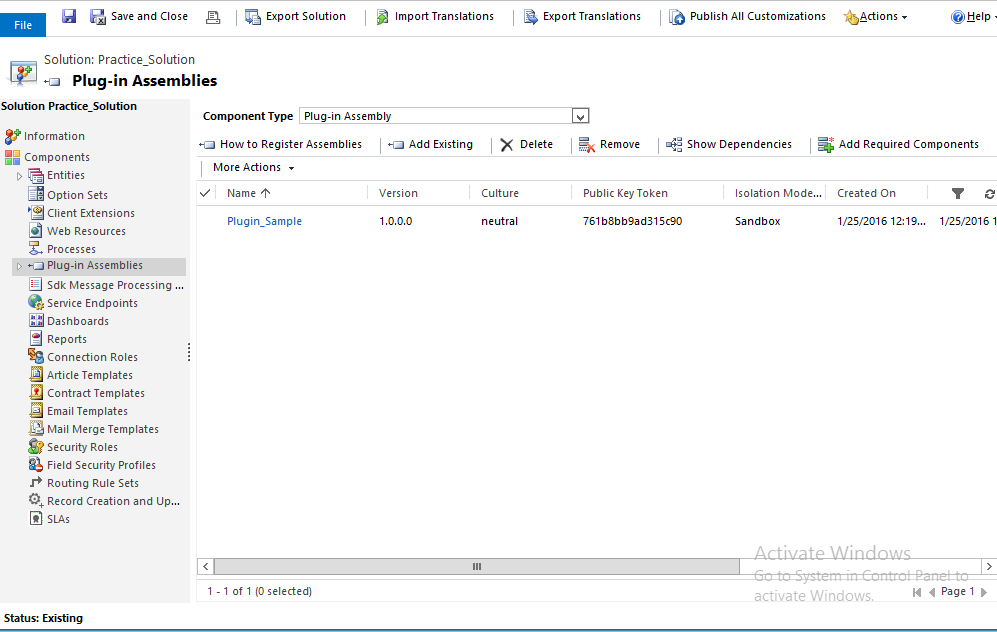
3618.plugin.png

I did the action when it should trigger, but is not performing action and not throwing any error?

How can I debug this plugin?

Thanks.

*This post is locked for comments

I have the same question (0)
  • Verified answer
    tpeschat Profile Picture
    4,930 on at

    Hi,

    did you register the sdk steps for this plugin?

    you should have registered one step for entity student - create and one for entity student  - update.

    Unfortunately I can't help you with Debugging, since I am on premise and always write a log with streamwriter ... but this is not an Option with sandboxed plugins, like you register in CRM online.

    Can you probably provide the source code?

    br Thomas

  • Suggested answer
    KZee Profile Picture
    on at

    Hi,

    You can use plugin profiler to debug your plugin.

    First make sure you have registered a step as explained in the following link.

    msdn.microsoft.com/.../gg309580.aspx

    Following link explains how to use plugin profiler.

    nishantrana.me/.../debugging-online-plugin-in-crm-2013

    Kashif

  • Community Member Profile Picture
    on at

    @Kashif..

    I tried to use plugin profiler, but it requires error/log file, and i am unable to get log file that is required and after this profiler works.

  • Community Member Profile Picture
    on at

    @Thomas..

    I am unable to register step for student entity, as I typed Student, student was not found in the list and by default it set it to any entity, but Student Entity resides there when I open from Settings->Solution.

    and sure I will show my code as well.

    using System;
    using System.Collections.Generic;
    using System.Linq;
    using System.Text;
    using System.Threading.Tasks;
    using Microsoft.Xrm.Sdk;

    namespace Plugin_Sample
    {
    public class tags:IPlugin
    {
    public void Execute(IServiceProvider serviceProvider)
    {
    IPluginExecutionContext context = (IPluginExecutionContext)serviceProvider.GetService(typeof(IPluginExecutionContext));

    if (context.InputParameters.Contains("Target"))
    {
    if (context.InputParameters["Target"] is Entity)
    {
    Entity entity = (Entity)context.InputParameters["Target"];
    if (entity.LogicalName == "Student")
    {
    try
    {
    Entity createTeacher = new Entity("Teacher");
    createTeacher["teachername"] = "Teacher Name.";
    createTeacher["new_teachername"] = "Teacher new_Name.";

    createTeacher["teacherclass"] = "Teacher Class.";
    createTeacher["new_teacherclass"] = "Teacher new_class.";

    createTeacher["teachercomment"] = "Comments about Teacher.";
    createTeacher["new_teachercomment"] = "Comments about new_Teacher.";

    if (context.OutputParameters.Contains(""))
    {

    }
    IOrganizationServiceFactory serviceFactoryObj = (IOrganizationServiceFactory)serviceProvider.GetService(typeof(IOrganizationServiceFactory));
    IOrganizationService client = serviceFactoryObj.CreateOrganizationService(context.UserId);
    client.Create(createTeacher);
    throw new Exception("New Teacher is Added.");
    }
    catch (Exception)
    {
    throw;
    }
    }
    }
    }
    else
    {
    return;
    }
    }
    }
    }


    This is complete code and it is built successfully.

  • Verified answer
    Community Member Profile Picture
    on at

    Hi Sakeel,

    replace 1line with 2, your entity is custom entity, in that case you have to put the prefix like new_ whatever you are using, same thing you need to do while registering the steps search with new_student you will get it.

    1. if (entity.LogicalName == "Student")

    2. if (entity.LogicalName == "new_Student")

  • Verified answer
    tpeschat Profile Picture
    4,930 on at

    Can you maybe provide a screenshot where you register the steps and where student can't be found.

    I only know plugin registration tool for CRM 2011. Haven't used the one for CRM 2016 yet. Probably something had changed.

    Can you navigate to settings - customizations - customize the system - entities - student

    Probably the name of the entity stored in the db is different from the display name?

    Br Thomas

  • Community Member Profile Picture
    on at

    @Mohit Thanks..

    It seems true, let me have a try to implement this suggestion.

  • Community Member Profile Picture
    on at

    @tpeschat

    Thanks, i think it was the problem, here is the screenshot of step registration...plugin_5F00_student.png

  • Community Member Profile Picture
    on at

    @Mohit can I easily update plugin there after rebuilding code? or first I have to delete the plugin from solution?

  • Verified answer
    Community Member Profile Picture
    on at

    Hi Shakeel,

    Just rebuild you code , you don't need to delete the plugin from solution.

Under review

Thank you for your reply! To ensure a great experience for everyone, your content is awaiting approval by our Community Managers. Please check back later.

Helpful resources

Quick Links

Introducing the 2026 Season 1 community Super Users

Congratulations to our 2026 Super Stars!

Meet the Microsoft Dynamics 365 Contact Center Champions

We are thrilled to have these Champions in our Community!

Congratulations to the April Top 10 Community Leaders

These are the community rock stars!

Leaderboard > 🔒一 Microsoft Dynamics CRM (Archived)

Last 30 days Overall leaderboard

Featured topics

Product updates

Dynamics 365 release plans
