web
You’re offline. This is a read only version of the page.
close
Skip to main content

Announcements

No record found.

News and Announcements icon
Community site session details

Community site session details

Session Id :
Small and medium business | Business Central, N...
Answered

Incorrect Number Series

(0) ShareShare
ReportReport
Posted on by 228

Hello All,

Last day One User posted the  invoice and once it comes to posted sales invoice the number goes 1056(1056,1057 all are going in july num series) now actually the number series going to 1196 series last day. 

what all are the possibilities to come the number in between the series or is there any chance for deleting the user and change the series.

how we can track what is happened exactly in this case 
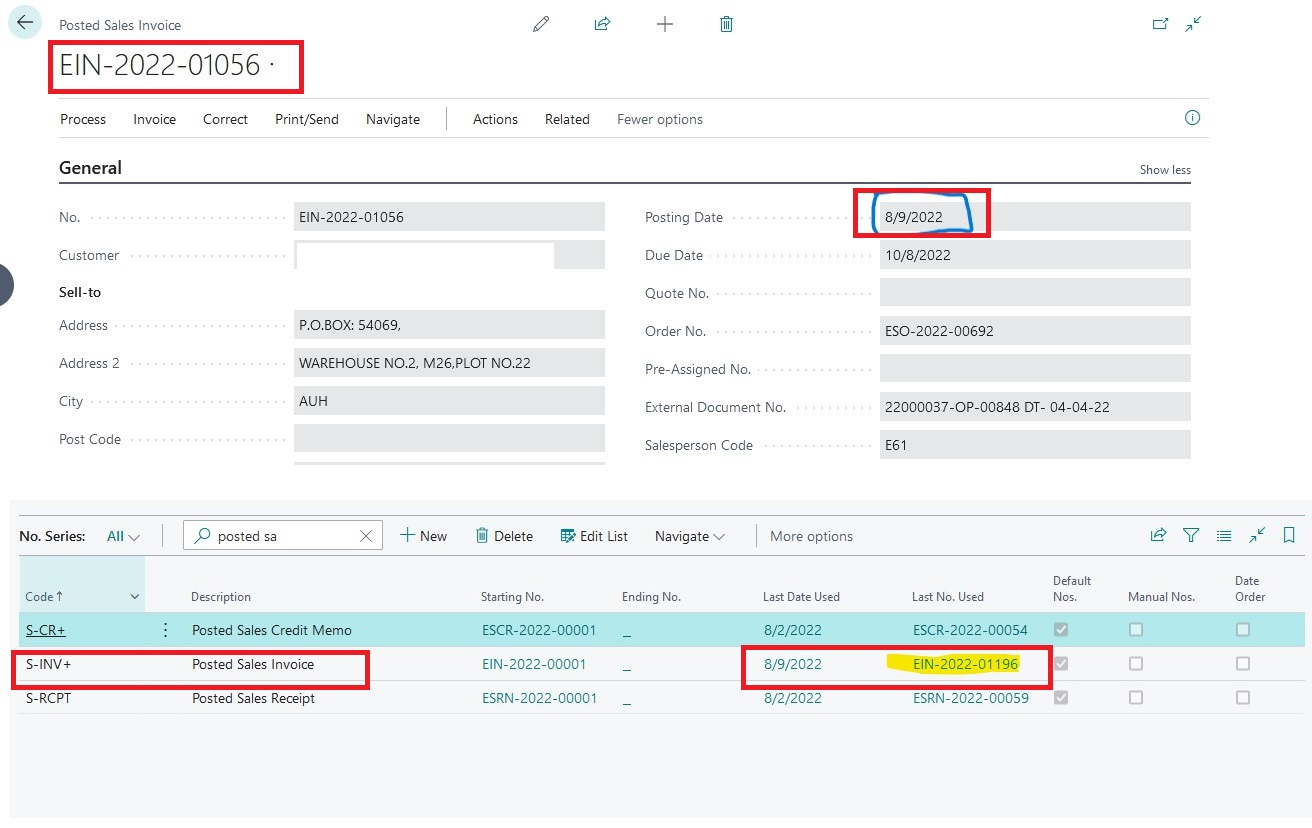
no-ser.jpg

I have the same question (0)
  • Suggested answer
    Nitin Verma Profile Picture
    21,794 Moderator on at

    Hi,

    Go to the No. Series > Starting No. and change the Starting Date but it will be effected to the new documents, as you have already posted the document it can not be reverse other then cr. Memo.

    Thanks.

  • LearnBC Profile Picture
    228 on at

    i dont want to change the setup. i want to know how it comes in between them. right now actually no seris is 1196 but it got posted on 1056 number.

    how it could happened. is there any options to track it whether the user did anything on this?

  • Suggested answer
    Nitin Verma Profile Picture
    21,794 Moderator on at

    Please go to the Starting No. column and check if you have multiple no. series line defined.

    Thanks.

  • LearnBC Profile Picture
    228 on at

    Here it is only like this

    noo.jpg

  • Suggested answer
    Nitin Verma Profile Picture
    21,794 Moderator on at

    Please drill down the Starting No. column and see how many no. series line are created.

    Thanks.

  • LearnBC Profile Picture
    228 on at

    while clicking on the starting number its coming like this only

    no1.jpg

  • Suggested answer
    Nitin Verma Profile Picture
    21,794 Moderator on at

    Please check once your Sales & Receivables setup with Numbering tab and check what is the Posted Sales Invoice No. series defined.

    Thanks.

  • LearnBC Profile Picture
    228 on at

    In the sales & Receivables setup it is like this

    no2.jpg

  • Suggested answer
    Nitin Verma Profile Picture
    21,794 Moderator on at

    I see, everything seems correct, only doubt is if some one has changed the no. series before posting. do you have enabled change log setup?

    Thanks.

  • LearnBC Profile Picture
    228 on at

    Yes it is also enabled ..how can we seach and find is anything done by the user. (is there any negative side if we activated in change log.in terms of storage or something also)

    ch-log.jpg

Under review

Thank you for your reply! To ensure a great experience for everyone, your content is awaiting approval by our Community Managers. Please check back later.

Helpful resources

Quick Links

Introducing the 2026 Season 1 community Super Users

Congratulations to our 2026 Super Stars!

Meet the Microsoft Dynamics 365 Contact Center Champions

We are thrilled to have these Champions in our Community!

Congratulations to the March Top 10 Community Leaders

These are the community rock stars!

Leaderboard > Small and medium business | Business Central, NAV, RMS

#1
OussamaSabbouh Profile Picture

OussamaSabbouh 2,005 Super User 2026 Season 1

#2
YUN ZHU Profile Picture

YUN ZHU 1,148 Super User 2026 Season 1

#3
Khushbu Rajvi. Profile Picture

Khushbu Rajvi. 557 Super User 2026 Season 1

Last 30 days Overall leaderboard

Featured topics

Product updates

Dynamics 365 release plans
