web
You’re offline. This is a read only version of the page.
close
Skip to main content

Notifications

Announcements

No record found.

Community site session details

Community site session details

Session Id :
Small and medium business | Business Central, N...
Suggested Answer

Change the Color of the environment D365 BC On Premise

(0) ShareShare
ReportReport
Posted on by 297

My D365 BC is On Premise. It has to 2 Environments: Test and Production

How can I change color of Test Environment as below picture:

pastedimage1655704995505v1.png

Thank you.

I have the same question (0)
  • Suggested answer
    Nitin Verma Profile Picture
    21,698 Moderator on at

    Hi,

    As far as I know this color scheme only changes in to the Main Production environment from the Admin panel and same transferred to its Sandbox, I dont think we have anything to change the color scheme of corresponding Test environment as well.


    https://yzhums.com/5266/

  • Hoang Ng Profile Picture
    297 on at

    My ERP is On Premises not in Microsoft Cloud. I cannot see Admin Center.

  • Suggested answer
    Rakesh Dobariya Profile Picture
    60 on at

    Hello Peter,

    As you now , default configuration is of  Company Badge color change only under the "Company Information"

    and above image is from  below link,

    docs.microsoft.com/.../unified-header

    Hence i would say there minor customization required and for that conditional code need to be written with define Global variable as per below,

    If company is CRONUS IN then banner color would be Green as a example, if CRONUS IN  TEST then color would be light Orange etc.

    Regards,

    Rakesh Dobariya

  • Hoang Ng Profile Picture
    297 on at

    Thanks Rakesh Dobariya.

    I changed in Company Badge and it changed a little bit

    pastedimage1655745196459v1.png

    pastedimage1655745396050v1.png

    Could you show me how I can code to change the banner color ?

    Thank you

  • Suggested answer
    YUN ZHU Profile Picture
    95,329 Super User 2025 Season 2 on at

    Hi, As far as I know there is no way to modify the banner color in the On-Premise version.

    And, I think the screenshot you provided is actually a SaaS version.

    For example, It can be seen from the direction of the search icon.

    SaaS:

    pastedimage1655772004856v1.png

    On-Pre:

    pastedimage1655772023012v2.png

    Hope this helps as well.

    Thanks.

    ZHU

  • Suggested answer
    Rakesh Dobariya Profile Picture
    60 on at

    Hello ZHU,

    Thank you for additional meaningful information,

    Could you please check it once, Banner object property is locked (non-editable) or could be change conditionally as per per i said earlier ?

    Mr. ZHU, as i'm a functional consultant not having developer license, please help it out community to perform the same, as you already having exposure.

    Appreciate if you uphold on the concern matter.

    Regards,

    Rakesh Dobariya  

  • Suggested answer
    YUN ZHU Profile Picture
    95,329 Super User 2025 Season 2 on at

    Hi, Rakesh, As far as I know, there is no Banner object or Banner property in BC Customization, so there is no situation where it can be changed.

    And the link you provided mentions Office 365 administrators, so I think it's talking about the SaaS version, not for the On-Pre version.
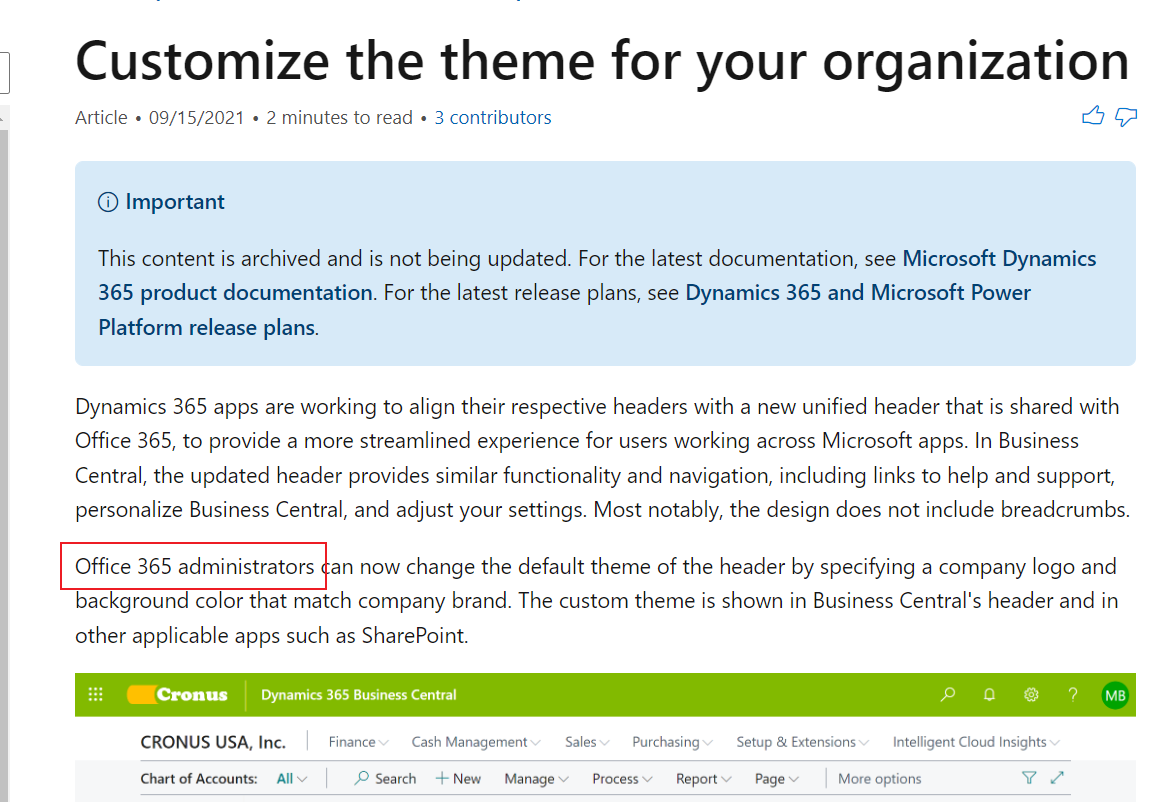
    pastedimage1655789053477v1.png

    In On-Pre, the only thing we can change is the Company Badge you mentioned.

    But as Peter tested, it only shows a very small one in the upper right corner. This is similar to the System indicator feature of NAV.

    More details: https://yzhums.com/20817/

    Hope this helps.

    Thanks.

    ZHU

  • Suggested answer
    Rakesh Dobariya Profile Picture
    60 on at

    Thanks for precise brief ZHU, It was meaningful discussion with you.

    Regards,

    Rakesh Dobariya

  • Suggested answer
    YUN ZHU Profile Picture
    95,329 Super User 2025 Season 2 on at

    Very interesting, thanks a lot for sharing.

  • Suggested answer
    Rakesh Dobariya Profile Picture
    60 on at

    Hello Peter,

    You able to change Banner for On-Prim,

    You did really extensive efforts on subjected matter, Appreciate for this,

    Keep It up.

    Regards,

    Rakesh Dobariya

Under review

Thank you for your reply! To ensure a great experience for everyone, your content is awaiting approval by our Community Managers. Please check back later.

Helpful resources

Quick Links

Responsible AI policies

As AI tools become more common, we’re introducing a Responsible AI Use…

Neeraj Kumar – Community Spotlight

We are honored to recognize Neeraj Kumar as our Community Spotlight honoree for…

Leaderboard > Small and medium business | Business Central, NAV, RMS

#1
OussamaSabbouh Profile Picture

OussamaSabbouh 3,229

#2
Jainam M. Kothari Profile Picture

Jainam M. Kothari 1,867 Super User 2025 Season 2

#3
YUN ZHU Profile Picture

YUN ZHU 1,153 Super User 2025 Season 2

Last 30 days Overall leaderboard

Featured topics

Product updates

Dynamics 365 release plans
