Hi,
Thank you for your query.
You can use Metadata Browser (a plugin of XRM Toolbox) to export entities and attributes to excel.
Then filter it by IsCustom column.
For example:
- Open Metadata Browser tool in XRM Toolbox and load entities and then click on export.
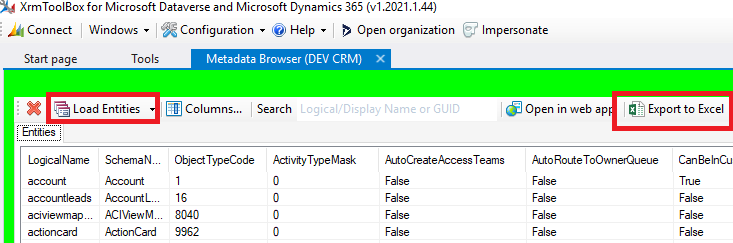
- Open the excel file and then filter on IsCustomEntity column:
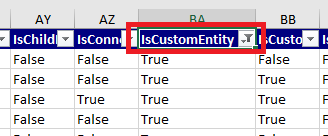
- Similarly, in the Metadata browser plugin, double click on an entity and then from the Attributes tab, export attributes to excel and filter on IsCustomAttribute.
There is no way to export columns along with all entities in this tool, once you find the custom entities, you have to export attributes for each column.
Furthermore, you can identify custom entities and columns by its prefix (new_, or abc_). Also you need to ignore objects starting with msdyn_ (these are created by Microsoft but listed as custom).
There are other tools in XRM Toolbox like Entity Explorer, these are also handy for this purpose.
Lastly, look at the Solutions and Publishers (each publisher has a prefix), this will also help you to narrow down your search.


