web
You’re offline. This is a read only version of the page.
close
Skip to main content

Notifications

Announcements

Community site session details

Community site session details

Session Id :
Microsoft Dynamics CRM (Archived)

Choosing existing option set not permitted?

(0) ShareShare
ReportReport
Posted on by

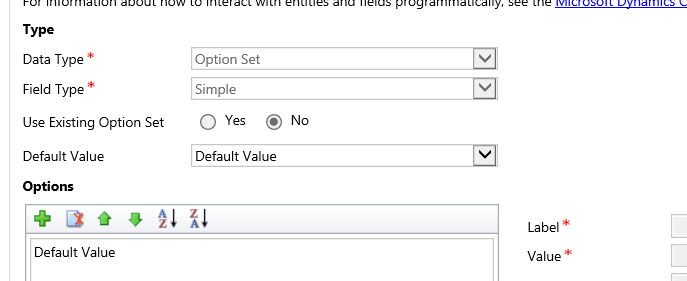
option_5F00_set.png

I'm working with a fresh Dynamics CRM 2015 instance, so I'm not worried about existing records.

I have a number of fields that I'd like to create global options, and then switch existing fields to offer them.

As the image shows, Existing Option Set is greyed for every current field of type 'option set.'

So I guess I'm missing something basic to unlock them.

Is there a way to unlock this control?

*This post is locked for comments

I have the same question (0)
  • Aileen Gusni Profile Picture
    44,524 on at

    If it is too dynamic, suggested to create n entity and then will be a lookup field master.

  • Community Member Profile Picture
    on at

    The more I look at this, the less workable it becomes. I wanted my shipping method choices to come off a master list. But the Filtered Contact table uses the stock field and also puts the description in a Name field using the stock field's value. So any access to the Filtered table won't contain my custom field data.

    Time for another thread.

  • Community Member Profile Picture
    on at

    So I have to step down the dependency tree and change all references to my new_Field in order to ensure it works like the stock field.

    Golly.

  • Community Member Profile Picture
    on at

    Yes, I'm beginning to believe that will have to be the solution.

    First, I have to imagine a planet where sixteen entities each share a set of options, but maintain their own individual copies, so that if a new option is added there have to be sixteen modifications.

    And the application offers no way to find all entities that use these fields...

    Golly. (Airplane movie watchers may insert subtitle here.)

  • Verified answer
    Aileen Gusni Profile Picture
    44,524 on at

    You cannot just convert it in supported way, you need to create a new field and start from the new field to use existing option set.

    Thanks.

  • Community Member Profile Picture
    on at

    And slight problem number 3:

    "Only Custom Fields can be deleted."

    An amusing sidelight - sorting the fields for Account on Option Set will make address1_shippingmethod DISAPPEAR! Won't be visible until you go back to sorting on Name.

  • anilambadan Profile Picture
    1,160 on at

    Try to delete the field itself and recreate it. while recreating you will be able to select existing optionset.

    2577.img.png

  • Community Member Profile Picture
    on at

    How do you mean delete the option set? I tried removing all the options, but the control still doesn't allow the choice.

  • anilambadan Profile Picture
    1,160 on at

    Hi

    I think you have to delete the optionset and recreate it to utilise the global optionset.

    thanks

Under review

Thank you for your reply! To ensure a great experience for everyone, your content is awaiting approval by our Community Managers. Please check back later.

Helpful resources

News and Announcements

Season of Giving Solutions is Here!

Quick Links

Responsible AI policies

As AI tools become more common, we’re introducing a Responsible AI Use…

Neeraj Kumar – Community Spotlight

We are honored to recognize Neeraj Kumar as our Community Spotlight honoree for…

Leaderboard > 🔒一 Microsoft Dynamics CRM (Archived)

#1
Shidin Haridas Profile Picture

Shidin Haridas 2

#2
Abdullah13 Profile Picture

Abdullah13 1

Last 30 days Overall leaderboard

Featured topics

Product updates

Dynamics 365 release plans
