web
You’re offline. This is a read only version of the page.
close
Skip to main content

Announcements

No record found.

News and Announcements icon
Community site session details

Community site session details

Session Id :
Microsoft Dynamics GP (Archived)

Are Workflow 2.0 emails able to cross domains to show Approval/Reject/Delegate

(0) ShareShare
ReportReport
Posted on by 372

Question: Is there any way to add remote domain users to the Approval/Reject/Delegate permissions?

We have several customers who are setup having GP running on a server and users setup to access GP on a terminal server session in its own domain and have another domain they use for their pcs and other software used including email.

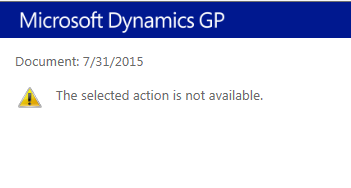
Issue we have encountered is when a workflow is submitted in GP and an email is generated, the users receive the email, open and when selecting one of the options "Approve, Reject or Delegate", an IE browser opens it displays the Microsoft GP header but has the message "The selected action is not available" and no buttons are visible.

If we take the link and copy/paste in an IE browser within the terminal service session, it displays with the button and able to "Approve, Reject or Delegate".  

Note: they do not access email from the GP terminal session.

We are testing this on GP2015 R2 ver 14.00.0725 and added users to the GP Dynamics Security Console.
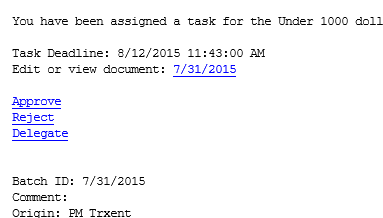
Workflow_5F00_email.PNG

Workflow_5F00_IE.PNG

*This post is locked for comments

I have the same question (0)
  • Michelle D Profile Picture
    on at

    Hi,

    We are getting this error. We opened Outlook inside the same environment as GP and the link still gives us "The selected action is not available."

    We copied and pasted the "approve" link into IE and it still gives us the same error. However, when we copied and pasted the link to view the document, it opened the PO in GP.

    Do you know if there is a resolution to this?

    Thank you!

  • Community Member Profile Picture
    on at

    We have the same issue.  Was working with local exchange and then we migrated to Office 365 and now all email is in the cloud.  Before we could do all actions when the exchange server was local.  Do you know of a way to make the approvals work when your email is in Office 365 and your Dynamics GP server is local to your domain?  Would really like an answer to this as it is holding up our requisition process.

  • Rennecia Barran Profile Picture
    on at

    Is there any update on this? I have the same issue.

  • Suggested answer
    Ian Grieve Profile Picture
    22,784 on at

    We have a client attempting to do this and it is a minefield. Your domains need to have particular trust relationships configured for it to work (basically a user on one domain needs to be able to authenticate on the other and vice versa).

  • Tanya Henderson Profile Picture
    on at

    Has anyone found a resolution to this we are in a single domain and we are having the exact same issue.  We actually have tried this from the server where web services is installed and this is what we are getting.  Any help is appreciated.

    Thanks,

    Tanya

  • Tanya Henderson Profile Picture
    on at

    What we tried was we logged onto the server as the approver who was supposed to approve the requisition and launched the email from there.  IT WORKED!  HOWEVER, we cannot get it to work from his local machine.  We are getting the Page Can't be displayed.  I am thinking that web services is not allowing us to see the page.  Any thoughts?

  • Suggested answer
    Michelle D Profile Picture
    on at

    If you add the Web Services site that it takes you to, to trusted sites in IE Options and then set it to automatically log you in. It also shouldn't prompt you every time for login/password when attempting to approve a workflow from an email notification. If it still isn't working it is most likely a Web Services setup issue.

  • TSMurphy Profile Picture
    372 on at

    We never got it to work after many attempts in our two-domain-crossing-over scenario and went with a third party solution from eRequester that is an add-in to GP.  It was a modest-middle price app but our customer wanted the features and willing to pay.  I would think that some of the suggestions offered in this thread should work under certain configurations.  All I could suggest is after trail and error with the different recommendations offered and still no resolution, call and submit a support case to Microsoft.

    Cheers

  • Community Member Profile Picture
    on at

    Hi, Is there any resolution for the workflows to work on cross domains as this thread is more than a year now. Thanks

Under review

Thank you for your reply! To ensure a great experience for everyone, your content is awaiting approval by our Community Managers. Please check back later.

Helpful resources

Quick Links

Introducing the 2026 Season 1 community Super Users

Congratulations to our 2026 Super Stars!

Meet the Microsoft Dynamics 365 Contact Center Champions

We are thrilled to have these Champions in our Community!

Congratulations to the April Top 10 Community Leaders

These are the community rock stars!

Leaderboard > 🔒一 Microsoft Dynamics GP (Archived)

#1
Shravan Attelli Profile Picture

Shravan Attelli 1

Last 30 days Overall leaderboard

Featured topics

Product updates

Dynamics 365 release plans
