web
You’re offline. This is a read only version of the page.
close
Skip to main content

Announcements

No record found.

News and Announcements icon
Community site session details

Community site session details

Session Id :
Microsoft Dynamics GP (Archived)

How to add a keyboard shortcut

(0) ShareShare
ReportReport
Posted on by

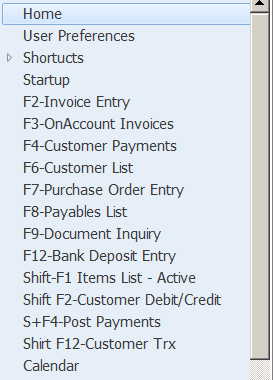
When I migrated to GP 2013 R2 my Home page Navigation Panel had keyboard shortcuts, IE: F1, F2 etc.,  brought over (see pic).  Somehow I lost the use of one and would like to recreate it.  Do not remember how.....
Example.png

TY

Mary

*This post is locked for comments

I have the same question (0)
  • Suggested answer
    Mahmoud Saadi Profile Picture
    32,738 on at

    Right click on the navigation and then click Add, you have several options to choose from

    • Window
    • SmartList
    • Macro
    • ..etc

    On the Add window, choose your window and then assign it to a shortcut as shown below:

    8737.1.png

    Further illustration can be found here

    Your feedback is highly appreciated,

  • Community Member Profile Picture
    on at

    TY for your fast reply-  Under the Sales Windows I have unposted invoices saved under Sales Order Transactions as "Unposted Invoices".  I do not see this in the listing under Available Windows.

  • Mahmoud Saadi Profile Picture
    32,738 on at

    You have un-posted invoices saved under sales order transactions as "un-posted invoices" , is this  a Smart List?

    Your feedback is highly appreciated,

  • Community Member Profile Picture
    on at

    Inv.png

    Under Sales Menu

  • Mahmoud Saadi Profile Picture
    32,738 on at

    Okay, try this

    Right click on the "Unposted Invoices", and click "Add to Shortcut".

    Then, go to the "Home" tab of the navigation list, and you will find the "unposted invoices" there, right click again and choose "Shortcut Properties"

    On the shortcut properties window, assign this window to whatever shortcut you want.

    Your feedback is highly appreciated,

  • Suggested answer
    Community Member Profile Picture
    on at

    TY

  • Verified answer
    Mahmoud Saadi Profile Picture
    32,738 on at

    Please feel free to close the case if your inquiry is fulfilled.

    Your feedback is highly appreciated,

Under review

Thank you for your reply! To ensure a great experience for everyone, your content is awaiting approval by our Community Managers. Please check back later.

Helpful resources

Quick Links

Introducing the 2026 Season 1 community Super Users

Congratulations to our 2026 Super Stars!

Meet the Microsoft Dynamics 365 Contact Center Champions

We are thrilled to have these Champions in our Community!

Congratulations to the March Top 10 Community Leaders

These are the community rock stars!

Leaderboard > 🔒一 Microsoft Dynamics GP (Archived)

Last 30 days Overall leaderboard

Featured topics

Product updates

Dynamics 365 release plans
