web
You’re offline. This is a read only version of the page.
close
Skip to main content

Notifications

Announcements

Community site session details

Community site session details

Session Id :
Small and medium business | Business Central, N...
Suggested Answer

Missing execute permissions

(1) ShareShare
ReportReport
Posted on by 140

I have added a new table to my production environment.

I created the table in my Uat environment. I then exported the FOB file and imported it to my production environment.

When I try and run the table from my production Development Environment, I receive the below error.

You do not have the following permission on Table Slow Reason Code: Execute

Page Edit - Slow Reason Code must close.

The object ID that I'm using is 50031. I have no issues running this table in my Uat environment. I have other tables in the 50000 range that I'm able to run in production. I'm trying to understand why I cannot run this table in production.
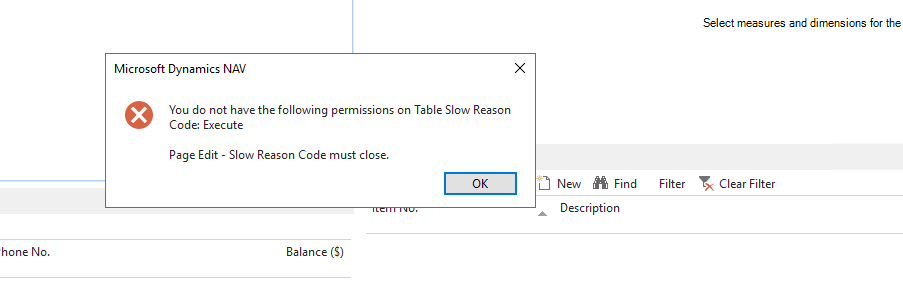
Slow-Reason-Code-error.png

I have the same question (0)
  • Suggested answer
    Inge M. Bruvik Profile Picture
    1,111 Moderator on at

    Have you added the table to your permission and have you checked that the table is in your license ?

  • drew777777 Profile Picture
    140 on at

    Thanks for the reply. I suspect it may be a license issue. How would I verify if the table is in my license?

  • Suggested answer
    YUN ZHU Profile Picture
    95,985 Super User 2025 Season 2 on at

    Hi, Yes, this seems to be a license issue, you may be using the development license in the UAT environment, but the production environment is using the customer's license, you need to regenerate the license after assigning the ID

    And generally, there are several methods to see license info.

    1. Using command.

    Export-NAVServerLicenseInformation

    https://learn.microsoft.com/en-us/powershell/module/microsoft.dynamics.nav.management/export-navserverlicenseinformation?view=businesscentral-ps-21

    2. Open License Information from Development environment

    pastedimage1678149164786v1.png

    3. As far as I know, there is a Txt file when the flf file is generated, which contains the detailed license range.

    Hope this helps.

    Thanks.

    ZHU

  • ManishS Profile Picture
    86 on at

    Check with your partner for permission detailed text file, there you will find the objects that are available in your license file.

  • Suggested answer
    DAnny3211 Profile Picture
    11,397 on at

    hi

    The error message indicates that the user account you are logged in as does not have the Execute permission on the Slow Reason Code table in the production environment.

    To grant the Execute permission, you need to follow these steps:

    Open the production environment in the Development Environment.

    In the Object Designer, find the Slow Reason Code table (object ID 50031).

    Right-click on the table and select "Properties" from the context menu.

    In the Properties window, go to the "Permission Sets" tab.

    Find the permission set that the user account belongs to and make sure that the "Execute" permission is checked.

    If the user account does not belong to any of the existing permission sets, you can create a new one and grant the necessary permissions.

    Once you have granted the Execute permission, try running the table again and it should work without errors.

    Daniele

Under review

Thank you for your reply! To ensure a great experience for everyone, your content is awaiting approval by our Community Managers. Please check back later.

Helpful resources

News and Announcements

Season of Giving Solutions is Here!

Quick Links

Responsible AI policies

As AI tools become more common, we’re introducing a Responsible AI Use…

Neeraj Kumar – Community Spotlight

We are honored to recognize Neeraj Kumar as our Community Spotlight honoree for…

Leaderboard > Small and medium business | Business Central, NAV, RMS

#1
OussamaSabbouh Profile Picture

OussamaSabbouh 1,810

#2
Khushbu Rajvi. Profile Picture

Khushbu Rajvi. 810 Super User 2025 Season 2

#3
YUN ZHU Profile Picture

YUN ZHU 676 Super User 2025 Season 2

Last 30 days Overall leaderboard

Featured topics

Product updates

Dynamics 365 release plans
