web
You’re offline. This is a read only version of the page.
close
Skip to main content

Announcements

No record found.

News and Announcements icon
Community site session details

Community site session details

Session Id :
Microsoft Dynamics CRM (Archived)

Solution Import Error

(0) ShareShare
ReportReport
Posted on by 222

Hi All,

I am trying to move my customization from development to Production environment. I have added the case entity with all assets including metadata, still I am facing issue. It is telling me that few components are missing from the solution.

I am not able to figure out how to add those components to the solution. I am using Dynamics CRM online v 9.1.
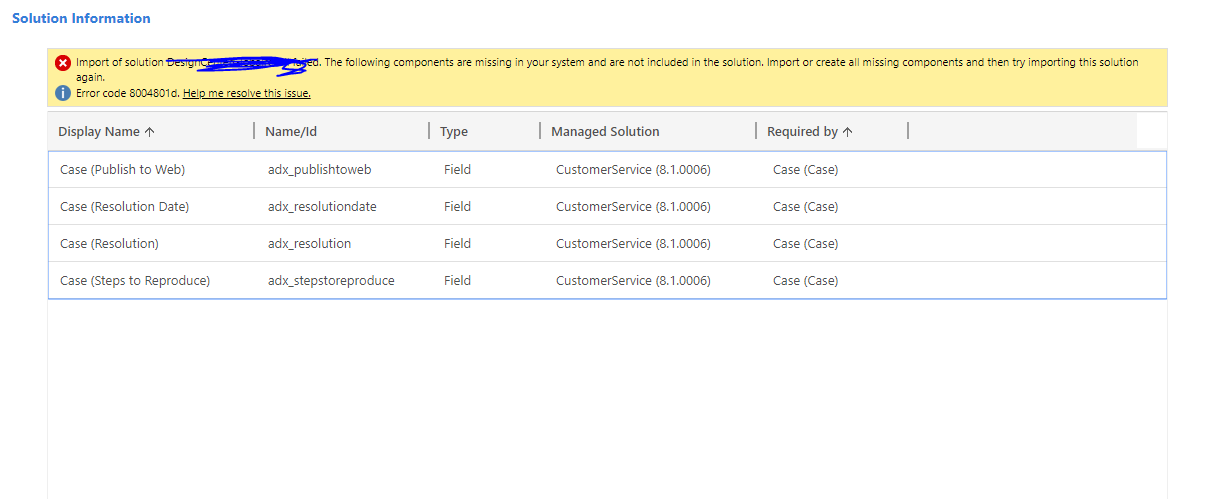
2084.ss.PNG

Any kind of help is appreciated.

Thanks

*This post is locked for comments

I have the same question (0)
  • Suggested answer
    Kokulan Profile Picture
    18,054 on at

    Could you check the fields name in your screenshot are part of case entity by going into Settings -Customization (Default Solution Case)

  • Aparna1 Profile Picture
    222 on at

    Hi Kokulan,

    Yes. These fields are present in the solution which I am trying to import into Production. But these fields are not present in Production default solution.

  • Kokulan Profile Picture
    18,054 on at

    The Customer Service Managed solution is yours? do you have that solution on Production?

  • Aparna1 Profile Picture
    222 on at

    No this solution is not mine. It is not even available under solutions present in system. I do not have these fields and customer service solution in Production.

  • Kokulan Profile Picture
    18,054 on at

    Sorry i did not focus on the prefix of the fields. These are added by Portal Installation and configuration. Have you installed Portal and configured on Dev and its not available on Production?

  • Aparna1 Profile Picture
    222 on at

    Yes, exactly this is the problem. We have portal installed in dev but not in production

  • Verified answer
    Kokulan Profile Picture
    18,054 on at

    Will you be installing Portal on Production any time soon or not planning yet.

    If not, exclude these fields from your solution and export the solution again and import onto Production

    You can add these back once you installed the portal

  • Verified answer
    Dynamics Objects 365 Profile Picture
    550 on at

    Aparna,

    I think in your Dev, you Adx installed. Thats why, when you selected include All Assets, the fields of Adx solution are also added.

    Solution 1 : Remove the Adx Solution from your Dev and try again.

    Solution 2 : Install the Ad in your Production and try again.

    Solution 3 (My Preferred one): Remove Case entity from your solution, and this time dont select include All Assets. Don't include anything which you have not changed /created. (particularly, dont include the above fields which are causing the issue).

    You can connect with me if you need any other info regarding the Solutions ( Managed/Unmanaged)

  • Aparna1 Profile Picture
    222 on at

    Thanks Dynamics Objects 365. I have implemented the solution 3 and successfully imported the changes into Production.

Under review

Thank you for your reply! To ensure a great experience for everyone, your content is awaiting approval by our Community Managers. Please check back later.

Helpful resources

Quick Links

Introducing the 2026 Season 1 community Super Users

Congratulations to our 2026 Super Stars!

Meet the Microsoft Dynamics 365 Contact Center Champions

We are thrilled to have these Champions in our Community!

Congratulations to the March Top 10 Community Leaders

These are the community rock stars!

Leaderboard > 🔒一 Microsoft Dynamics CRM (Archived)

#1
JS-09031509-0 Profile Picture

JS-09031509-0 3

#2
AS-17030037-0 Profile Picture

AS-17030037-0 2

#2
Mark Eckert Profile Picture

Mark Eckert 2

Last 30 days Overall leaderboard

Featured topics

Product updates

Dynamics 365 release plans
